
Moosend Pricing 2026: It’s cheap, but is it good value?
 Paul Newham
Moosend is a low-cost email marketing service that’s popular with SMBs. It has one of the best prices around and a very simple pricing structure.
I’m a long-time Moosend user. I’ve reviewed the full platform in depth for Email Vendor Selection. And I have to agree with a lot of Moosend customers. For the quality of features, Moosend is fantastic value.
In this article, I will share details of how Moosend’s pricing works. You can get started with Moosend for just $9 a month. But that is not all. With our discount, this becomes even lower. That’s cheaper than any email marketing platform I’ve used. And I’ve reviewed 30+ services for Email Vendor Selection.
How much does Moosend cost? Summary
Moosend has a 30-day free trial with 1,000 subscribers and unlimited emails. It offers 15% discounts for bi-annual contracts. And 20% off if you pay annually. On top of these, non-profit organisations can get a further 25% discount.
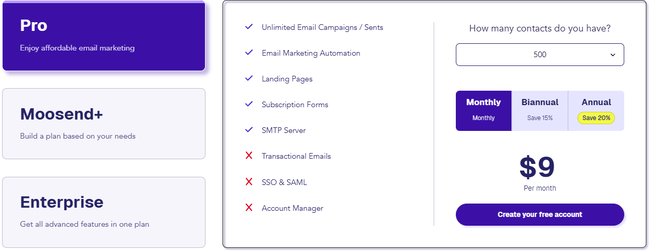
Most Moosend users will pay between $9 and $315 a month. That’s the price range between 500 and 50,000 contacts. Moosend allows up to 1 million contacts. By the time you get to that many subscribers, it costs $5,840 a month.
You get a 15% discount if paid per six-months. And a 20% discount if you pay annually for 12 months at once. This works out at $7 a month for 500 contacts.
Moosend’s pricing structure is much simpler than most other email marketing platforms. It has a Pro plan, which unlocks all core features. This includes unlimited email campaigns, email automation, landing pages and subscription forms. Most Moosend users are on the Pro plan.
| Free | 30-day trial with all Pro features |
| $16 | 1,000 contacts Unlimited email sends with all Pro features |
| $24 | 2,000 contacts Unlimited email sends with all Pro features |
| $48 | 5,000 contacts Unlimited email sends with all Pro features |
| $88 | 10,000 contacts Unlimited email sends with all Pro features |
| $160 | 25,000 contacts Unlimited email sends with all Pro features |
| $315 | 50,000 contacts Unlimited email sends with all Pro features |
Moosend also has a custom-priced Enterprise tier. This is aimed at larger businesses and includes additional premium features. In between Pro and Enterprise is Moosend+. This lets you pick and choose Enterprise features as paid-for add-ons.
Exclusive discount
Moosend has generously offered an additional 10% off for EmailVendorSelection readers. That’s on top of the 20% discount when paying per year. Sign up here to get the extra 10% off.
Moosend Monthly Pricing
I love the simplicity of Moosend’s subscription pricing. Unlike rival services, you don’t have to worry about paying extra for more advanced features. The Pro plan includes all of Moosend email & automation tools.
With Moosend, the Pro plan also comes with unlimited email sends. It also gives you access to all email marketing tools. This includes creating emails, contact forms and landing pages.
Here is the overview once again:
| $16 | 1,000 contacts Unlimited email sends with all Pro features |
| $24 | 2,000 contacts Unlimited email sends with all Pro features |
| $48 | 5,000 contacts Unlimited email sends with all Pro features |
| $88 | 10,000 contacts Unlimited email sends with all Pro features |
| $160 | 25,000 contacts Unlimited email sends with all Pro features |
| $315 | 50,000 contacts Unlimited email sends with all Pro features |
Moosend uses the same user-friendly drag-and-drop editor for all three. You get a choice of 116+ modern-looking email templates. Plus various form and landing page designs.
I really enjoy using the visual workflow editor. It’s simple but flexible, with scope to build complex automated sequences. This is backed up by 18 pre-made workflow templates.
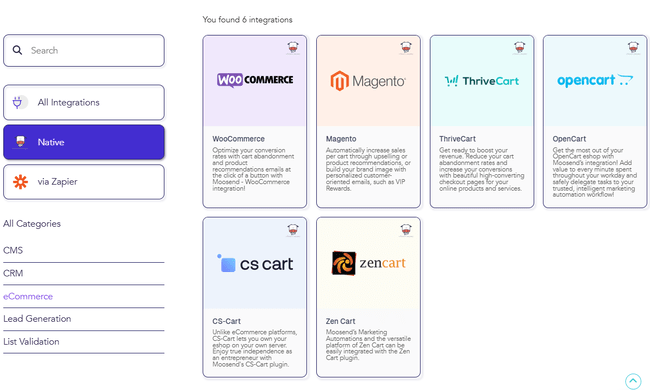
Some features are fairly unique to such budget email marketing software. For example, Moosend comes with 42+ third-party integrations, including ecommerce platforms like WooCommerce and Magento. It supports web tracking. So connecting your web store lets you track revenue generated from campaigns. And trigger automations based on what people do in your store. You can also pull product listings directly into emails.
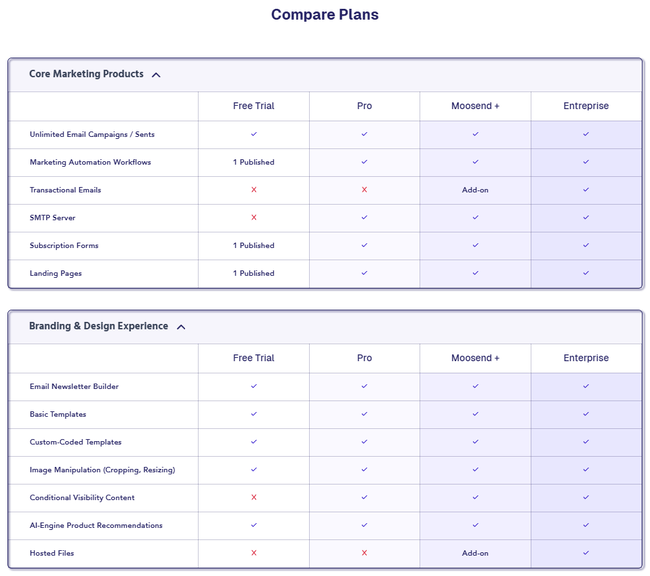
Moosend Enterprise is Moosend’s second subscription tier. It includes all Moosend Pro features. Then it adds dedicated IP addresses for reliable bulk sending. And audience discovery. Moosend Pro includes 5 user accounts. Enterprise lets you have as many users as you like for a custom price. And comes with single sign-on (SSO) authentication across different devices. Enterprise subscribers also benefit from a dedicated account manager. Plus priority support and deliverability optimization.
Moosend+ lets you add some Enterprise features to a Pro account as paid-for add-ons. We’d love to see phone support included in the Enterprise plan. Read our Moosend review for a full breakdown of features.
EVS readers can get an extra 10% off on top of the 20% discount when paying per year. Sign up here to get the discount.
Moosend Pay-as-you-go Pricing
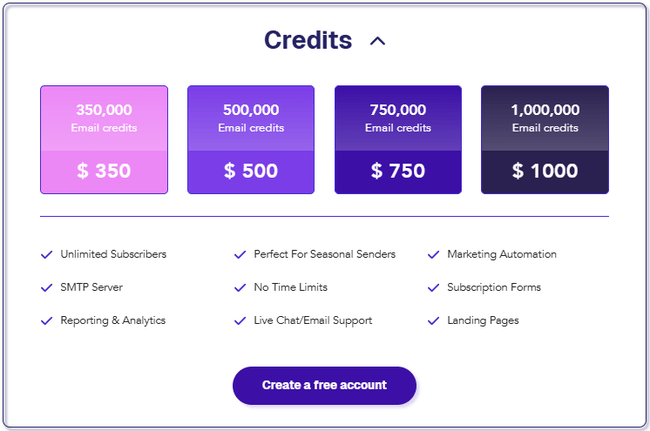
Moosend has pay-as-you-go pricing if you’d rather buy email sending credits than sign up for a subscription. Pricing starts at $350 for 350,000 email credits. One credit equals one email sent to a single address. And single credit works out at $0.001.
| Moosend Pay-as-you-go Price | Email Sends |
| $350 | 350,000 |
| $500 | 500,000 |
| $750 | 750,000 |
| $1000 | 1,000,000 |
Moosend’s pay-as-you-go option flips its usual pricing criteria around. Its subscription plans come with unlimited email sends. You pay according to how many contacts you have. With send credits, you get unlimited subscribers. And pay for how many emails you send out. This works well for anyone with very large lists. Or for seasonal/more occasional email marketing that requires bulk send volumes. You only pay for what you send. Credits don’t expire.
Moosend Add-ons and Extras
Moosend has some extra features you can add to a Pro plan. To do this, you choose a Moosend+ plan. And then choose the features you want to add. You can choose from:
- transactional emails
- dedicated IP address
- hosted files
- custom reporting
- SSO & SAML authentication
- audience discovery
Moosend doesn’t publish prices for individual feature add-ons on their site. If you like these, get started with a trial and you can get a quote for the features you want.
Moosend Discount
Moosend offers a 15% discount for paying six months in advance. And a 20% discount for paying yearly. Here are some examples of how much money that saves you:
- If you have 500 contacts, paying every 6 months will save you $1 a month ($8/month). If you pay annually, you’ll save $2 a month ($7/month).
- If you have 2000 contacts, the monthly cost is $24/month. Paying every six months saves $4 a month ($20/month). Paying annually saves $5 a month ($19/month).
- If you have 5000 contacts, the monthly cost is $48/month. Paying every 6 months saves you $7 a month ($41/month). Paying annually saves you $10 a month ($38/month)
Moosend also has a 25% discount for nonprofit or non-governmental organizations. This is on top of the 15% and 20% bi-annual and annual discounts.
Get started with Moosend for free and claim your discount here
Explaining Moosend Pricing: Contacts
What you pay on Moosend mainly depends on the number of contacts you have. Read our guide on how much email marketing costs to compare Moosend’s prices with other email marketing services.
Contacts
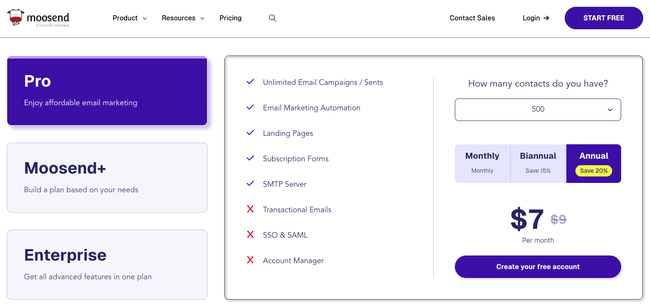
Contacts are the most important factor influencing Moosend pricing. Moosend prices its subscription plans by the number of contacts. You pay for 500, 1000, 2000, 3000 contacts, and so on. All the way up to 1 million.
Each tier caps the number of contacts you have. If you want to add more subscribers than the limit, you have to pay for the next tier up. Or use pay-as-you-go credits to send emails to them.
Moosend has a ‘one email address, one contact’ policy on pricing. This means it only charges an email address once, no matter how many lists you have it in. Some email marketing services count each time an email address appears in a list as a contact.
Is Moosend really free?
Moosend has a 30-day free trial. You can build email campaigns, forms and landing pages for free. You get access to the drag-and-drop editors and templates. You can build and send unlimited emails for 1000 contacts. But the trial only allows you to build one form and one landing page. Similarly, you can only build one automation workflow. And the free trial doesn’t include dynamic content or audience discovery.
How does this stack up against other email marketing services?
If you want free email marketing software, there are better options. MailerLite has a free plan that includes 12,000 emails per month and 1,000 subscribers. You get all essential email marketing tools for creating campaigns. Plus access to a free image library, automation builder, and forms. You can also build 10 landing pages for free and even a basic website. Find out more about features, pros, cons, and pricing in our full MailerLite review.
Brevo’s free plan is even more generous. You can send 300 emails a day, or around 9,000 a month. But it includes 100,000 contacts. And full access to its drag-and-drop email, landing page and form builders, and templates. Same goes for its automation builder and workflow templates. Even better, Brevo’s free plan includes WhatsApp and SMS marketing. You can also send transactional emails, connect to ecommerce platforms like WooCommerce, Shopify, and WordPress, and activate web tracking. Check out our full Brevo review to find out more about its features, pros, cons, and pricing.
Read our review of the best free and cheap email marketing tools for more comparisons.
Comparing Moosend Pricing
Moosend gets rave reviews for the value it offers. It’s one of the cheapest email marketing services around. It’s popular with SMEs for its all-in-one pricing, quality tools and ease of use. But how does it compare to similar email marketing services?
Moosend vs Mailchimp
| Moosend Pro | Mailchimp Standard | |
| Starting Price (500 contacts) | $9/month | $20/month |
| Emails Sends | Unlimited | 6000 |
| Marketing Automation | Unlimited automation actions | 200 actions/automation |
| Users | 5 | 5 |
| A/B Testing | ✔️ | ✔️ |
| Dynamic Content | ✔️ | ✔️ |
| SMTP Server | ✔️ | ❌ |
| Spam Testing | ✔️ | ❌ |
Mailchimp has more plans than Moosend. Including a free plan. Moosend has all the features included in its plan, while Mailchimp asks you to go to more expensive plans if your business needs those features. Here are the starting prices of Mailchimp’s 4 main subscription plans:
- Free: $0/month for 500 contacts, 1000 emails, and 1 user
- Starter: $13/month for 500 contacts, 5000 emails, and 3 users
- Standard: $20/month for 500 contacts, 6000 emails, and 5 users
- Premium: $350/month for 10,000 contacts, 150,000 emails, and unlimited users
Moosend’s Pro plan compares best with Mailchimp’s Standard plan. Both include better features like advanced automation features, dynamic content, and web tracking.
| Contacts | Moosend Pro | Mailchimp Standard |
| 500 | $9 | $20 |
| 5000 | $48 | $100 |
| 10000 | $88 | $135 |
| 25000 | $160 | $310 |
Mailchimp has more features than Moosend. But more doesn’t always mean better. Mailchimp set its sights on becoming an all-in-one marketing platform several years ago. So it’s been trying to play catch-up with marketing platform heavyweights. But a lot of its new features aren’t relevant to SMBs looking for good value email marketing. Do you need to pay more for social media and ad campaign tools? Will you ever use them?
Mailchimp’s Essentials plan sticks to email marketing basics. But basic really is the word. Core features like automation and segmentation are so basic they’re barely usable. It doesn’t come close to competing with Moosend. And Mailchimp Essentials is still more expensive. With caps on the number of emails you can send.
Mailchimp’s unfair pricing
Mailchimp caps both contacts and emails on all plans. It also counts the same subscriber as multiple contacts if it appears in different lists. So you pay more than once for the same person.
Get all the details with our complete Mailchimp review and guide to Mailchimp pricing. Are you a Mailchimp customer looking for a better tool? Check out our review of the best Mailchimp alternatives.
Moosend vs Constant Contact
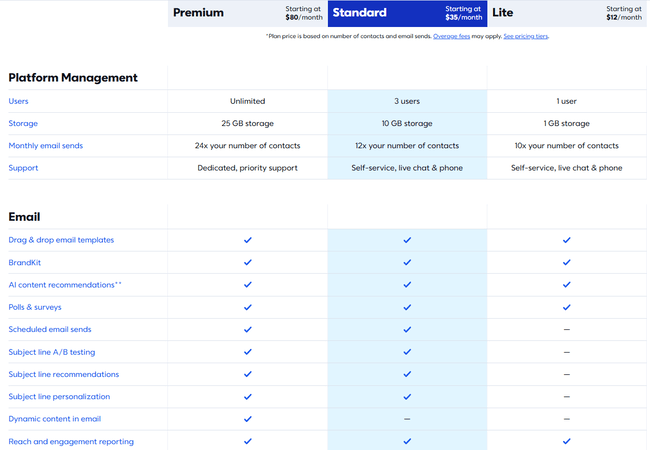
Constant Contact’s pricing is similar to Mailchimp’s. Three plans that unlock more features the more you pay. But Constant Contact doesn’t have a free plan. Just a 30-day free trial. Its plans look like this:
- Lite: $12/month for 500 contacts, 5000 emails and 1 user
- Standard: $25/month for 500 contacts, 6000 emails and 3 users
- Premium: $85/month for 500 contacts, 12,000 emails and unlimited users.
Constant Contact’s Lite plan is very basic and doesn’t even include automations. Its Standard plan is most similar to Moosend’s Pro plan. Here’s how they compare for different numbers of contacts:
| Contacts | Moosend Pro | Constant Contact Standard |
| 500 | $9 | $35 |
| 5000 | $48 | $110 |
| 10000 | $88 | $160 |
| 25000 | $160 | $340 |
Moosend is much cheaper than Constant Contact. And it’s way ahead on value, too. Constant Contact’s features are much more limited and basic. The automation tools are not even close to Moosend’s. And you are limited to just 10 audience segments on the Standard plan. Constant Contact also limits both contacts and emails, compared to Moosend’s unlimited sends. For features like dynamic content and ecommerce tools, you have to go up to the Premium tier. Find out more in our full Constant Contact review.
The only benefits of Constant Contact are its extra marketing tools. You can use it for event management, social media marketing and advertising.
Find out where we rank Moosend in our review of the best Constant Contact alternatives.
So which Moosend pricing plan should you pick?
Moosend Pro has everything most email marketing users want. Especially SMEs, start-ups and small marketing teams. And that’s part of the attraction. One tier, one great price, all the tools. And not just the basics, either. The email marketing automation and ecommerce features are outstanding for this price range.
Moosend appeals most to small to medium-sized email marketing teams. And with unlimited emails and SMTP servers, bulk sending isn’t a problem either. The extra tools available with either a Moosend+ or Enterprise plan are helpful as you grow.
Get started with Moosend for free