
Mailtrap Review 2026: Deliverability, Price, Pros and Cons
 Paul Newham
Mailtrap is an email sending platform built with developers and marketers in mind. It lets you send transactional emails from any software via API. And it includes campaign building and email testing tools.
Over the years, I’ve tested plenty of email marketing, transactional email and email testing services. But I haven’t seen many that combine all three the way Mailtrap does. So I signed up and gave it a thorough test drive.
If you want to know what I learned, read on. In this review, I’ll unpack Mailtrap’s features, share its pros and cons, break down pricing, and tell you who it is (and isn’t) right for.
Mailtrap Review Overview
Here’s the quick take from my Mailtrap review:
- Mailtrap is an email platform with transactional emails, email marketing, and testing.
- It offers fast and secure transactional email delivery through an API or SMTP relay.
- Setup is developer-friendly, with clear API docs, prebuilt SDKs, and easy domain configuration.
- You can design templates using a simple drag-and-drop editor or add your own HTML templates.
- Mailtrap tracks every email in detail, with logs, breakdowns by mailbox provider, and performance alerts.
- Deliverability is a strong point thanks to authentication, bounce and unsubscribe blocking, and dedicated transactional streams.
- The Email Sandbox provides safe inbox placement and spam scoring tests without touching real inboxes.
- Support includes rich technical documentation, 24/5 chat, and helpful knowledge-base guides.
Get started with Mailtrap for free
Mailtrap’s Core Features
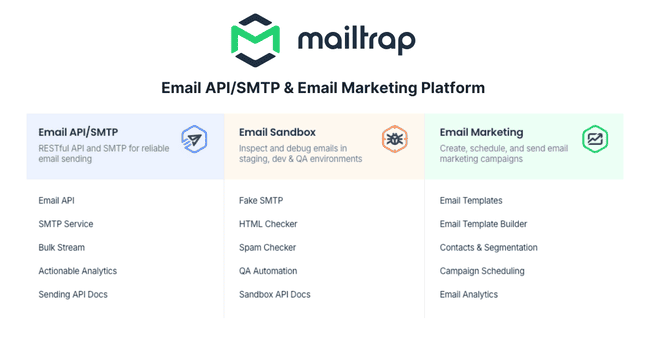
- Email API and SMTP: Mailtrap adds email sending to digital platforms via an email API and SMTP relay.
- Email Marketing: Create campaigns with the drag-and-drop email template builder. And use segmentation and personalization to target and customize emails.
- Marketing Automation: Automate sending and contact management with a simple workflow wizard. Events on your platform can trigger automations via API calls.
- Deliverability: Mailtrap automatically authenticates every email and monitors IP and domain reputation. It blocks all addresses that bounce, unsubscribe, or make spam complaints. And runs separate sending streams for transactional and bulk emails.
- Inbox Placement Testing: You can test inbox placement in Mailtrap’s unique ‘fake SMTP’ sandbox environment.
Mailtrap Pros and Cons
Mailtrap Pros
- Developer-friendly: Mailtrap’s APIs come with extensive SDKs and code libraries in 12 programming languages. A drag-and-drop template builder and automation editor save time and effort.
- Excellent deliverability: Mailtrap automatically blocks sending to unsubscribed and bounced emails to protect sender reputation. It has separate sending streams for transactional and bulk emails. Ensuring transactional emails always arrive as quickly as possible.
- Email campaign tools included: You don’t need a separate email marketing tool to create and manage email campaigns. Mailtrap includes a drag-and-drop email builder, automation, contact management tools, and the email API.
- Standalone testing environment: Mailtrap’s email sandbox lets you run inbox placement and spam tests without sending an email.
Mailtrap Cons
- The email marketing features are still a work in progress: Mailtrap is still developing its email marketing features. You might find some of the campaign building and automation tools basic for now. But it’s likely to get better!
- No built-in landing page builder: You’ll have to use specialist landing page builders and lead generation tools to build pages and forms.
Get started with Mailtrap for free
Is Mailtrap for you?
Recommended if:
- You’re a digital business that wants to integrate email sending into your platform. Mailtrap is one of the most user-friendly and flexible email APIs around. And whatever coding language and infrastructure you are using, Mailtrap likely has an SDK to suit.
- You want the convenience of a single platform for transactional and marketing emails. Rival email APIs like SendGrid and Mailgun offer email marketing tools as separate products. Mailtrap includes them with its email API as standard.
Not recommended if:
- You need advanced email marketing automation features. Mailtrap’s campaign tools complement its API. But if you are looking for advanced marketing automation tools, you’d be better off with a platform like ActiveCampaign.
- You have an ecommerce store. Mailtrap adds email sending to any platform, including ecommerce sites. But specialist ecommerce email services like Omnisend or Klaviyo have specific ecommerce features that may matter to online retailers. Like easy drag and drop product blocks in the email editor and ecommerce automations based on site behavior.
Mailtrap Review Rating Details
Email API and SMTP | Mailtrap is a great value email sending service for small businesses. It’s easy to use and suitable for transactional and marketing emails. |
Ease of Use | Mailtrap designs tools to save time and the UI is very user-friendly. |
Email Editor | The email editor is minimalistic and simple to use. It’s a handy time-saving device for developers to build a basic design quickly. And then polish using HTML. |
| Email Templates | Mailtrap doesn’t have pre-made email templates. But developers can build their own template library by coding, using the email editor or importing from elsewhere. Templates can be used flexibly for transactional and marketing emails. |
| Email Types | Mailtrap supports transactional and bulk/marketing emails. It doesn’t have A/B testing, auto-resend, or RSS emails. |
Marketing Automation | Automation tools are basic but effective. You can automate emails, segmentation, and list management. And set simple yes/no conditions to split workflows. API calls trigger workflows from any action on your website. |
List Management | You can create as many lists and segments as you want. And automate contact and list updates. But there are no lead capture features. |
| Personalisation | Mailtrap supports dynamic content if you use coding. The email builder has personalization using merge tags. |
Reporting & Analytics | Reporting tools show the open, click, and bounce data by different mailboxes. There’s in-depth spam and performance analysis for every email sent. |
| Customer Service | 24/5 live chat and email support come with all paid plans. There is plenty of technical support and documentation for developers. |
Deliverability | Mailtrap automatically authenticates every email sent and monitors IP and domain reputation. It blocks sending to addresses linked to bounces, unsubscribes, and spam complaints. |
| Spam and Design Check ✔️ | The sandbox’s Spam Analysis tool provides a technical breakdown of what triggers different spam filters. |
| AI Writing & Image Generation ✔️ | You can generate unique non-photorealistic images. The generative text AI tools give responses that could be more refined. |
| Integrations & API ✔️ | Mailtrap has 10 official SDKs but supports integrations in many more languages and frameworks with code snippets and guides. There are 16 pre-built integrations. These include AI and low-code dev platforms, email template builders, like Stripo and Tabular, and platform connector Zapier. |
| User Permissions ✔️ | You can set many permission statuses to define roles and manage access for other users. |
| GDPR & Legal Compliance ✔️ | Mailtrap is ISO-27001 certified, which includes approval of GDPR and CCPA compliance. Plus other SaaS safeguards on data. Unsubscribe options are mandatory on all emails. And it blocks sending to all addresses that unsubscribe. |
| Interface Languages ✔️ | Mailtrap is available in 9 languages: English, Portuguese, Spanish, Polish, Italian, Ukrainian, French, German, and Japanese. |
Customer Satisfaction | Mailtrap gets excellent user review scores on G2 and Capterra. Users trust Mailtrap for its deliverability, ease of use, and great customer and technical support. |
Overall Score

Mailtrap is a great sending service for developers and high volume senders. With so many SDKs available, you can use its email API to add email to any platform or website. It has great deliverability for transactional emails. And the icing on the cake is its user-friendly, time-saving but simple email marketing tools.
Get started with Mailtrap for free
Getting Started with Mailtrap
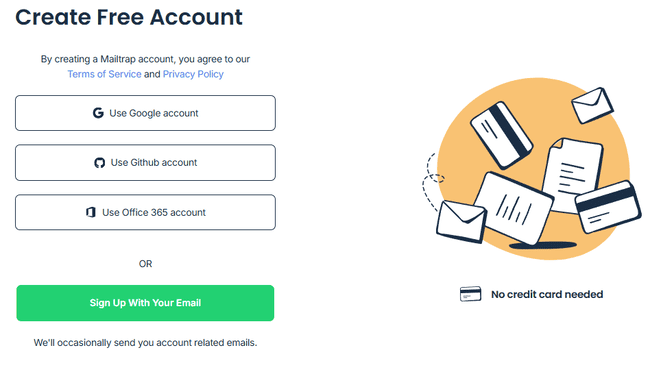
It takes under a minute to set up a new Mailtrap account. Developers can sign up with a GitHub account. The main thing you have to do is provide an email domain.
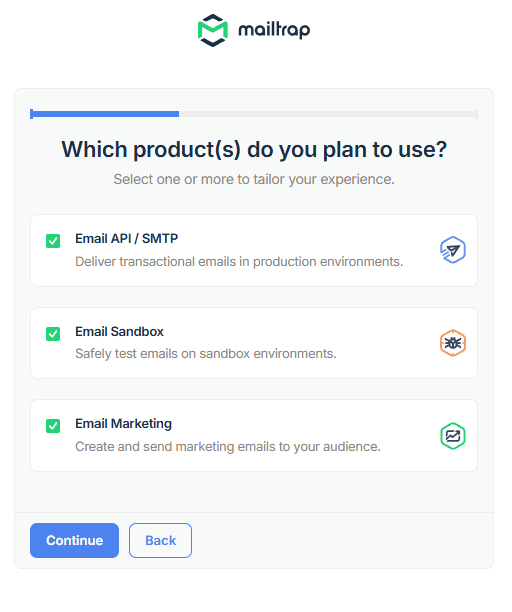
I like that Mailtrap signs you up automatically for its free plan. A lot of services go straight into the hard sell, trying to get you to pay. Mailtrap leaves you to explore at your own pace. Each product has a ‘get started’ wizard to guide you.
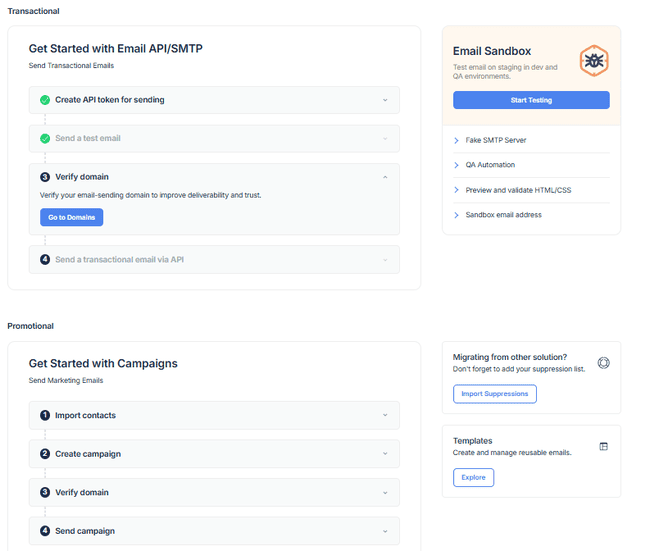
I was impressed by how easy it was to configure. Email APIs, SMTP servers, and sandbox testing environments are technically sophisticated. But Mailtrap makes it easy to get started. It automatically creates API key permissions and tokens for your domain.
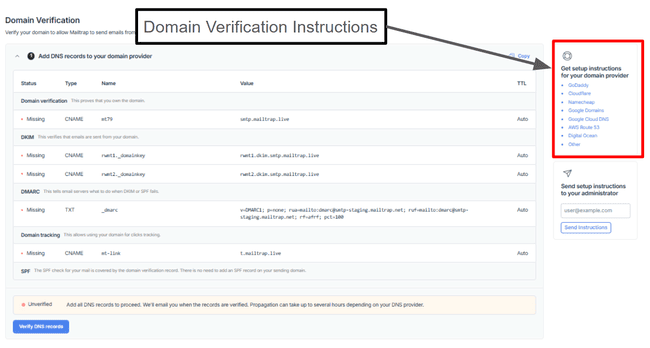
The only part of the setup that requires technical know-how is verifying your domain. Luckily, there are clear instructions on how to add DNS records for all major domain providers.
Get started with Mailtrap for free
Mailtrap Review: Email Marketing and Delivery Platform
Mailtrap SMTP and Email API
Mailtrap has two ways to connect its sending infrastructure to your chosen platform. You can use an SMTP relay. Or Mailtrap’s Email API. SMTP connections are easier to set up and troubleshoot without coding. But email APIs are faster, more secure, and support extra features.
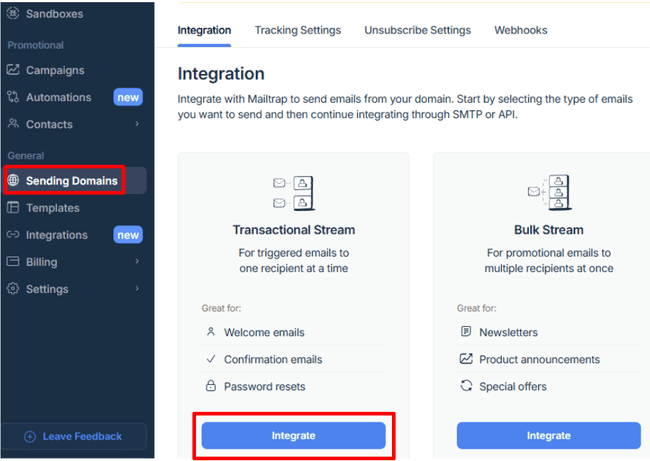
Both options are in Sending Domains. There are separate Transactional Stream and Bulk Stream. The transactional emails get sent using different infrastructure to mass broadcasts for promotional emails.
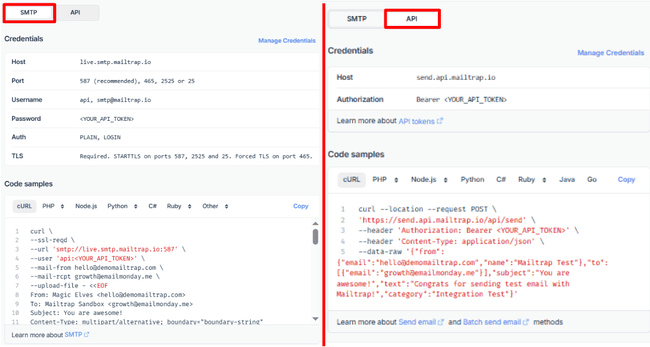
Mailtrap has official SDKs for Node.js, Ruby, Python, PHP, Elixir, .NET and Java. Plus full repositories for the NodeMailer, Laravel & Symfony (PHP), and ActionMailer (Ruby) frameworks. On top of these, it supports integrations in C#, Go, and cURL, including ready-to-use code snippets.
Mailtrap Deliverability
Mailtrap is a platform you can trust with email deliverability. Both the team and the tool do all the technical things that affect deliverability reliably. It monitors IP and domain reputation and looks at blocklists by default. On top of authenticating DKIM, SPF, and DMARC records.
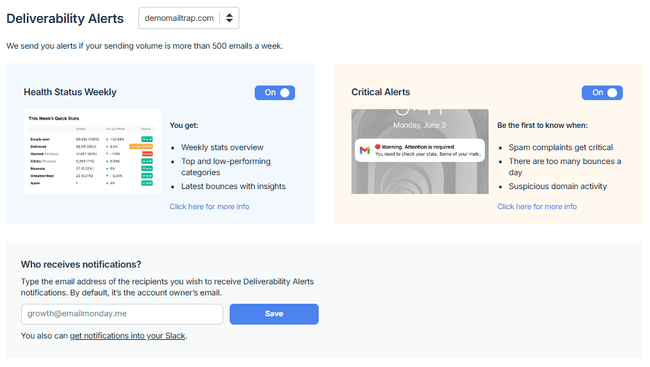
Most importantly of all, Mailtrap helps you manage email deliverability. If you send more than 500 emails in a week, you get a deliverability report. This gives you a breakdown of email health opens, clicks, bounces, unsubscribes, and spam complaints. Plus, Mailtrap notifies you straightaway if bounce rates get too high. Or if you get a sudden rush of spam complaints.
Another excellent deliverability feature is Mailtrap’s separate transactional and bulk email streams. Transactional emails such as password resets and order confirmations need to arrive quickly. That might not happen if you have a big campaign queued for sending. A dedicated transactional stream ensures priority sending. Mailtrap can also whitelist your IP if you’re on the Business plan.
Testing in the Email Sandbox
Another unique deliverability feature is Mailtrap’s Email Sandbox. This secure testing environment simulates spam filters in an isolated SMTP server. It runs inbox placement tests and spam checks without sending an email.
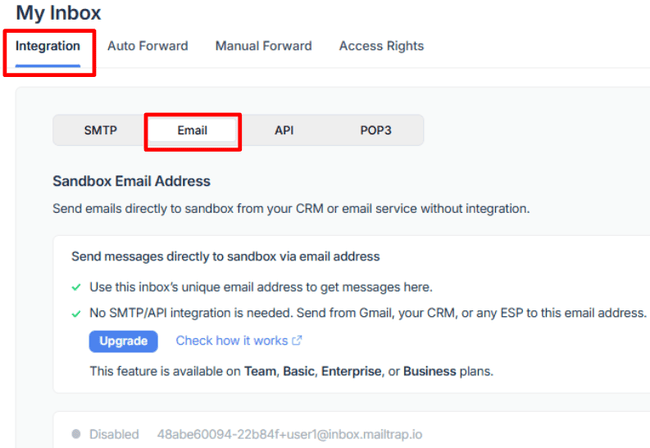
You can connect the sandbox to your platform via API or SMTP relay. Alternatively, you can simply send test emails to Mailtrap addresses. And they run the test for you.
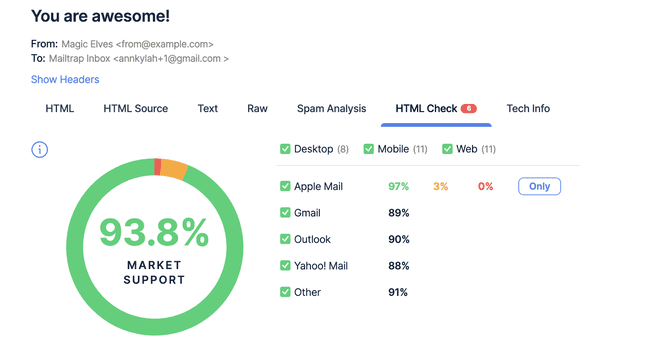
The list of simulated mailboxes includes Gmail, Outlook, Apple, and Yahoo! This allows you to analyze how emails perform across different clients. You can narrow tests down to desktop clients, mobile, and web browsers.
The level of detail in Mailtrap’s sandbox testing is very impressive. It dives deep into an email’s HTML, for example. Broken or incorrect code can cause major delivery issues. Mailtrap’s HTML checker goes deeper. Different mailbox providers handle HTML code in different ways. Mailtrap highlights problematic code in the HTML source. So you can see clearly what to fix.
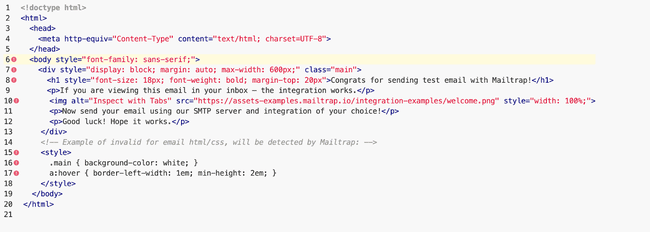
Under the Tech Info tab, you can run checks on the technical setup of your emails. And you can preview how your emails look in different inboxes.
To balance all this detail, Mailtrap offers two handy summaries. The HTML Check tab gives an overall score for ‘market support’. And how your email will display across devices and mailboxes.
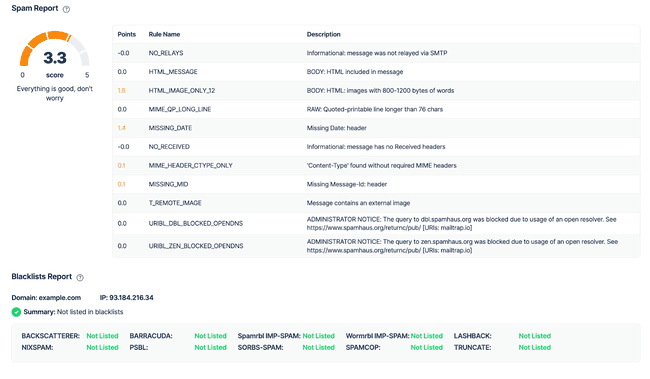
Then there is the Spam Analysis overview. Here you see all the technical spam filter tests with an overall score. Anything under 5 means you should beat most spam filters. 5 or over means you have things to fix. You get blacklist reports on this page, too.
Get started with Mailtrap for free
Creating and Sending Email Campaigns with Mailtrap
Mailtrap is still developing its campaign tools. As they stand, they focus on creating and sending simple, functional marketing emails. It’s a useful addition for the sending infrastructure. But we expect to see a lot more features added.
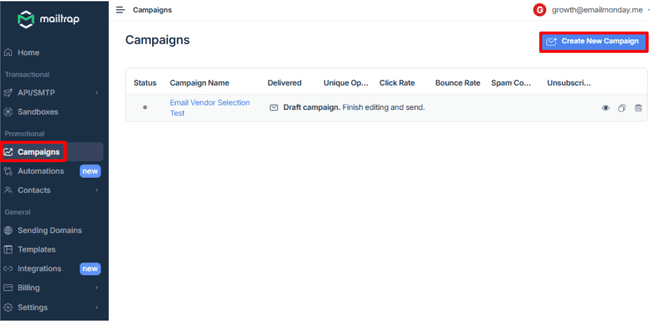
For example, Mailtrap doesn’t currently have a long list of email templates. It has just two basic outline templates, for welcome emails and promo emails. But for developers who can code HTML, that’s still a useful shortcut. Even a very simple template saves time compared to starting to code an email from scratch.
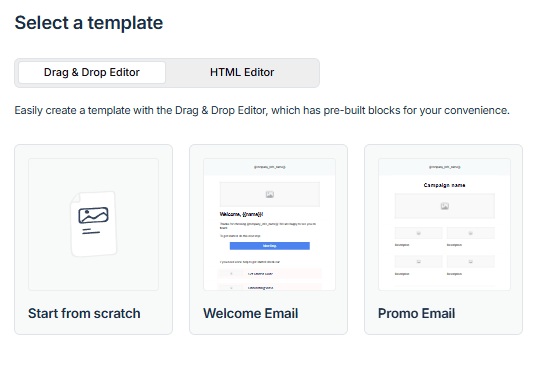
The same goes for Mailtrap’s drag-and-drop email editor. Developers don’t need a no-code option to create HTML emails. But it’s a lot quicker. Mailtrap’s editor is simple to use, too, with zero learning curve. You can knock up a basic design in no time. And then switch to the code builder to polish a final version. And if you do want more inspiration from a professional template, no problem. You can find and customize great designs from Mailtrap’s integrations with Stripo and Tabular.
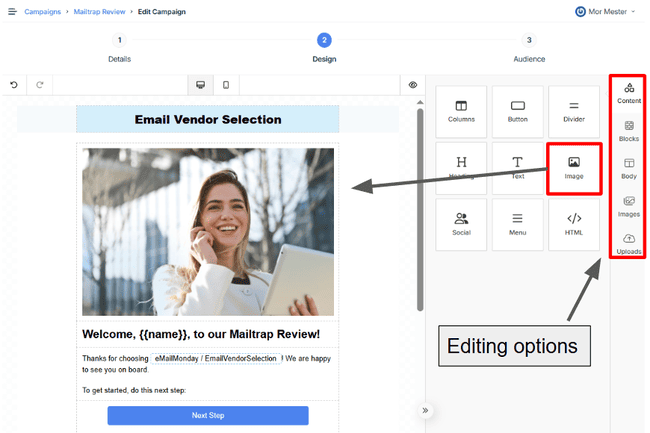
I like the image options in Mailtrap’s email editor. Partnerships with Unsplash, Pixabay, and Pexels provide millions of license-free stock images. You can upload your own. And it has a generative AI tool that creates images from scratch.
In the drag-and-drop editor, personalization uses merge tags. These can display contacts’ details into text. Default tags supported are first name, last name, and email address. Plus company details like company name, address, and city. Or you can use {{handlebars}} to add content from any other field in your contact database. There’s no support for dynamic content in the editor. But you can code to change what content appears to different recipients.
Email Automation in Mailtrap
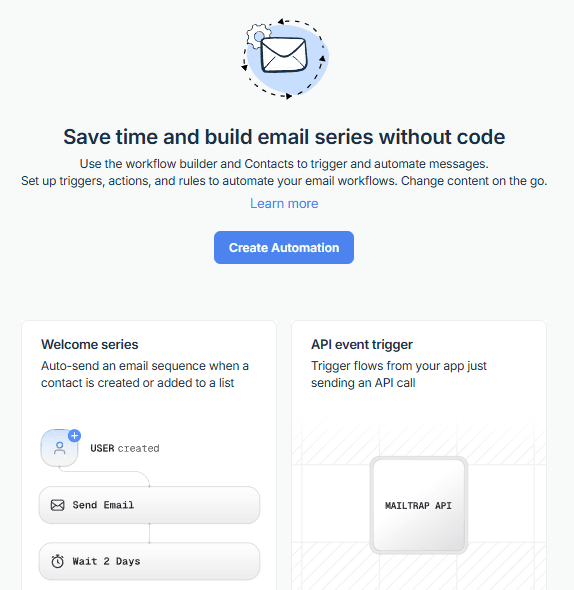
Mailtrap’s automation tools are pretty simple. It’s a simple From the setup wizard you choose a trigger, actions, and rules/conditions in order. Mailtrap told us they are still building out the marketing automation editor and features.
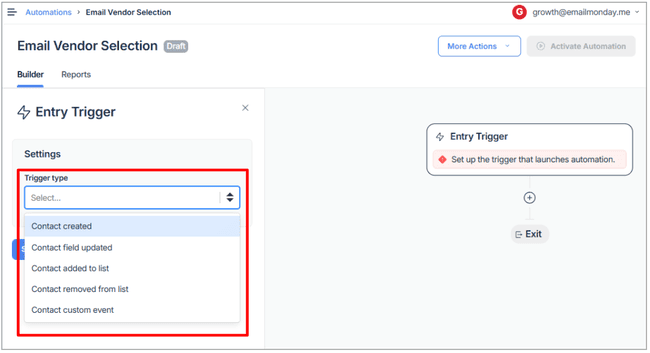
Currently, the number of triggers are mostly contact actions. Like creating a contact or adding someone to a list. It seems like this could be a much bigger set of triggers. But the fifth, ‘API event received’, saves the day. This means you can use any event in your platform to trigger a workflow. You just have to set up the API events.
There are five actions. Sending an email. Adding and removing contacts from your email lists automatically. Unsubscribing a contact. And changing a contact’s data field. As a change in the data field can be a trigger, too, this lets you link workflows together. Say you set up a workflow so a purchase changes a contact’s status from prospect to customer. You could then have this trigger a change in a list or segment. Or send an email offering special first-purchase benefits. It shows how even simple automation tools can have an impact.
There are two options for adding rules for how (or when) an automated action happens. You can set a time delay. Or a yes/no conditional split. And have different actions on different paths, depending on whether the condition was met or not.
Managing contacts in Mailtrap
Mailtrap’s contact management features are basic yet functional. Building forms and lead capture is either done on your own site, app or using the integrations and API.
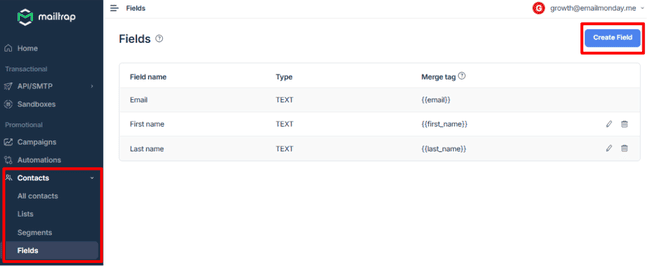
When importing a list from a file, Mailtrap starts with three data fields. Email, first name and last name. You can create the fields in Mailtrap first (Contacts > Fields > Create Fields). Allowing for personalized emails using merge tags. And more ways for triggering automations.
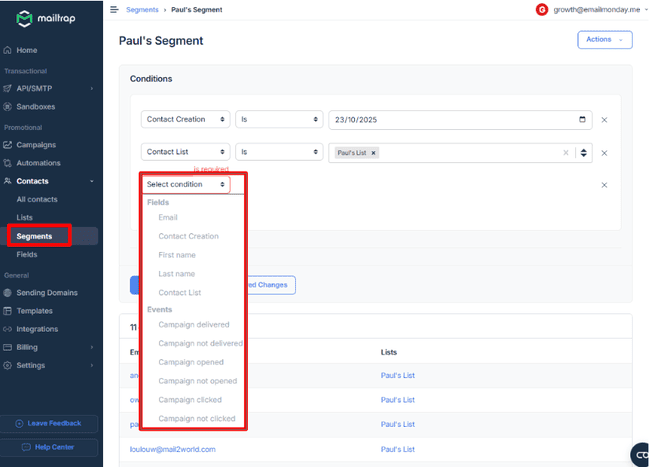
You can create as many lists as you want for different email marketing projects. And build segments to target sending. You can filter by any contact data field. Plus basic recipient behavior, like opening or not opening an email. There’s no specific tagging, but there is a workaround to add a field “tag” (or similar) and add your own custom information to that field for segmentation of contacts.
One other important contact management feature is Mailtrap’s Suppression list. This acts as an automatic list hygiene tool. It blocks sending to unsubscribes, spam complainers and bounced emails.
Analytics in Mailtrap
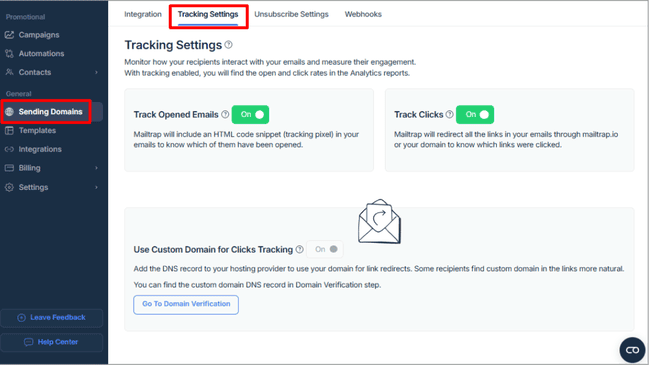
To use analytics in Mailtrap, you switch on email tracking in Sending Domains > Tracking Settings. And toggle Track Opened Emails and Track Clicks to On. This also means you can switch tracking off. You don’t get this choice with many other platforms. You can use https link branding so all tracking links come from your (sub)domain
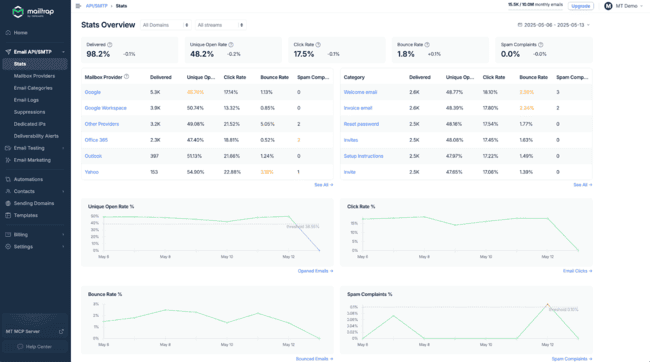
Mailtrap’s analytics include delivery, bounce, and spam complaint rates. For me, the most useful part is how it breaks these metrics down by mailbox provider and email category. I like the traffic light coding system. It means you can see at a glance if, say, bounce rates have ‘gone red’ with a particular mailbox provider.
The Email Log page lists every email sent. The email body retention (storage) period depends on your plan and is up to a maximum of 30 days. The log gives in-depth technical performance analysis of every email. There’s also content-free logging. This includes a spam check score. And details about every link clicked.
Mailtrap Integrations
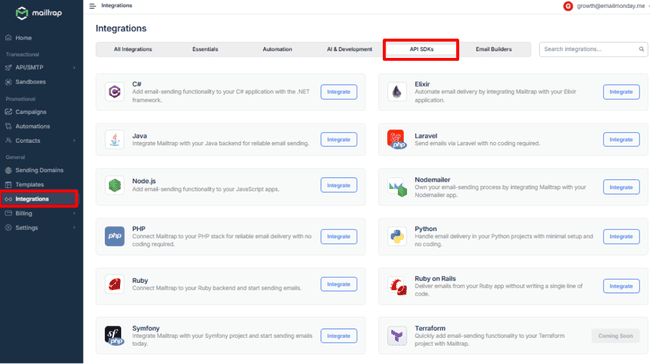
As an API-based platform, Mailtrap integrates into any platform you choose. It has SDKs and extensive code libraries in 12 programming languages.
There are 16 pre-built integrations. These include integrations with AI IDEs and low-code development tools such as Bolt AI, Cursor, and Vercel. The recently released Mailtrap MCP server extends this to any IDE. And lets you send emails from Claude’s chat interface. For email templates, Mailtrap has plug-ins for Stripo and Tabular. Zapier, Make, and n8n open the door to 5,000+ further apps and loads of automations.
Get started with Mailtrap for free
How Much Does Mailtrap Cost? Pricing and Plans
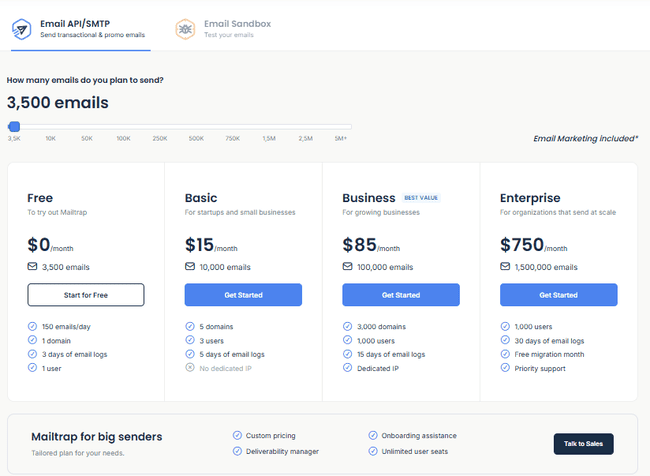
Mailtrap has four pricing plans: Free, Basic, Business, and Enterprise. All four come with the full set of sending features. Within each paid tier, the pricing depends on the email volume. Then at a certain point, the email limit upgrades to the next tier up. There’s a 30-day money-back guarantee.
| Free | – 150 emails per day – 3,500 emails per month – 100 contacts – 1 domain – 1 user |
| $15 | – Basic Plan – 10,000 emails per month – 50,000 contacts – 5 domains – 3 users |
| $85 | – Business Plan – 100,000 emails per month – 750,000 contacts – 3,000 domains – 1,000 users – Dedicated IP with auto warm-up and optional IP whitelisting. |
The email sandbox is a separate product starting at $17 a month for 500 test emails. It has a free tier with 50 free tests a month.
Mailtrap Discount 💎
Ready to try Mailtrap? Email Vendor Selection readers get a 30% discount for 1 year if you start your free account via our page and add the coupon code EVS30.
Get started with Mailtrap for free
Mailtrap Customer Support

Mailtrap provides customer support via live chat, email, and a self-service knowledge base. Live chat is available 24/5, Monday to Friday. This is great if you need to resolve urgent technical issues. During our tests, a member of the support team responded within a minute.
Mailtrap shares excellent technical documentation for its API to assist developers. It links to full code repositories for its 10 official SDKs in GitHub. But it doesn’t just leave you to wade through all of these. It has guides on all allowed requests and common responses. These break down requests into headers, path parameters, and body. And show code examples. For core actions like integrating a sending domain, Mailtrap has code snippets ready to copy.
The knowledge base contains more than 100 articles. If you click through to the main Help Center page, they’re sorted into 13 helpful categories. There’s strong documentation. Many guides and resources conveniently link directly to API documentation. They offer clear explanations and step-by-step instructions.
Final Conclusion: Is Mailtrap the right email delivery platform for you?
What are the key takeaways from my Mailtrap review? Mailtrap fills a niche between email API/SMTP and email marketing. Its appeal is that you can do more than just the API and SMTP in one place. Transactional emails, bulk emails, marketing campaigns. The great choice of SDKs means you can use Mailtrap for most platforms and projects. It has great technical support and is affordable.
So, who does Mailtrap suit best? There’s no escaping that Mailtrap is very much a developer-focused service for product companies. You have to know what you’re doing with APIs and coding to get the best out of it. It’s ideal if your main focus is on integrating transactional emails into a SaaS platform or digital service app. And want your marketing team to send campaigns without bothering the dev team.
The roadmap for Mailtrap’s email marketing tools is that they want to keep it easy to use and lightweight. And that they’ll focus on improving usability and enhancing the functionality users rely on the most.
Get started with Mailtrap for free
Mailtrap Frequently Asked Questions (FAQ)
Mailtrap Alternatives
Mailtrap vs. Sendgrid
The main difference between Mailtrap and Sendgrid is target audience. Both are email API services with email marketing tools. Mailtrap is mainly aimed at smaller, growing companies. Sendgrid has its own purpose-built message transfer agent (MTA) for enterprise-level sending. This can handle 100 billion-plus emails a month. And has outstanding delivery speeds and deliverability even at the very highest volumes.
Sendgrid has more advanced marketing tools than Mailtrap. But its campaign features are in a separate product to its email API. Mailtrap bundles them all together. So Mailtrap is more affordable.
Check out our review of the best SendGrid alternatives for more similar tools.
Mailtrap vs. Mailgun
The main difference between Mailtrap and Mailgun is the number of developer tools. Mailtrap is a user-friendly email API and SMTP relay. It has a separate API for its standalone email testing environment. Mailgun has five APIs for sending, email validation, templates, event tracking and analytics. This gives you a huge amount of control to configure your email environment. But Mailgun separates different functions into different products. For example, its deliverability tools are an extra to its sending API. Mailtrap includes things like authentication and reputation monitoring in its API.
Read our full Mailgun review to compare these tools.
Mailtrap vs. Amazon SES
Like Mailtrap, Amazon SES is a developer-focused email sending platform. It lets you add email sending capabilities to any software. But SES is purely about adding sending infrastructure. There’s no option for creating emails, for example. Mailtrap doesn’t just let you create emails and mail templates. You can automate campaigns. And target who you send to with segmentation. Amazon SES’s main USP, on the other hand, is scalability. It uses Amazon’s AWS cloud infrastructure and there are no send limits. Pay-as-you-go pricing means you only ever pay for exactly what you need.
Find similar services in our review of the best Amazon SES alternatives.