
Maestra Review 2026: the best ecommerce marketing platform?
 Paul Newham
Maestra is an ecommerce marketing platform for mid-market retail and ecommerce companies quickly gaining popularity. Their client list is impressive. Ugg, Crocs, United Colors of Benetton, Tefal, Miele, and L’Oreal are just a few of the brands.
I’ve been testing and reviewing marketing software for nearly a decade. So I was very excited to see how this platform holds up in the very competitive ecommerce email and marketing space.
The thing that intrigued me was Maestra’s ecommerce personalization and unified CDP. I know that many platforms claim almost magical marketing outcomes. But does Maestra deliver on their promise? We got our hands on an account to test and find out.
Maestra Review Overview
Here’s the TL;DR version of my Maestra review:
- Maestra is a powerful all-in-one ecommerce marketing platform.
- It has omnichannel features including email, SMS, WhatsApp, push notifications, on-site pop-ups, promotions, and loyalty tools.
- The platform is specifically for mid-market and larger retailers and ecommerce.
- The built-in CDP tracks millions of customer profiles and behavior for precise segmentation and dynamic content.
- You can create campaigns with a drag-and-drop email editor, dynamic content blocks, and 100+ on-site pop-up and survey templates.
- Automation is a major strength. The flow builder works exactly like you expect, has 30+ triggers, and automates your campaigns, loyalty, and personalization.
- Revenue-focused analytics and an Email Health dashboard show exactly which campaigns, flows, and touchpoints increase AOV.
- Every customer gets “white glove” service to assist in migration, strategy, and ongoing campaign setup, including a dedicated CSM.
Maestra’s Core Features
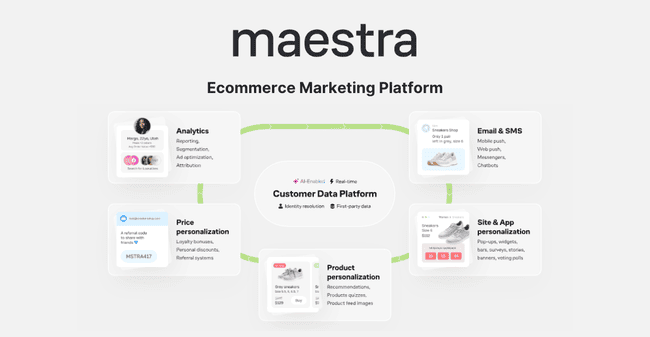
Maestra packs a lot into one platform. Here’s an overview of the main features you should know about:
- Ecommerce Features: Maestra connects directly to Shopify, BigCommerce, WooCommerce, and Magento. You can add product recommendations to emails, generate promo codes for discounts, referrals, and gift cards. Maestra syncs codes with your checkout and tracks use.
- Drag and drop email editor: Maestra’s visual email builder has lots of features, but is still easy to use. It’s one of the best builders I’ve used for dynamic content.
- Templates: There are 13 pre-made email templates and 100+ form templates to kickstart designs. And as part of onboarding you get custom designed templates done for you and set up at no cost. You can import your own HTML email templates.
- Automation: Maestra automates everything. There are no workflow templates. But its workflow builder is incredibly easy to use. It comes with 30+ triggers and unlimited conditions and branches.
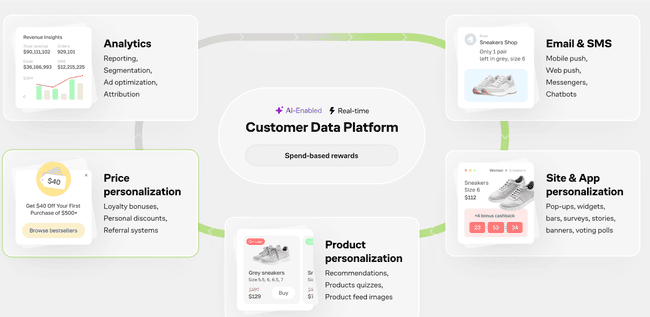
- Customer Data Platform: A built-in CDP captures data from every customer interaction. This is the engine that drives automation, advanced segmentation, and personalization.
- Site Personalization: One of my favourite parts of Maestra. Maestra uses pop-ups, product recommendation widgets, inline forms, and dynamic banners to increase on-site conversions. And you can build surveys for first-party data capture.
- Loyalty Program: Maestra fully automates bonus points, rewards, and redemptions. You can build detailed multi-tiered customer rewards programs. Or just have rewards for repeat customers without setting up a formal scheme.
- SMS, WhatsApp, and Notifications: Maestra runs campaigns via SMS, WhatsApp, web, and mobile push. You can mix and match channels in any campaign flow.
- White glove service: Every client gets their own customer support manager (CSM). Your CSM works directly with you on everything from migration to marketing strategy. And they build campaigns, flows, and segments on your behalf.
- Integrations: The onboarding includes the setup of integrations. It supports connections to all major ecommerce platforms. Including Shopify, BigCommerce, WooCommerce, Magento, and any custom set up.
Maestra Pros and Cons
Pros:
- Makes customer data management more efficient and insightful. Maestra’s CDP captures data from every customer interaction. It’s the fuel that drives smart automation and personalization.
- Automates everything as standard. In Maestra, marketing automation is more than triggering campaigns. It automates promotions, loyalty, dynamic content, product recommendations, and segmentation. Its flow builder is intuitive.
- Helps you personalize every interaction. Maestra’s personalization is impressive. You can set campaign content to appear/not appear or change depending on who receives it. And use pop-ups to offer discounts, promotions, and product suggestions.
- Consolidates your marketing stack. Retailers often run separate platforms for marketing automation, data management, and loyalty programs. Maestra unites all these into a retention marketing platform for DTC brands.
- Personal service as standard. Maestra’s ‘white glove service’ gives you your own dedicated CSM. It’s not just for onboarding. Your CSM helps you with everything from strategy to building assets. For the lifetime of your account.
Cons
- It can do with more email templates. Maestra has plenty of templates for personalization pop-ups, forms, and surveys. But works different when it comes to templates. You get custom designed templates at onboarding and your CSM will help set up flows. We personally prefer more premade for emails and flows. In the meanwhile, standalone drag-and-drop email builders are a good way to get more email inspiration.
Is Maestra right for you?
Recommended if:
- You want to increase retention for your ecommerce business. With a lot of competition in DTC ecommerce, retention and loyalty matter more than ever. Maestra data, loyalty and retention tools mean you can personalise the experience and reward customers from one platform. Automation means you can do it at scale.
- You’ve outgrown basic ecommerce marketing automation. As your store grows, simple welcome emails and abandoned cart reminders aren’t enough on their own. Customers expect messages that actually reflect what they browse, buy, and care about. You need automation that feels personal without becoming a full-time job. Maestra makes it easier to run smarter, more relevant campaigns using real customer behaviour.
- You want to consolidate marketing tools and channels. Maestra combines multiple marketing point solutions. No more running separate platforms for automation, personalization, and loyalty, and trying to manage integrations.
- You’d like professional services included. Maestra isn’t a fully managed service, but it is as close as platforms come. They work together with you, as an active partner, saving time and scaling up. The white glove support service is like having a consultant and operations on call.
Not recommended if:
- You’re a small ecommerce or start-up. I’m sure plenty of small retailers would love all the benefits and features I’ve listed for Maestra. But it’s a platform that caters only to bigger ecommerce companies. Unless you have over 100.000 customers, it won’t be a good fit. There are plenty of smaller, simpler, cheaper ecommerce email marketing services. Check out Omnisend and Klaviyo for starters.
- Looking for a simple and more affordable email marketing tool: Platforms like Brevo or MailerLite win for affordability and ease. More basic functionality, but perfect for small teams starting out.
Maestra Review Rating Details
Ease of Use | I found Maestra easy to use overall. It’s particularly good for making advanced features like automation and personalization simple. A couple of tools feel a little hidden. But Maestra is working on improving navigation. |
Email Editor | A user-friendly drag-and-drop editor. It has lots of content and layout options. I like its ‘card’ system for stacking elements so you can track everything as you build. |
| Email Templates | 13 pro-quality template designs. You get custom templates created for you on onboarding. |
Email Types | Maestra’s strength is engagement-focused emails. So welcome, abandoned cart, reminders, product promotions etc. You can A/B test campaigns. |
Marketing Automation | Automates everything from campaigns to segmentation, and personalization to loyalty programs. The visual flow builder makes it easy to create open-ended flows. And there are 30+ action-based triggers. The only thing I’d improve is adding pre-built flow templates. |
CDP & List Management | Maestra’s CDP can handle millions of customer profiles. It captures every customer interaction and lets you create unlimited custom fields. This enormous data resource drives outstanding segmentation. |
| Personalization | Maestra’s biggest selling point is personalizing stores with targeted promo pop-ups and product recommendations. And either switch email content on or off depending on who sees it. Or change entire content blocks for different segments. |
| Reporting & Analytics | Detailed analytics focus on the revenue impact of campaigns, automations, promotions, and personalization. Maestra filters out bot clicks. More charts would help with all the heavy detail. |
Customer Service | Maestra’s white glove means support is second to none. As a client, you get a personal CSM and scheduled catch-ups. CSMs help with all aspects of running an account. And live chat is available during office hours, Monday to Friday in US and Europe. |
| Deliverability | Maestra partners with Email Consul to provide continuous deliverability monitoring. It handles IP warm-up as part of the onboarding process. And has an Email Health dashboard with key metrics broken down by mailbox provider. Offers list cleaning as an add-on. |
| Spam and Design Check ✔️ | Flags formatting and coding errors that could trigger spam filters. Plus warns when the size of the email file is likely to cause Gmail to truncate it. No spam check tools for content or design. |
| AI Features ✔️ | The Beautify text tool optimizes text in emails, SMS, and push notifications. Yet to add more generative AI features. But does have optional AI analytics to identify growth opportunities from performance data. |
| Integrations & API ✔️ | 5 native integrations for Shopify, WooCommerce, BigCommerce, Wix, and HubSpot. The Maestra team will build custom integrations to any platform with an API. Publishes extensive documentation and SDKs for dev teams to build their own. Some clients might prefer more integrations. They can connect themselves without dev help. |
| User Permissions ✔️ | Clients can create any permissions they need for unlimited users. CSMs can set custom permissions as part of their service. For speed, there are a few pre-set permissions for API access, marketing, customer support and administrators. |
| GDPR & Legal Compliance ✔️ | Maestra is compliant with the SOC2 auditing framework for customer data management. This covers privacy, security and confidentiality. It also covers full GDPR, CCPA/CCRA compliance. |
| Interface Languages ❌ | Maestra is available in English to date. Though there are plans to expand to more languages. |
| Customer Satisfaction | Maestra has 4.7 stars on G2. They publish impressive customer case studies and testimonials. Clients talk very positively about how Maestra compares to previous platforms. And particularly about its impact on revenue and ROI. |
Overall Score
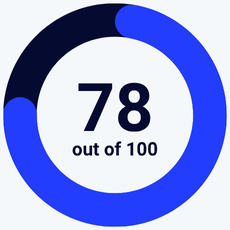
Maestra is impressive in most departments. It’s built to turn data-driven marketing into bottom-line results. And it achieves this with refined personalization, automation, and CDP tools. The white glove service is another major plus.
Book a Maestra demo to get started
Getting Started with Maestra
Maestra doesn’t have a self-service sign-up. You can get started by booking a demo. A customer service manager (CSM) will get back to you in 24 hours and show you the platform.
Once signed up, CSMs take charge of the whole onboarding process. A typical migration takes two to four weeks. CSMs handle integration with your commerce platform. If you’re switching from another marketing platform, they’ll migrate all customer data and assets, too. This includes rebuilding automated workflows in Maestra. Throughout the process, you stay involved via a Teams or Slack channel.
Book a Maestra demo to get started
Maestra Review: Marketing Platform for DTC Ecommerce Brands
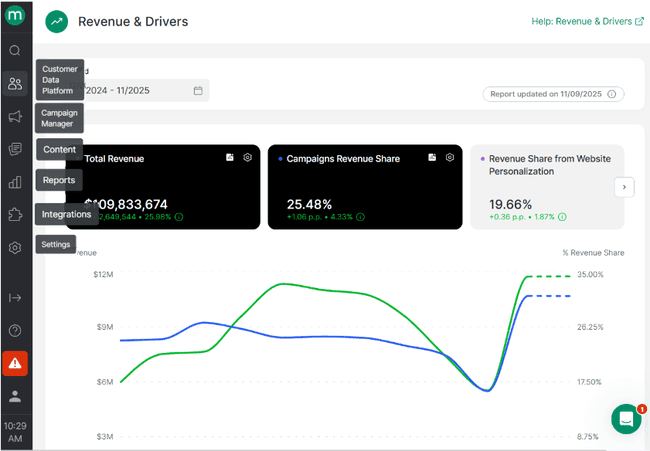
One of the first things I judge software on is navigation. Poor navigation wastes time. As a new user, I want to immediately understand where everything is.
I had no problems with Maestra. It organises all its features into six categories in the left-hand menu:
- Customer Data Platform: Contact management and segments. Plus a breakdown of actions and engagement by customer. And a list of all your products.
- Campaign Manager: Campaign building, automations, personalization, loyalty, and surveys.
- Content: Email templates, product recommendation presets, and promo codes. You create these here, and when you’re building campaigns, you have the content ready.
- Reports: 11 analytics dashboards, including revenue and drivers, flows, loyalty, promotion report, campaigns, subscribers, email health, and website personalization.
- Integrations: Access to the app plug-in menu. Plus details of all current and previous integrations, ad optimization, and webhooks.
- Settings: 30+ options for loyalty points and personal offers, pop-up frequency, send time optimization, order statuses, and payments. Plus user and system settings.
Email Templates in Maestra
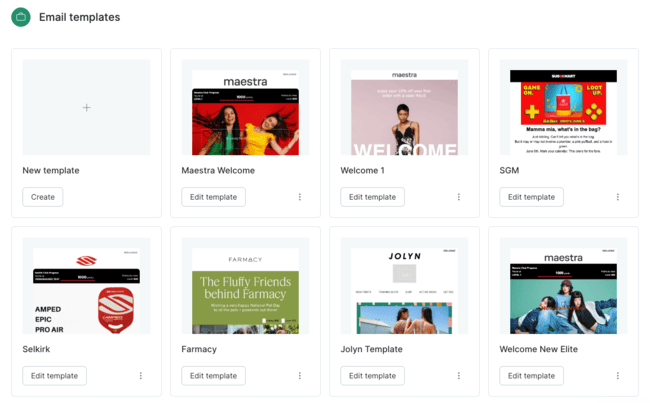
Maestra is a multichannel marketing platform. But I’ll start with emails. Maestra currently has 13 pre-built email templates. The designs are bright and professional. Five are welcome templates for loyalty programs and new customer discount codes. Others include product updates, promotions, sales events, and newsletters. All templates are fully customizable using Maestra’s no-code email editor.
Note: In onboarding, the Maestra team will design and create new custom branded templates for you. At no cost.
Creating and Sending Newsletters with Maestra
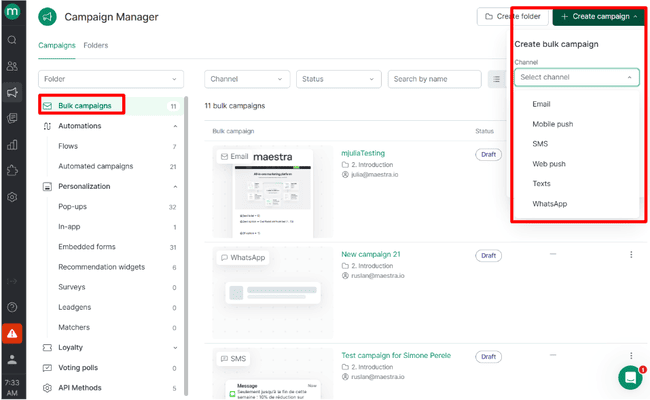
Maestra divides campaigns into two types: bulk and automated campaigns. You create both using exactly the same tools under Campaign Manager > Create Campaign. You have to choose an automated campaign if you want to add a message to an automation workflow.
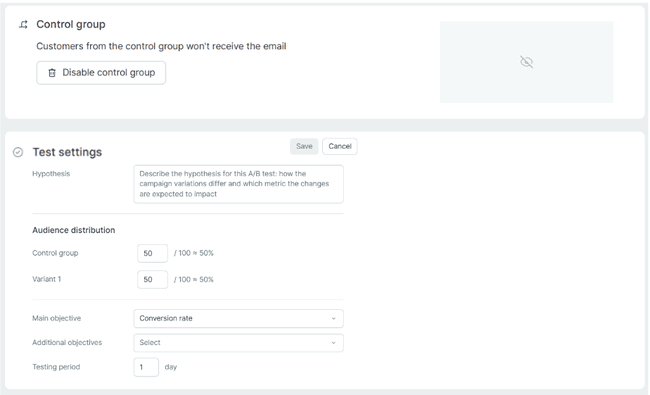
Setting up a new campaign is a breeze. For emails, you add the usual subject line, sender, and recipient details. You can set up an A/B test. A lot of platforms only show A/B testing options at the end of the build. I like knowing where everything is up front. Your A/B test needs a hypothesis. This describes the variations in your different versions. Test metrics are conversion rate, average order value (AOV), and average revenue per user. You specify how many people to send the test to by setting a control group. This is the group that doesn’t receive the test.
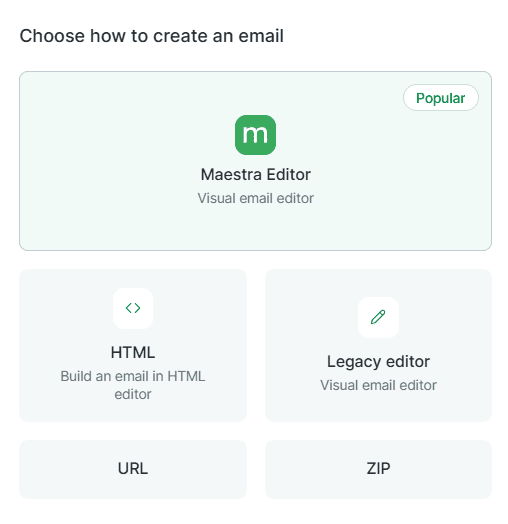
Onto creating your email, Maestra has two no-code visual builders. Plus an HTML email editor. You can open templates from the Maestro library directly in all three. Alternatively, you can import templates using a URL or by uploading ZIP files.
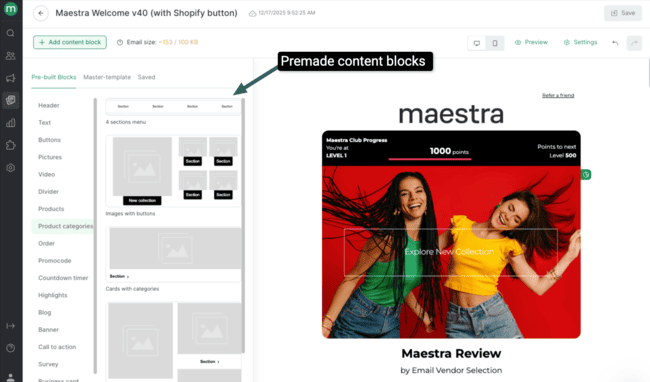
The most recent Maestra visual editor packs in plenty of tools and design options. But I still found it brilliantly intuitive to work with.
I always look for how flexible layouts are when I test an email builder. I want room for customization to make a design my own. Maestra ticks this box with 50+ premade content blocks. You simply find the block layout you want and drag and drop it into your template. Content categories include product listings that link directly to your store catalogue. And promo code blocks that link to codes you create in Maestra.
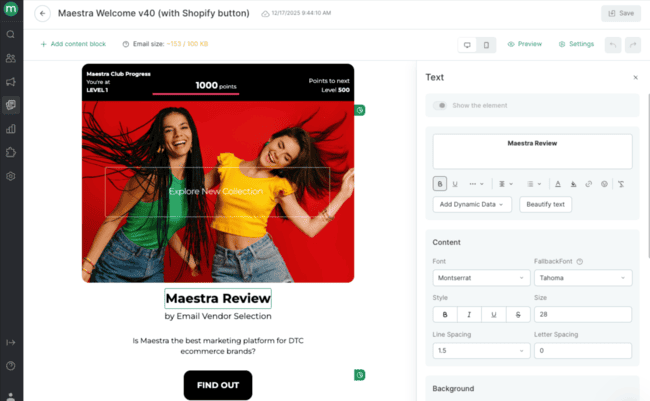
As for adding content and editing styles, Maestra does something that I love. You can edit individual elements to type text, upload images, and add links. You can work at the block level to add background color, borders, and spacing. But in between, you can work with what Maestra calls Cards. Cards are the arrangement of elements in a block. You can toggle visibility for different elements on and off. This helps you judge size and spacing. For column layouts, you can flip the order left to right with a single click. It gives you an extra level of control I really enjoyed.
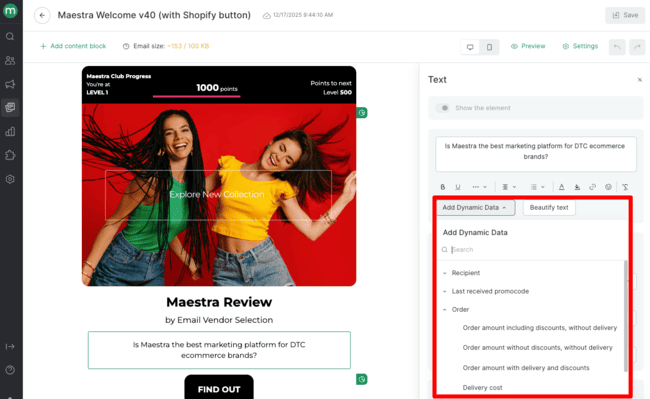
Something else I love is Maestra’s approach to email personalization. It’s all built around dynamic content. Yes, you can do the standard thing of dropping a recipient’s name or other personal data into text. But that’s not really the focus. There’s a clue in what Maestra calls this feature. Dynamic Data.
Dynamic Data makes elements appear or disappear based on data tags. Say you didn’t have a person’s name on file. Any text element with a ‘Name’ tag added wouldn’t display to that person. It means, for example, you can personalize an email for known customers. And still use it for non-customers too.
The real benefit comes with all the other data types you can add as tags. Previous order values and dates. Promo codes and their expiration dates. Plus, you can create any custom fields you like. The point isn’t to display all this data in emails. It’s to personalize what each recipient sees. You can tag non-text elements like images, promo codes, product listings, and CTAs.
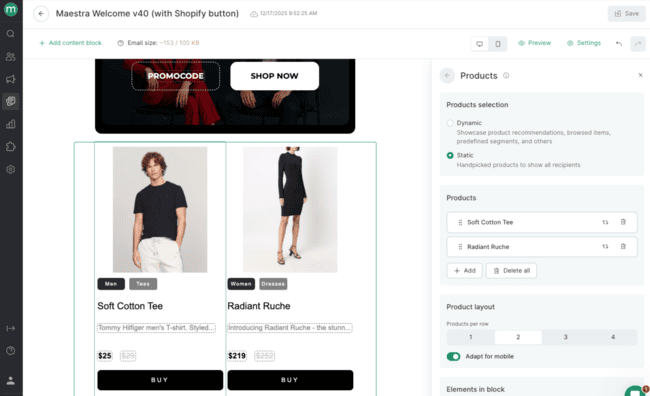
You can set rules so different blocks are shown to different segments. You do need to build the segments before using dynamic content – and it is either shown or not shown. This means you’ll never have to send a generic email. It’s a proven way to increase campaign returns. German appliance brand Miele, for example, saw revenues from campaigns jump by 21.6%. All on the back of better targeting and personalization.
Marketing Automation in Maestra
Automation in Maestra leaves me with a warm glow. For usability, for features, for how much you can automate, it’s impressive. The best marketing automation tools let you automate any process. No matter how complex. But still make it simple and user-friendly. Maesta scores high on both points.
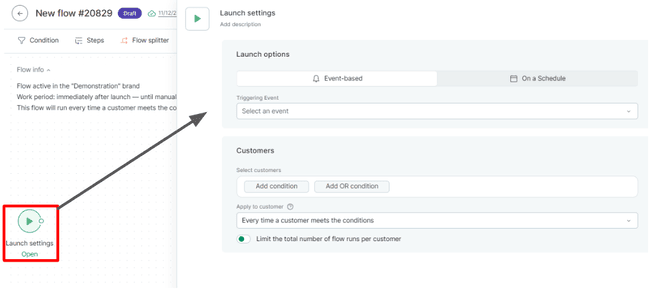
That’s all thanks to their visual workflow builder. You find that in Campaign Builder > Create Campaign > Flow. Creating a new flow takes you through two stages. First, there’s a mini-wizard for Launch Settings, or creating a trigger for your flow. There are 30+ event triggers. Everything from a customer leaving a page to finishing a purchase. And changes to customer data, to entering a segment.
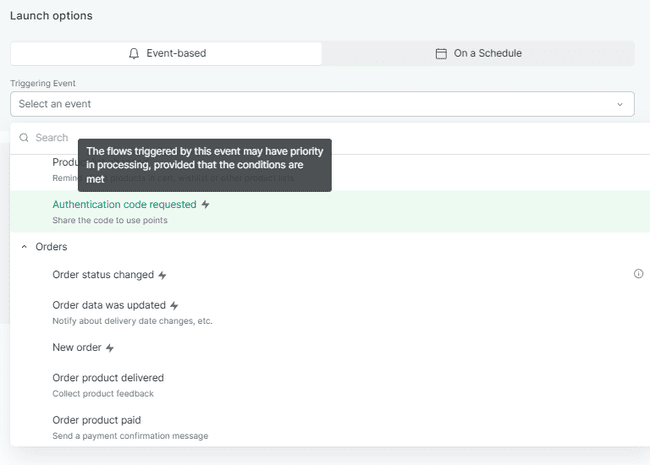
Flows are used for transactional as well as purely promotional emails. Triggers like authentication code requests and order status changes are automatically flagged for priority sending. If you need to schedule a promotional campaign, you can set a time trigger. And you can set conditions to segment which customers a trigger applies to.
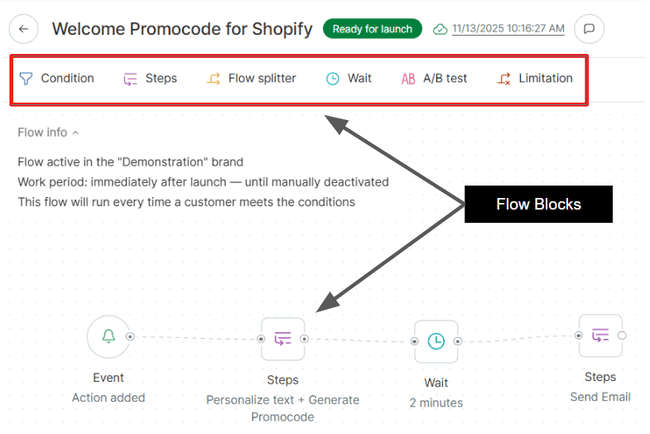
After the trigger, there are six block types you can add to a flow:
- Condition: Sets rules for the next step in a flow. Can split flows into multiple branches.
- Steps: Automated actions. Includes sending campaigns/messages. Adding customers to segments. Editing customer data. Issuing promo codes and discount card. And changing loyalty points.
- Flow Splitter: Divides flows into multiple branches by percentage of recipients.
- Wait: Time delays before the next step.
- A/B Test: Automates testing of campaign variables. Follows the same set up as A/B testing for bulk campaigns.
- Limitation: Sets a limit on how many times a customer can pass through a certain path. Once they hit the limit, they go down another path.
Building a flow involves simply dragging and dropping event blocks into position. You can link as many blocks as you like together. With all the step choices and multiple branches, the possibilities are endless. You can automate personalization, retention campaigns, and transactional messages. Even better, you can mix it all up for multichannel campaigns.
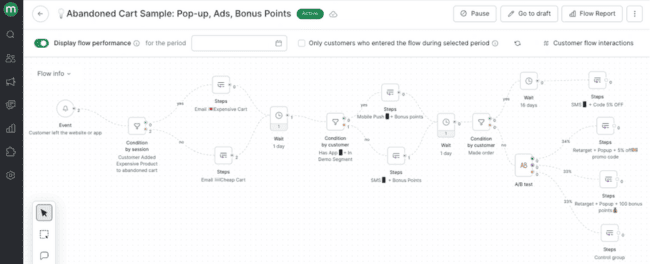
The above abandoned cart flow is a great example. It shows different uses for conditional splits. Give a promo code based on the value of the abandoned cart. Send the code in the app if the customer has it, or use different channels. But the cleverest part is at the end. If a customer doesn’t make the purchase, they enter a retargeting path. This flow doesn’t just trigger 1 ad. It A/B tests different social ads. Over time, you learn the best options for winning back customers and improving ROAS.
A/B Testing in marketing flows is a cheat code to success. Electronics giant Panasonic reduced the number of abandoned cart emails sent per customer from four to one. And identified customer segments that weren’t covered by existing workflows. After the changes, Panasonic’s share of revenue from automated campaigns more than doubled from 2.3% to 5.06%.
SMS Messaging in Maestra
Maestra is a multichannel marketing platform. Email is one of six messaging options you can use in campaigns. The others are mobile app push, web push, text, and WhatsApp. Plus SMS.
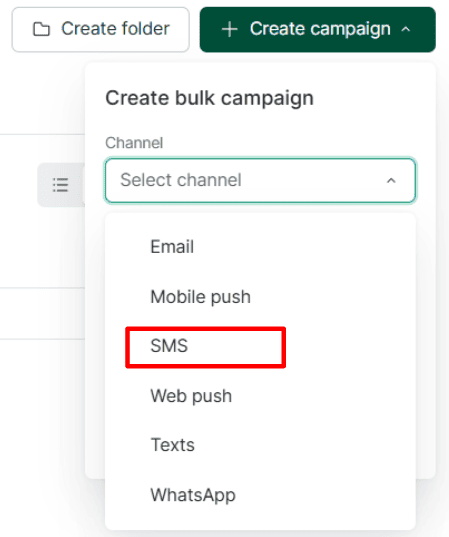
Setting up an SMS campaign is similar to email. You go to Campaign Manager > Create Campaign. Choose Bulk Campaign or Automated Campaign to make SMS messages to drop into flows. And then Select Channel > SMS.
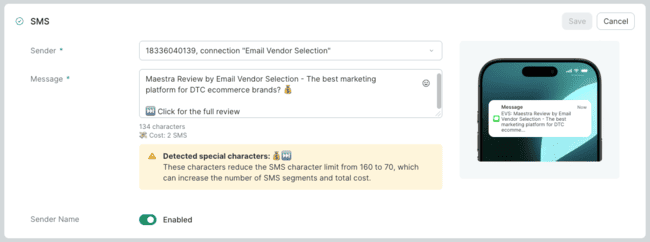
Setting up an SMS in Maestra takes about 5 minutes. There’s a text box to type your message and a preview that displays your message as it will appear on a phone. As with email, you can set up A/B tests, coupon codes, and UTM tracking. Maestra includes link shortening for tracking links in SMS.
To set up SMS shortcodes, Maestra’s CSM will handle everything on your behalf. They’ll help with paperwork and coordinating directly with the SMS provider.
Once that’s done, we just configure the connection settings and add the issued phone number or sender ID in the platform settings.
On-Site Personalization in Maestra
Maestra makes on-site personalization easy and practical, with pop-ups, banners, quizzes, surveys, games, and product recommendations all in one place. You get 100+ customizable templates and a simple visual editor. It’s easy to customize forms, collect first-party data, and help shoppers find the right products. With forms and surveys included, there is no need to juggle another platform, and smart targeting keeps messages relevant.
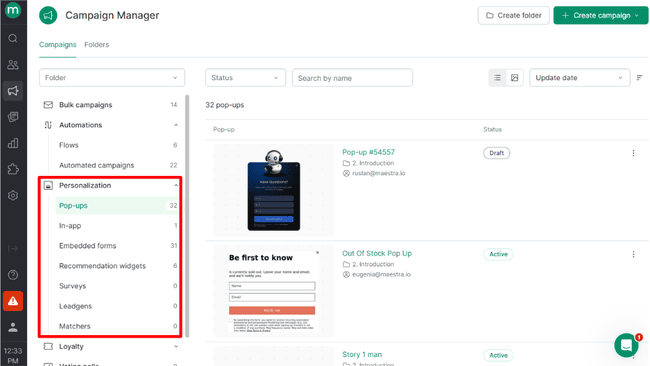
Maestra offers pop-ups, customized banners, quizzes, recommendations and offer embeds and even games to personalize the on site customer experience.
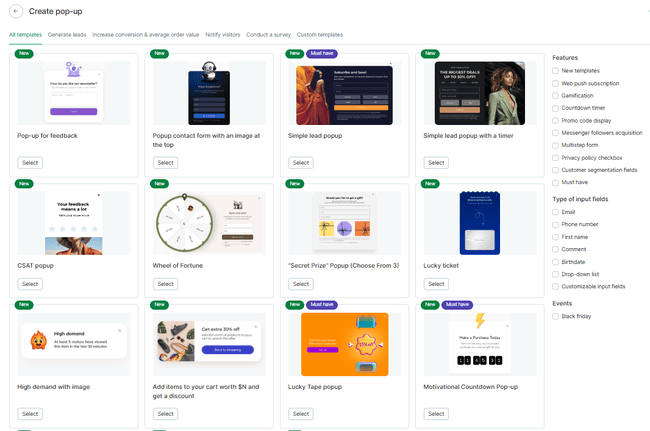
There are 100+ pop-up and embedded form templates, including:
- Feedback and ‘leave a comment’ requests
- Special offer timers
- Wheel of Fortune & Lucky Ticket giveaways
- One-click links to join messenger groups and social media
- Sign-up forms
- Targeted promo codes and discount offers.
- Social proof pop-ups, e.g. telling browsers how many people have bought a particular product.
- Recommendation widgets showing a curated selection of products.
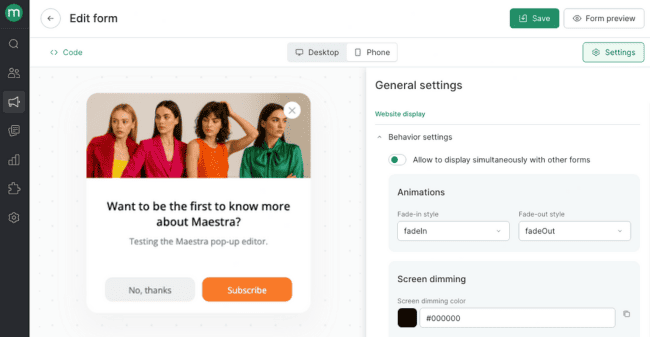
All templates are fully customizable in a visual editor. Plus, you can upload custom forms and pop-ups from other sources. The editor has the same interface as the email builder. The formatting options are simpler. I love little touches like the resizing sliders.
To publish pop-ups and forms, you simply choose the web page you want it linked to. You get full control over how often they appear so they don’t get annoying. And you can segment who they appear to. You can target how popups appear with:
- How many products customers have in their cart
- Product pages, category pages, CSS elements on pages
- How many times customers visited your website
- Customer segments
- Javascript
- Visited pages
- Geography
- Device and OS
- Form actions
- Traffic sources
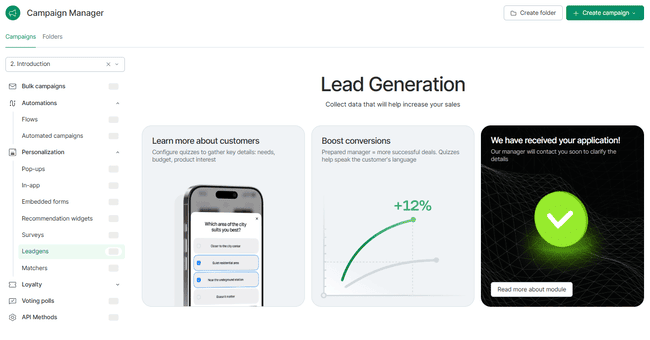
I’m equally impressed by Maestra Surveys. Use them to gather first party data. Like customer feedback surveys that score customer satisfaction and loyalty. Leadgen surveys let you capture more leads and while collecting data for lead qualification/scoring. And you can run more engagement-focused quizzes for retention marketing.
Finally, the product recommendation wizard, called Matcher. You set a list of questions and based on that make the right product recommendation. These are particularly useful for helping people choose between products and variations.
Managing contacts in Maestra
Every marketing platform collects data on contacts, leads, and customers. A CDP takes customer data up a level. Maestra’s CDP can handle millions of customer profiles. It pulls in data from every available source connected to your store and directly to Maestra.
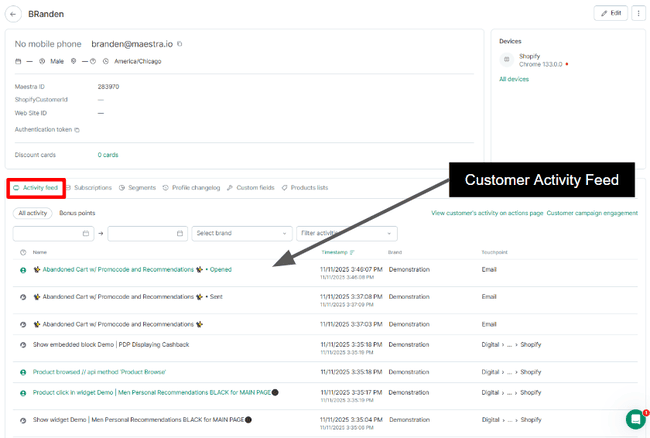
The first thing I noticed is the Activity Feed for every customer.
Most basic email databases list profile data like name, location, and contact details. And maybe add tags or email received.
Maestra logs every activity for every individual. From all campaigns and store or app activity. Every message sent. Every pop-up displayed. Every product browsed. Every link clicked. Each action record includes a timestamp and the touchpoint.
All customer actions can trigger campaigns. The CDP can use all this data for personalization and segmentation. And good segmentation relies on accurate customer data about purchases, carts, and order values.
The first thing that struck me was how detailed and precise you can make segments. There’s a huge list of conditions to filter by but the interaction and customer data really makes Maestra’s segmentation extremely useful.
You can segment by:
- Which campaigns and flows a customer has received and how they engaged.
- Full order history and purchase details.
- Participation in loyalty programs and use of promo codes.
- Add in custom data fields, and the possibilities are limitless.
You can use as many conditions as you like to craft segments and selections.
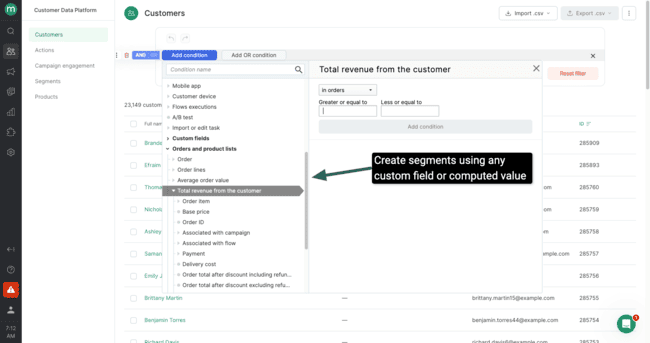
Maestra allows computed fields for segmentation. Computed fields store dynamic, calculated values rather than static, fixed values. This lets you create segments for changeable quantities. Such as most browsed or most purchased items. Or average order value.
Finally, you can build segments using the Recency, Frequency, Monetary (RFM) model. Marketers use RFM to calculate and/or rank customers based on value.
Home appliance brand Tefal used RFM segmentation in Maestra to create five broad customer segments. It then A/B tested automated campaigns to work out the best way to activate each segment. It doubled its direct marketing revenues.
Loyalty bonuses, discounts, and referrals in Maestra
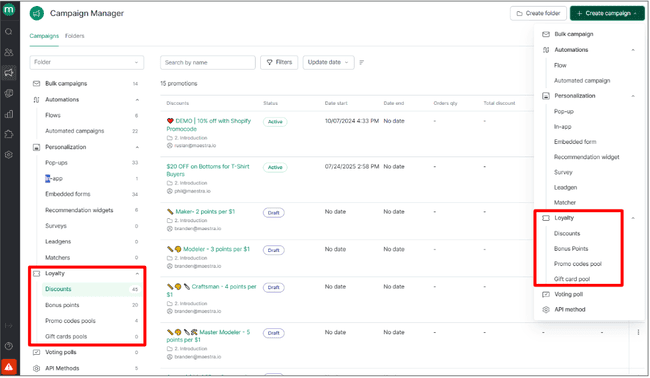
Retention marketing and loyalty features are baked right into Maestra as a campaign option. You can create discount codes, add points, and it logs redemptions automatically. This can all be done without an official “loyalty program”. You can set up incentives, and Maestra does the rest.
Generating and using promo codes is one of the simplest Loyalty means. You can create these in bulk using promo code pools. And then assign pools to a particular campaign. These are ideal for things like sending introductory offers with every welcome email. Or offer a discount to the first 100 people who sign up.
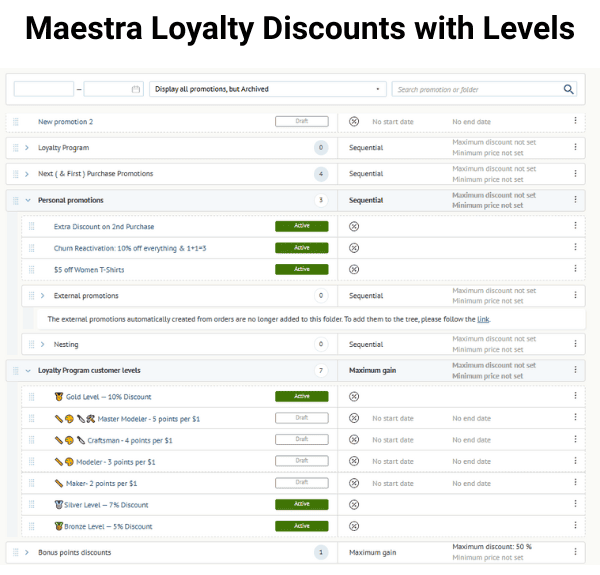
But things get way more sophisticated when Maestra links offers into long promotional sequences. This is how you create different levels in a loyalty program. Or ramp up rewards incrementally with time.
You can mix and match earning bonus points with discounts. And set levels of reward for different numbers of points. Maestra manages the logic using arbitration trees. You get full control over who qualifies for promotions. And it’s the same with value limits on rewards, product exclusions, devices and touchpoints. You can run mobile-only or email-only promotions.
Another promotional feature available in Maestra is referrals. These work much the same as promo codes. You create a code or link for a customer to share. It can have a discount offer attached for the new customer. But the main part is a discount or bonus points for the sharer. When the code or link gets used, that incentive is activated.
What I noticed right away is how easy and simple it is. You can build each of the steps into automated sequences. This means customers get reminders and confirmations that codes are active.
Overall, what stands out most is the flexibility of Maestra’s loyalty and rewards offers. For instance the case study from Sports chain Decathlon used Maestra to trial an in-store loyalty program. In three months, its share of identified offline customers grew from 11% to 44%. Fashion brand United Colors of Benetton has had success with several innovative loyalty features. It added 94,000 new loyalty members after rolling out integration with the Wallet app. And saw customer lifetime value increase by 10.3% after launching a video game for members.
Reporting and Analytics in Maestra
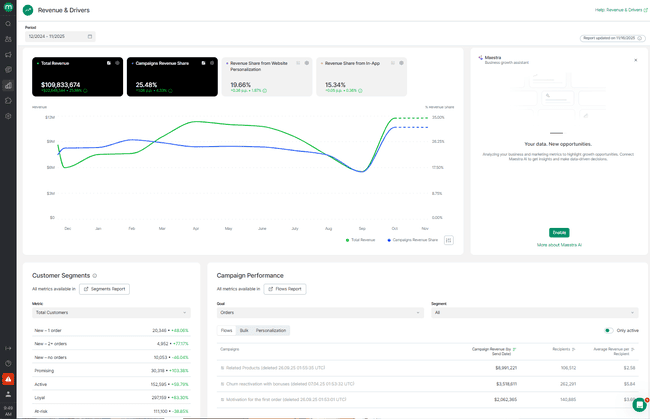
In ecommerce marketing, success boils down to driving sales. Revenue reporting and analytics is front and centre at Maestra. Quite literally, as it places its Revenue & Drivers reports on your account home page. The headline data covers revenue share by campaign, website personalization, and in-app. There’s a summary of performance across recent campaigns, again led by revenue. Plus, the growth of customer segments.
Maestra does something many other platforms don’t to get this laser-sharp revenue focus. It filters out opens and clicks from bots to make attribution easy and accurate. There’s no guesswork involved, so you can trust campaign revenue figures.
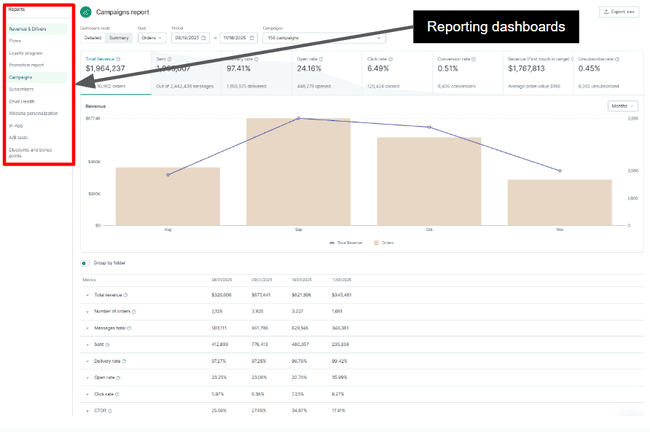
As well as being revenue-led, Maestra’s reporting is very detailed. There are 11 separate reporting dashboards, including Revenues & Drivers. And you get outstanding levels of control over the data you see. For example, the Campaigns and Flows dashboards give you very similar figures. Both cover open rate, clicks, conversions, and delivery rate. In Campaigns, you can toggle between bulk and automated campaigns. Or choose any mix of the two over any period you like.
There are separate dashboards for loyalty programs, promotions, discounts, and bonus points. That means you can look at stats across a full loyalty program and break it down into parts.
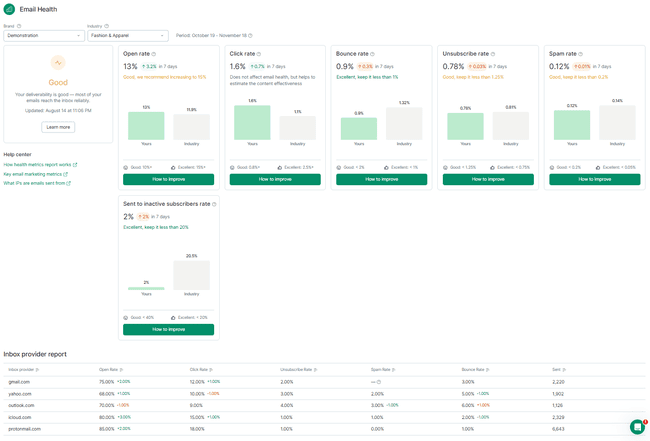
A useful reporting dashboard is Email Health. This serves as an in-platform deliverability checkpoint. It gives you stats on open, click, bounce, unsubscribe, and spam rates. And how many emails go to inactive subscribers. Maestra compares your rates across all of these to industry benchmarks. And it breaks them down by mailbox provider.
Maestra Integrations and API
Maestra has 5 standard integrations with Shopify, BigCommerce, WooCommerce, Magento, and HubSpot. But Maestra’s white glove service includes custom-building connections to any software.
Over the past three years, the Maestra team has built API connections to more than 1,000 apps. The team told us they get many regular requests. These include the Shopify personalization service Rebuy. Conversational AI platform Gorgias. Review and UGC apps Yotpo and Okendo. And data and analytics platforms Snowflake and Amplitude.
Maestra shares its API so dev teams can take charge of integrations if they wish. These come with excellent documentation and SDKs. The SDKs include Android, iOS, and Huawei for building and customizing mobile apps. This means you can send push notifications via mobile apps.
How Much Does Maestra Cost? Pricing and Plans
The first thing to say about Maestra’s pricing is that it actually publishes their pricing. This isn’t always the case with mid-to-enterprise marketing platforms. Lots of Maestra’s direct competitors, such as Attentive, Braze, Bloomreach, Listrak, and Iterable don’t publicise their pricing.
I love how transparent and simple the pricing is. There are no tiers or plans. You pay more for more contacts. One price unlocks the whole platform.
Prices start at $2,990 per month for 150,000 active customer profiles. That includes unlimited emails and unlimited user seats. And you get the full onboarding and implementation service. SMS rates are at $0.0045 per message (US).
It’s important to put the price into the context of what you get for your money. Many Maestra users come from Klaviyo, which also targets smaller businesses. But at its highest tiers, it has a Customer Data Platform, too.
Klaviyo prices its marketing and CDP features separately. So to get close to Maestra’s feature set, you’d need the Email + SMS plan with 150,000 active profiles starting at $1,970/month. Plus, the Klaviyo Data Platform costs $1,250/month for 250,000 profiles. (The Klaviyo CDP doesn’t have a tier for 150,000 profiles.) That adds up to $3,220/month. So Klaviyo is more expensive than Maestra. And Klaviyo lacks the on-site personalization features. And the tools to run promotions and loyalty programs with so much customization.
Here’s a quick summary table of Maestra’s prices:
| $2,990/month | 150,000 active customers and access to all platform features & unlimited emails |
| $4,160/month | 250,000 active customers and access to all platform features & unlimited emails |
| $6,110/month | 500,000 active customers and access to all platform features & unlimited emails |
| $8,710/month | 1 million active customers and access to all platform features & unlimited emails |
| $14,560/month | 2.5 million active customers and access to all platform features & unlimited emails |
Maestra Customer Service and Support
Maestra doesn’t leave the white-glove touch behind once onboarding is complete. It defines its whole customer support approach. Every client’s CSM sticks with them from sign-up onwards. They act as a personal point of contact for all issues and requests. And they manage relationships through weekly strategy sessions. Their hands-on approach covers everything. Making recommendations for how to achieve your goals. Helping set up campaigns, flows, and segments on request. Dealing with any glitches or technical issues you’re having.
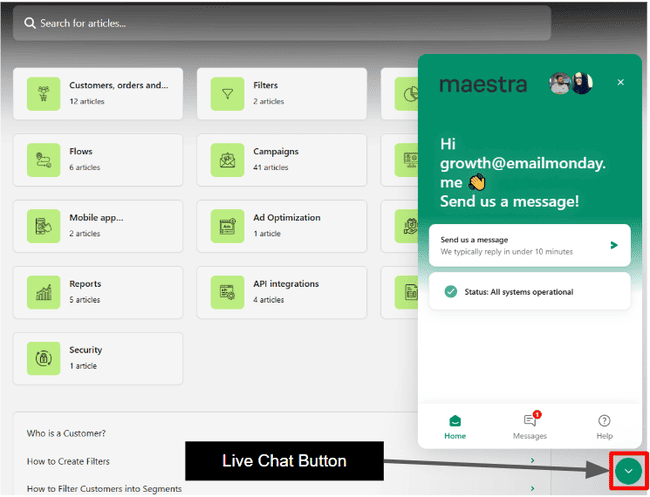
For urgent help requests, Maestra has a live chat service staffed by CSMs. It’s available during office hours Monday to Friday in the US and Europe. Service requests from Europe get picked up after hours by the US team, too. Maestra advertises responses within 10 minutes. When I tested response time, I got a reply in under five minutes.
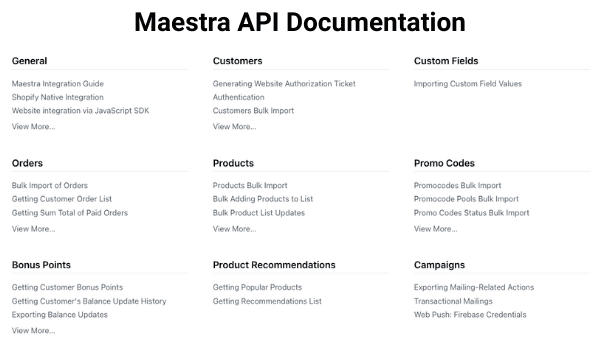
Maestra’s Help Page has 80+ guides and articles. There’s a separate resource of API documentation. This covers everything developers need for setting up integrations.
Final Conclusion: Is Maestra the right marketing platform for you?
The million-dollar question from my Maestra review is this. Is it good value-for-money? For me, it’s a resounding yes. Maestra is a marketing platform powerhouse for DTC ecommerce brands. Above all else, with its own CDP baked in, it makes customer data talk. First through automation, then through personalization. It’s a recipe for more engagement, more conversions, and better retention.
The value that unlocks is very real. Swimwear brand JOLYN reported a 17% increase in revenue after switching to Maestra. Furniture Fair got a 7,543% return on investment. Outdoor apparel brand Enlightened Equipment increased revenues by 22% in two months. And that came with no additional cost because it consolidated so many apps into Maestra.
You need to be a certain size to afford Maestra. It’s not a platform for SMBs or start-ups. If you have fewer than 50,000 active customers, there are many more affordable ecommerce email marketing platforms. From ecommerce specialists like Omnisend and Klaviyo. To marketing automation services like ActiveCampaign. And CRM platforms with email marketing, like Brevo.
Maestra Frequently Asked Questions (FAQ)
Maestra Alternatives
Maestra vs. Klaviyo
The main difference between Maestra and Klaviyo is pricing. Klaviyo requires add-ons for loyalty and the Customer Data Platform. Maestra has both in a single, cost-efficient platform.
Maestra is a good Klaviyo alternative for mid-market (and larger) DTC ecommerce brands. Both offer direct integrations with major ecommerce platforms. And have campaigns, automation, and segmentation. In Klaviyo, the CDP is an add-on, and it doesn’t have loyalty programs. Klaviyo also targets smaller stores. Start-ups can start using it for free before they have any active customers. And Klaviyo’s prices start at $20/month for 500 active contacts. Maestra pricing starts at $2,990/month for 150,000 active profiles. For a plan with similar features, you’re looking at $3,220/month with Klaviyo.
Read our full Klaviyo review to find out how these platforms stack up
Maestra vs. Omnisend
The main difference between Maestra and Omnisend is their target audience. Omnisend is an email and SMS marketing platform for smaller webstores. It’s one of the best email marketing tools for Shopify. It provides simple, quick out-of-the-box marketing tools along with advanced tools designed to help retailers grow.
Maestra targets mid-market DTC retailers looking to unlock the next stage of revenue growth. It ships a lot of functions in one platform. Open-ended customer data management and segmentation. Automation of every marketing process. Precision personalization through promotions and product recommendations at scale. Plus loyalty programs. Omnisend is a more affordable pick for online retailers with up to 50,000 active customers. Maestra’s unified stack handles bigger lists and more complex operations better.
Read our full Omnisend review to compare the platforms
Maestra vs. Braze
The main difference between Maestra and Braze is their service model. Both share a lot of features in common. They both have a CDP. They offer multichannel, fully automated campaigns. They put a big emphasis on personalization.
Maestra is more specifically targeted at ecommerce businesses. Braze also aims at businesses in hospitality, financial services, media & entertainment, and gaming. But the biggest difference is that Maestra has a single tier with all features. And it’s fully transparent in publishing its pricing. Including how costs rise with the number of active customers. Braze offers custom pricing on application, which lengthens procurement and obscures the total cost.