
My Unbiased Klaviyo Review: What You Need to Know in 2026
 Paul Newham
Klaviyo is a popular marketing platform for online retailers. It integrates deeply with Shopify and most major ecommerce platforms. Klaviyo was founded in 2012 and now has more than 160,000 customers worldwide, making it the biggest among ecommerce stores, wellness businesses, and restaurants.
It’s an amazing platform, but you may be wondering… is it right for me? So I signed up. Connected our Shopify store. And used my knowledge reviewing 20+ email marketing platforms to judge for myself.
In this Klaviyo review, I’ll walk you through the journey of a new Klaviyo user. I’ll explain all the key features, including email marketing, automation, SMS, product reviews, forms, contact management, and analytics. And I’ll share details about pricing, integrations, support, pros and cons, and who I’d recommend Klaviyo to.
Klaviyo Review Overview
Short on time? Here’s a concise “tl;dr” summary of our Klaviyo review:
- Klaviyo is an email and SMS marketing platform designed specifically for online stores. It integrates deeply with Shopify, WooCommerce, BigCommerce, and Magento.
- The drag‑and‑drop email builder is powerful and easy to use. It comes with 350+ pre‑designed email templates, dynamic product blocks, A/B testing, and personalization.
- Klaviyo Flows let you automate welcome series, abandoned‑cart reminders and post‑purchase follow‑ups. 80+ automation templates help you get started quickly. Segmentation uses behavioural and purchase data from your webstore to build precise audiences.
- List growth and conversion forms work well. You get 100+ sign‑up forms, exit‑intent pop‑ups, spin‑to‑win games and embedded forms. All are customizable and can trigger on timer, scroll percentage or hover.
- Klaviyo’s reporting goes beyond opens and clicks. showing revenue and conversion metrics like checkout started or placed order, with customizable charts and deliverability reports.
Klaviyo Core Features
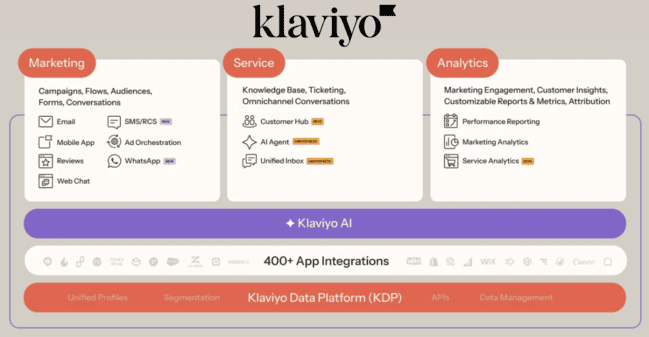
Klaviyo has marketing, service, data, and analytics tools. Here are the highlights of Klaviyo’s features:
- Ecommerce Features: You can sell products directly via email. You can also automate customer review requests. And manage reviews on your webstore.
- Drag-and-drop email editor: Klaviyo’s email builder is full of features, but keeps it user-friendly. There’s a good choice of content elements and lots of editing options.
- Templates: Klaviyo has 350+ email templates. The design quality is excellent. And they are all fully customizable.
- Automation: Klaviyo Flows visual automation builder is very easy to use. It supports conditional logic. It has 80 templates.
- Contact Management: Klaviyo lets you build multiple lists and offers excellent open-ended segmentation. You can use behavioral data from your web store as segment filters.
- Other channels: Klaviyo supports SMS, WhatsApp, RCS, and push notifications. You can combine SMS and email in automated campaigns. A unique feature is SMS-only automated conversion funnels.
Get started with Klaviyo for free
Klaviyo Pros and Cons
Klaviyo Pros
- Built for ecommerce: Klaviyo focuses on ecommerce. It offers deep ecommerce with your ecommerce platform. Including features like customer review management, direct product feeds into email.
- Great choice of templates: Klaviyo excels in its choice of email, form and automation templates. It has 350+ professionally designed email templates. And 80 pre-made flow templates for marketing automation.
- Segmentation: Add as many conditions to your segments as you’d like with AND/OR operators. You can segment based on lifetime value with ecommerce data from your online store.
- Integrations: Klaviyo has deep native integrations with all major ecommerce platforms. Including Shopify, WooCommerce, BigCommerce, and Magento. But that’s just some of the 350+ integrations available. With the API it’s easy to expand it with custom integrations.
- Documentation is top-notch: The Klaviyo help center is filled with guides, FAQs, and training videos. You’ll probably find the answer in the documentation or community if you have a question.
Klaviyo Cons
- More expensive than many email marketing services: Klaviyo gets costly as your list grows, for an email marketing service aimed at SMBs.
- Revenue attribution to email is exaggerated: Klaviyo notoriously has a generous over-attribution for email and SMS by default. It will count a sale as “email-driven” for any buyer who opened an email in the days leading up to the sale. (even via Apple’s auto-open). You can change the attribution settings, and Klaviyo has released updates to make the attribution more accurate.
Klaviyo Pricing and Plans: How Much Does It Cost?
You can always sign up to Klaviyo for free and use the free plan with 250 contacts. Klaviyo has two paid plans: Email and Email + SMS. They give you nearly identical features. Email starts at $20 for 500 contacts and 5,000 emails. Email + SMS starts at $35 with 1,250 SMS credits. Pricing is based on contacts. Email limit is 10x the contact count of your plan.
Klaviyo has three paid add-ons. Reviews, which start at $25 a month, their advanced marketing analytics suite and a data platform. These all have their value, but the result can be that Klaviyo will get pretty expensive quickly. Certainly, compared to rivals like Omnisend and, if you are doing simple emailing, MailerLite.
| Contacts | Klaviyo Email + SMS | Omnisend Pro | MailerLite Advanced |
| 500 | $35 | $41.30 | $18 |
| 1,000 | $45 | $41.30 | $30 |
| 2,500 | $75 | $41.30 | $36 |
| 5,000 | $115 | $63 | $45 |
| 10,000 | $165 | $105 | $99 |
| 25,000 | $415 | $280 | $180 |
| 50,000 | $735 | $500.50 | $306 |
Klaviyo has a free plan with 250 contacts and 500 monthly emails. In our experience, that is very handy for a trial or when you are just starting up your ecommerce shop. We definitely recommend first trying with a free account here.
| Klaviyo Free | Omnisend Free | MailerLite Free |
| – 250 contacts – 500 emails – 150 SMS credits – Mobile push marketing – Ecommerce integrations | – 250 contacts – 500 emails – 500 web push notifications – 50 product reviews – Ecommerce integrations | – 1000 contacts – 12,000 emails – 10 landing pages – 1 website – Ecommerce integrations |
| Get started with Klaviyo | Get started with Omnisend | Get started with MailerLite |
Is Klaviyo for you?
Recommended if:
- You have an ecommerce shop. It’s certainly worth considering as one of the most popular B2C marketing platforms for ecommerce and retail.
- If you have Shopify: Klaviyo is one of the best email marketing tools for Shopify. You can pull in reviews, showcase products, and even trigger campaigns based on what customers are browsing and buying in your Shopify store.
- Work with a Klaviyo agency and you get good results. Klaviyo has a lot of happy customers because it is good at what it does. And a big network of agency partners that support these brands.
Not recommended if:
- If price is a major point of concern. I can’t fault Klaviyo for its usability and features. But everybody has to look at the cost as well, and it can be prohibitive. You can find better pricing from the likes of Omnisend and MailerLite.
- If you are only doing simple newsletters. Klaviyo is overkill if you’re trying to send newsletters and create simple automations. There are newsletter platforms and cheaper email marketing tools.
- If you are B2B. It’s no coincidence that Klaviyo markets itself as the CRM for B2C. It doesn’t have B2B features like a built-in CRM with pipelines. If you’re a B2B business, try ActiveCampaign or HubSpot.
Klaviyo Review Rating Details
Ease of Use | Klaviyo is well-designed and user-friendly. It offers great support to new users with lots of self-help wizards and guides. |
Email Editor | Klaviyo’s drag-and-drop email editor is flexible, easy to use, and full of features. |
Email Templates | Klaviyo has 350+ high-quality email templates. They cover a wealth of use cases. All are fully customizable. |
| Email Types | Klaviyo specializes in promotional emails. This includes selling products directly via emails. But you can send all types of marketing emails. And switch between marketing and transactional emails. |
| Marketing Automation | Klaviyo has 80 workflow templates organised by marketing goals. It has a user-friendly visual editor for customizing them. And you can make unique SMS-only conversion workflows. |
| List Management | You can create as many contact lists as you like. Segmentation is highly flexible and open-ended. |
Personalization | You can personalize emails by dropping personal information into the content. And set rules to show and hide certain content to different people. |
Landing Pages & Forms | Klaviyo has 100+ form templates and an excellent choice of form types. As well as forms, there are one-click and keyword sign-up options for SMS. Klaviyo doesn’t have any landing pages. |
| Reporting & Analytics | Klaviyo’s reporting tools focus on business outcomes for your store. It tracks metrics from both your store and your marketing activity. |
| Customer Service | Klaviyo has live chat and email support in all regions. It advertises them as ‘24/7’ or ‘24/5’. But the support desk is only staffed during specified office hours. |
| Deliverability | Klaviyo handles DKIM, SPF, and DMARC authentication on all shared domains. Its deliverability reporting dashboard lets you analyse inbox performance. And it excludes unengaged contacts from campaigns to improve open rates. |
| Spam and Design Check ❌ | Klaviyo doesn’t have native spam testing tools. But it does let you A/B test email subject lines, content, and send times. |
| AI Writing ✔️ | Klaviyo uses generative AI tools for segments, forms, automations, email templates, and content. You can specify email layouts, elements, and text with prompts. |
| Integrations & API ✔️ | Klaviyo has 350+ integrations, including ecommerce platforms like Shopify, WooCommerce, BigCommerce, Magento, and Salesforce. |
| User Permissions ✔️ | All paid Klaviyo accounts include unlimited seats. Users can be assigned seven roles. Owner, admin, manager, analyst, content coordinator, content creator, and support. |
| GDPR & Legal Compliance ✔️ | All accounts have to register a physical address to comply with international anti-spam laws. Klaviyo requires opt-ins for all forms. And helps you with disclosure language and terms of use for SMS. |
| Interface Languages | Klaviyo is available in 7 languages: English, French, German, Italian, Korean, Portuguese, and Spanish. |
Customer Satisfaction | Klaviyo gets a lot of love from its customers. As evidenced by its 4.5 average review score on G2. And 4.6 on Capterra. |
Overall Score
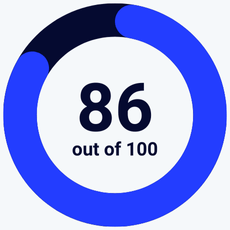
Klaviyo is a powerful ecommerce marketing platform. It combines advanced email and SMS tools with automation, segmentation, and deep store integrations to drive conversions. With 350+ email templates and 80+ prebuilt workflows, setting up effective campaigns is fast and intuitive. It’s ideal for Shopify, WooCommerce, and BigCommerce users who want to scale.
Get started with Klaviyo for free
Getting Started with Klaviyo
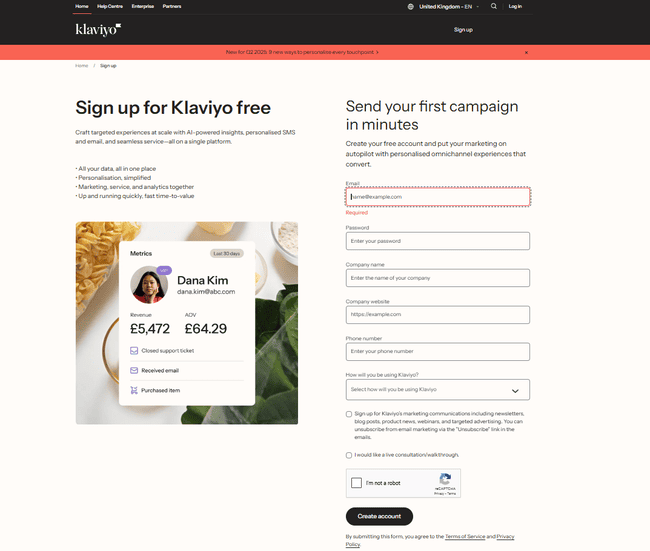
Setting up a new Klaviyo account is painless. Just be ready to provide business details, including a physical address. This is to comply with international anti-spam laws.
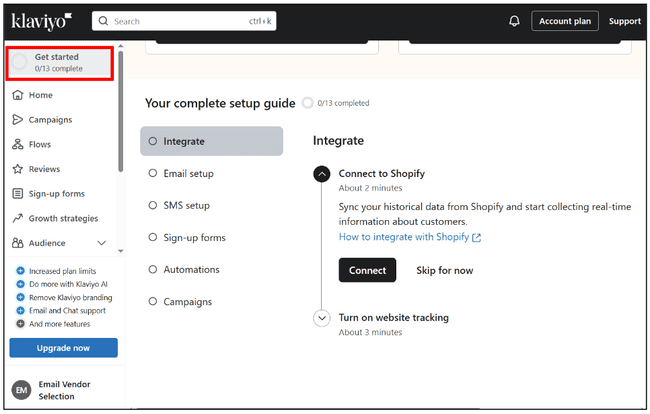
After you sign up to Klaviyo, it takes you through a setup guide. There are 13 steps. But you can skip and do most of it in your own time.
The most important onboarding step is integrating your ecommerce platform. I connected to a Shopify store.
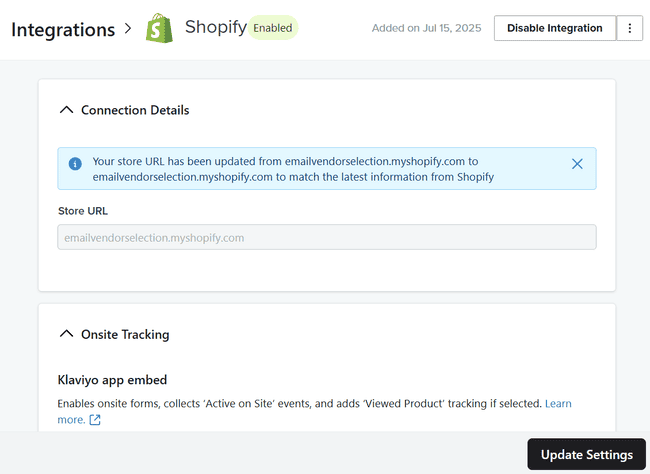
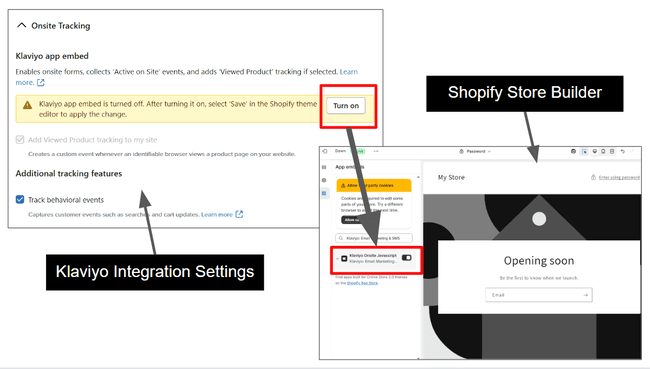
Connecting a store is straightforward. You simply paste in your store URL, and Klaviyo does the rest. It imports and syncs all customer data automatically. Then you log in to your ecommerce platform and turn on some features there. For example, to use Klaviyo forms in Shopify, you simply turn on the Klaviyo App embed.
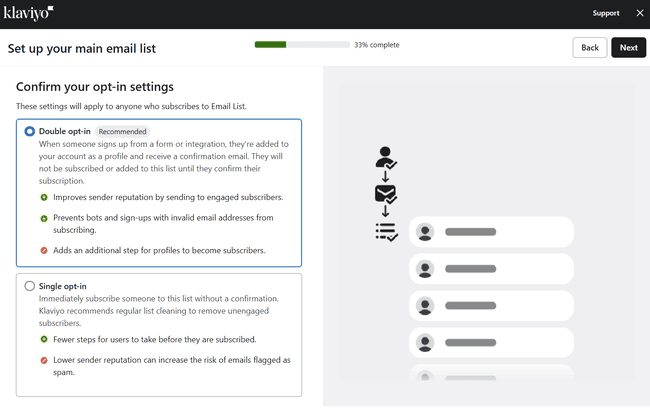
Klaviyo takes contact opt-in and data privacy very seriously. The Email setup and SMS setup onboarding guides are all about permissions. You can’t add people to lists before opt-in settings are finished.
Get started with Klaviyo for free
Klaviyo Review: Marketing Platform for Ecommerce
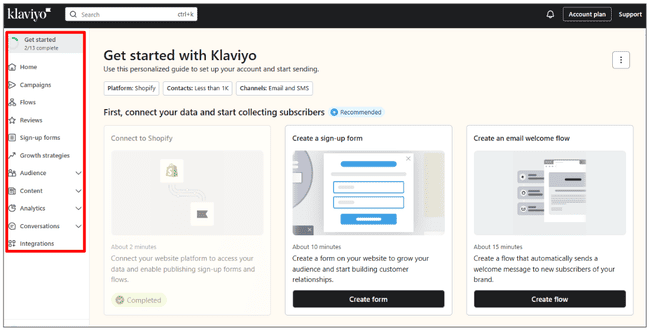
Navigation is pretty straightforward, but I feel this menu could be simplified. There are several repetitions. For example, Flows is where you find all the email automation features. But then there’s an Automations tab under Conversations. It isn’t immediately clear, but this is for SMS and WhatsApp automations. Same with sign-up forms being repeated under Audience.
Email Templates in Klaviyo
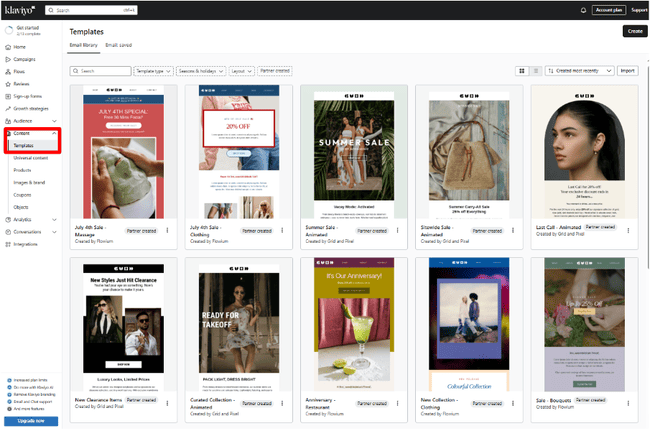
Klaviyo has more than 350 email templates. They’re found under the Content tab. Along with product listings, coupons, and universal content for making emails.
There’s a strong ecommerce focus to the templates. Main categories include product sales and deals/promotions. There are also ‘reminder’ templates for time-sensitive deals and abandoned carts. And templates for order confirmations.
As well as a lot of choice, the design quality of Klaviyo’s templates is good. And they are fully customizable using Klaviyo’s drag-and-drop editor.
Creating and sending emails with Klaviyo
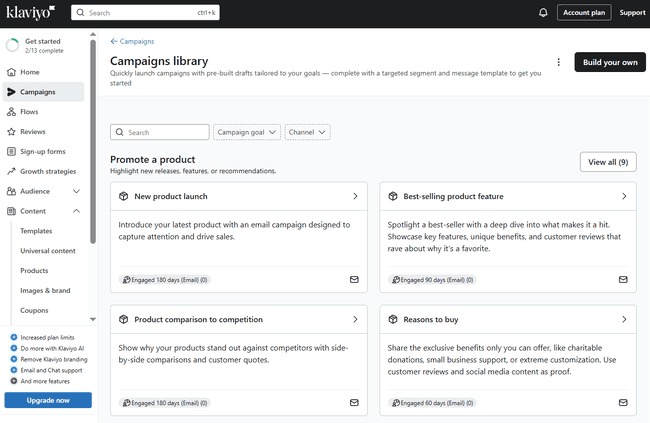
Klaviyo helps you think strategically about email marketing. Its Campaign Planner asks you about your objectives. And suggests a campaign calendar for achieving them. Then its Campaign Library gives you 20+ campaign templates. These are linked to different objectives. And come with ready-made email drafts and suggested audience segments. They’re great time-saving tools. And great for first-time email marketers.
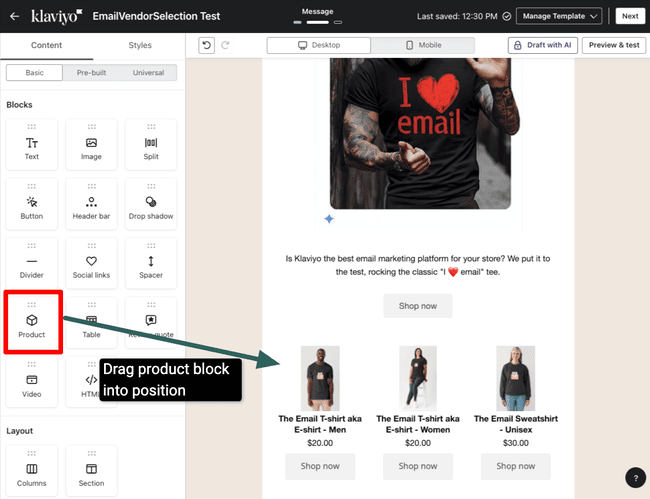
Klaviyo’s drag-and-drop email editor strikes the right balance between user-friendly and flexible. There’s a list of content blocks you drag in from the left-hand menu. This includes the Product block. With this, you can import your product listings from your connected store.
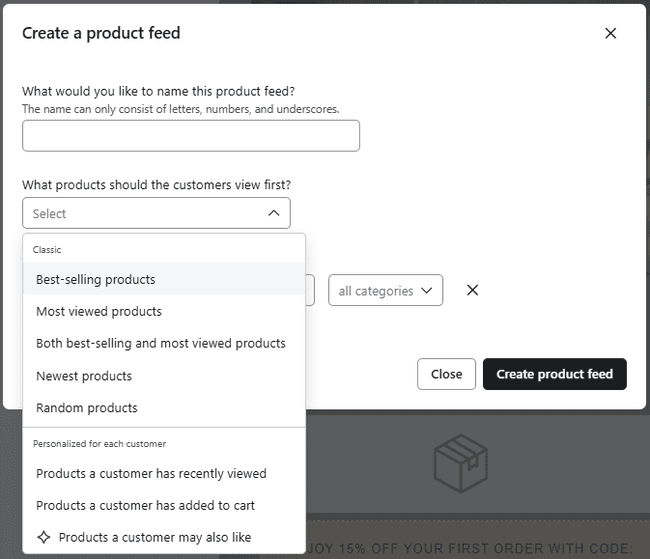
The dynamic product feed is convenient because you don’t need to pick specific items. You select a category, such as best-selling or most viewed products. Or you can completely randomize the selection that displays.
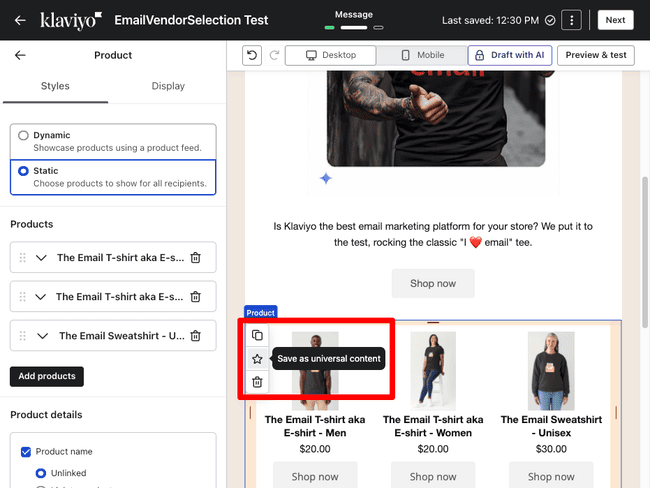
Another cool thing you can do is save a product selection as Universal Content. You can do this with any content by highlighting the block and clicking the star icon. That block can then be dropped straight into any future email.
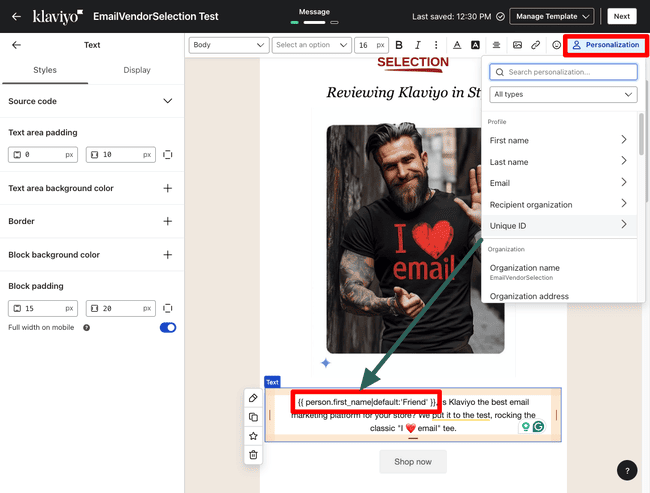
The Personalization option appears when you highlight any text in your email. This lets you drop in contact details via merge tags.
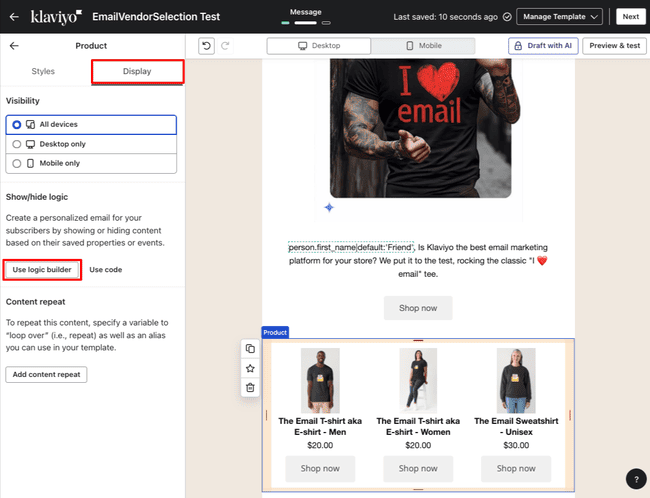
You can also use the Logic Builder to show or hide content depending on who receives the email.
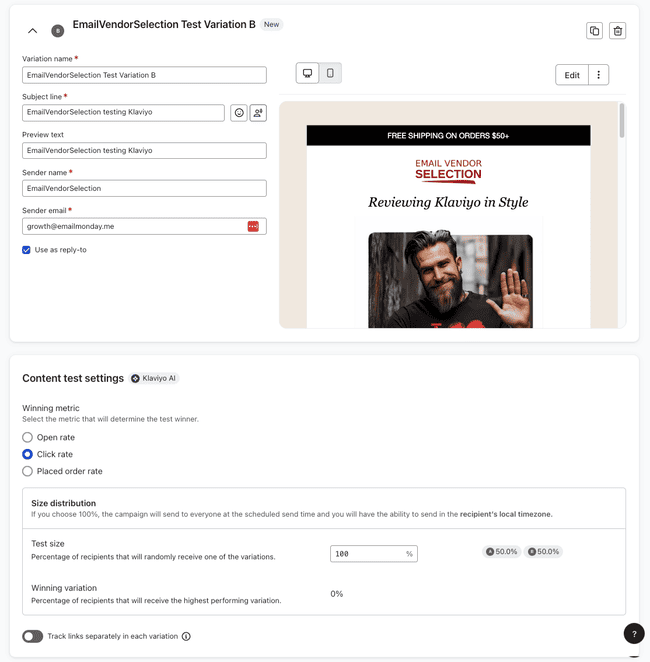
Klaviyo is excellent for A/B Testing. You can test up to 50 versions of an email at a time. And you can change any content, plus subject lines. Or you can send out exactly the same version at different times, and see which performs better. You also get a lot of control over how the tests run. You can choose to compare open, click or placed order rates, for example. And set the size of the test run.
Get started with Klaviyo for free
Klaviyo Flows Review: Marketing Automation
Klaviyo calls its marketing automation tools Flows. Again, there is plenty of support for new users. Including 80+ flow templates. You can browse by goals like avoiding lost sales, nurturing subscribers, or building customer loyalty. Flow templates suit your connected ecommerce platform.
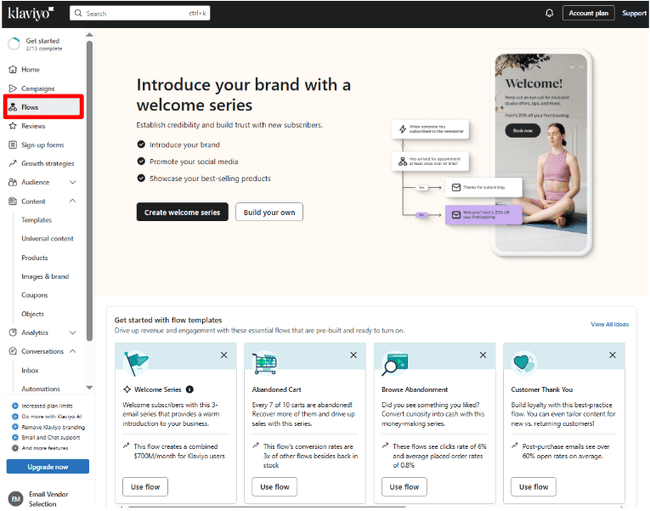
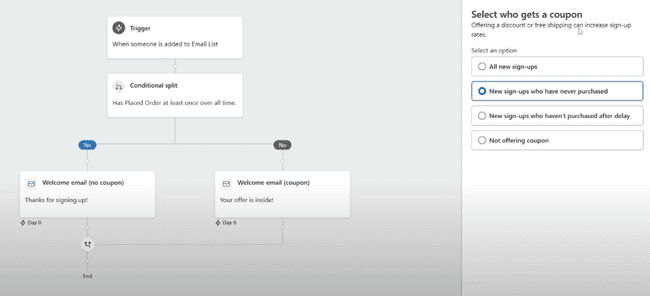
New users can start a wizard showing how to build a Welcome series. This is probably the easiest way to build a first automation I’ve come across. All you do is toggle some options. And Klaviyo’s AI does the rest on autopilot.
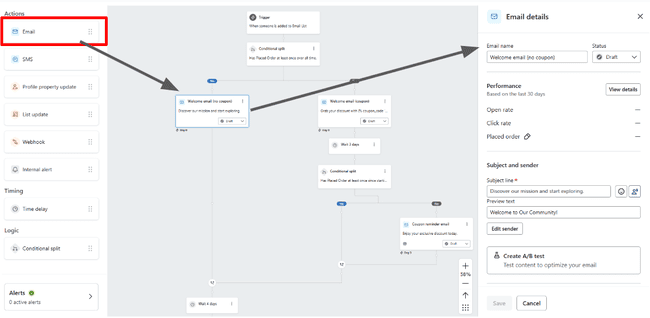
All workflow templates are fully customizable in Klaviyo’s automation editor. This also has a drag-and-drop design. You drag in actions you want to automate from the left-hand side. And then configure them in a panel to the right. You can build emails from scratch from this window.
SMS Messaging in Klaviyo
Klaviyo is great for Shopify SMS marketing. You can mix and match email and SMS in the same workflows.
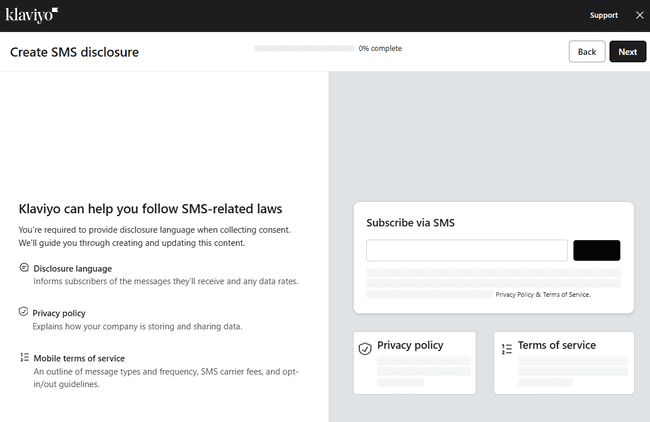
To use SMS, you have to set up appropriate SMS disclosures. These are the privacy policies and mobile terms of service customers see when they sign up. Klaviyo is excellent at walking you through all the steps.
SMS messages can be part of any Flow. Dedicated SMS tools are under Conversations > Automations.
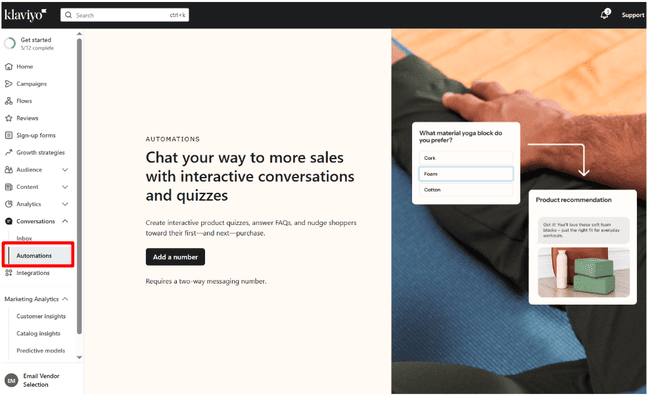
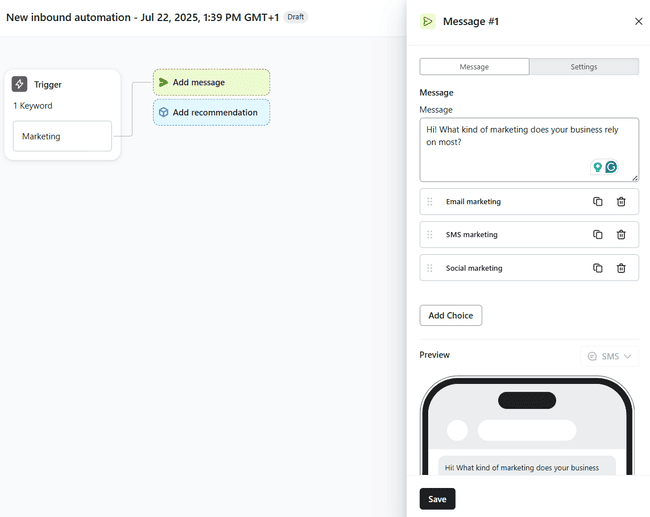
Klaviyo’s SMS automations start with a basic survey or quiz with a number of choices. Then, based on the response, you send a targeted product recommendation. A dedicated visual builder makes setting up a sequence very easy. Triggers are either an SMS subscriber responding to a specific automation or flow. Or a keyword in any kind of message.
The downside is that there’s more configuration to do. You have to set up local numbers in every country you operate in to receive texts.
If you’re interested in how Klaviyo matches up to rivals, read our review of the best SMS marketing platforms.
Klaviyo Reviews for Shopify
Customer reviews have become one of the most important marketing tools. They harness ‘social proof’. The majority of shoppers look for reviews before making a purchase. And people tend to follow other people’s recommendations. Displaying reviews on your site improves your SEO.
So Klaviyo’s product reviews feature is a huge plus. Tools include automating review requests following a purchase. Creating coupons as an incentive for customers to leave reviews. And displaying reviews in store and emails.
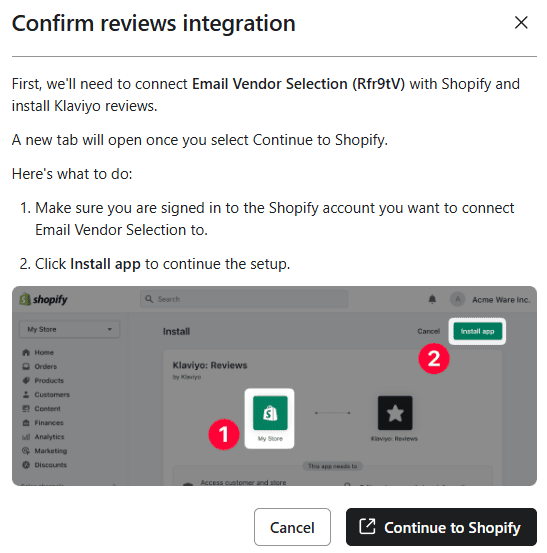
To get started, you need to install Klaviyo’s reviews app in your ecommerce platform. As usual, Klaviyo walks you through this. Then there’s a choice of four review widgets to add to your store. One displays full reviews for a specific product. Another shows star ratings only. A third displays a featured reviews carousel. And the fourth installs a dedicated reviews page.
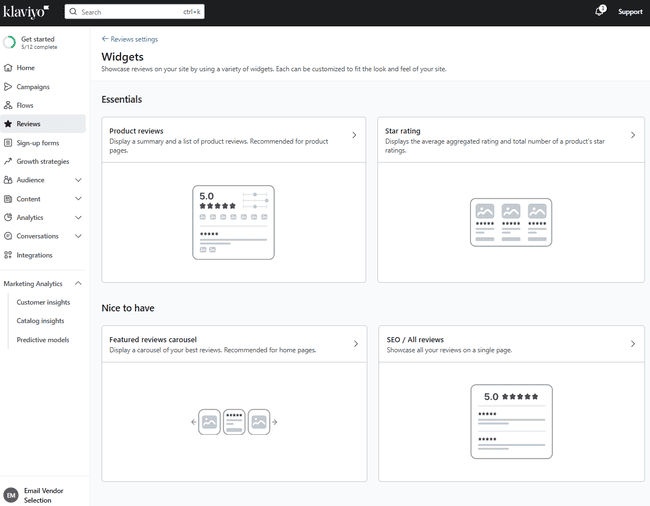
Each widget is fully customizable in a dedicated editor. You can edit style, layout, what and how elements are displayed.
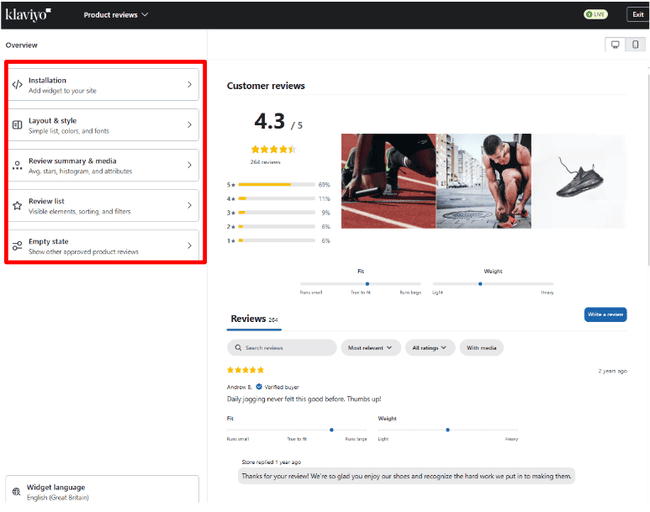
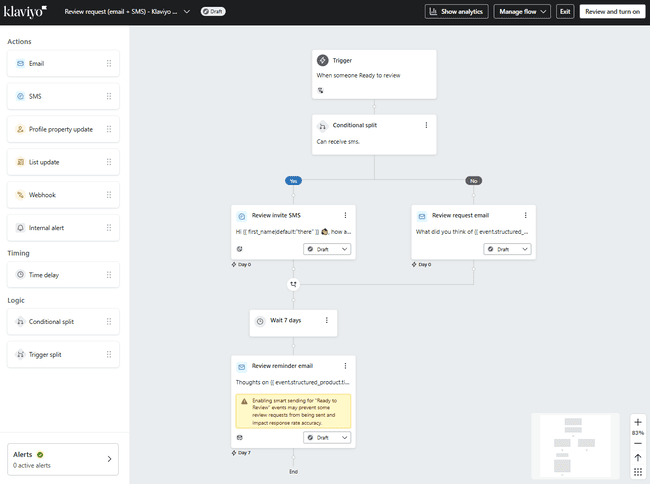
Klaviyo has flow templates to request reviews. These are triggered by ‘ready to review’ data coming back from your ecommerce platform. Which means a customer completing a purchase. You can choose to send requests by email or SMS.
Get started with Klaviyo for free
Getting new leads with Klaviyo
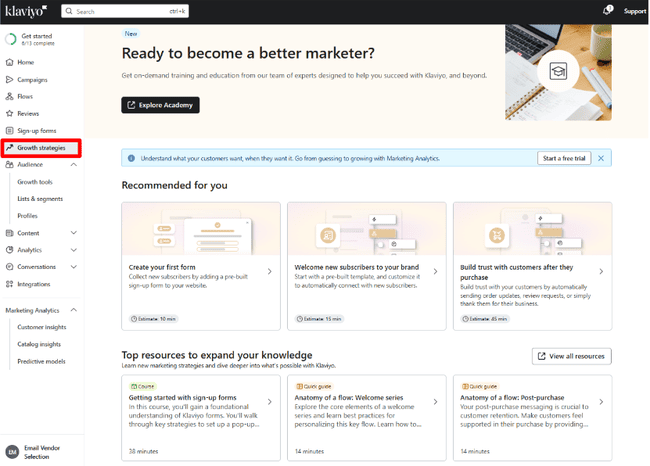
Klaviyo puts a lot of effort into helping you grow your subscriber list. There are three lead generation options in the main menu. One, Growth Strategies, is a page of list growth learning resources.
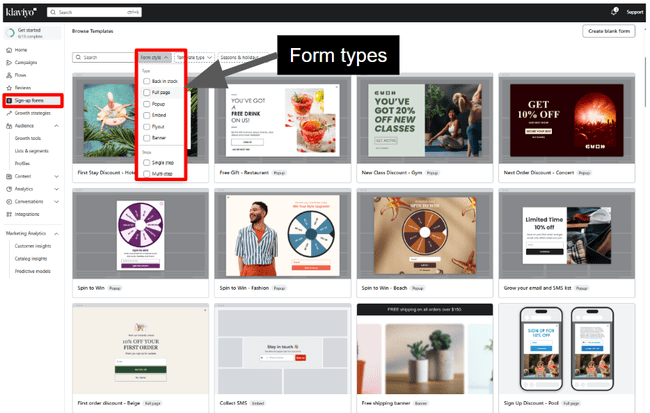
Klaviyo has one of the best choices of sign-up form templates I’ve seen in an email marketing tool. The 100+ designs are eye-catching and professional. The form types include full-page forms, pop-ups, fly-outs, and banners. Klaviyo’s form builder is way better at email capture than Shopify forms. Merchants often report that Shopify Forms lacks design flexibility and has a more basic feature set.
Klaviyo’s form targeting tools are good, and the design options cover most needs.
You can stack multiple triggers and segment people based on browsing behavior. Maybe you might need to use a few workarounds here and there.
The only reason to pair Klaviyo with a specialized pop-up tool is if you wish to do more interactive campaigns, like multi-step quizzes or surveys with branching paths.
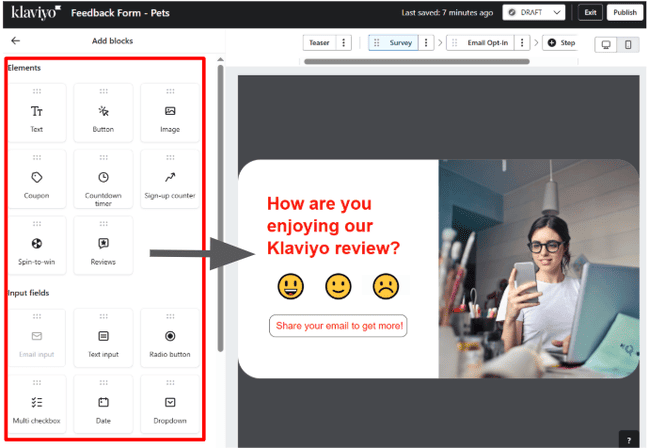
Klaviyo’s drag-and-drop form builder is packed with options. You can add images, timers, spin-to-win wheels, reviews, and more. And multiple input fields for email, phone numbers, opt-in checkboxes and multiple choice.
You can also set rules for how, when and why a form appears. Like someone scrolling to a certain part of a page. And how long the form appears for. The form builder doubles up for surveys and polls to collect customer feedback, too. I found it easy to customize the form template to our branding.
With Klaviyo’s form A/B testing, you can create five variations of a form to see which version performs best. You can change almost anything: headlines, images, offers, and button texts. You can control how traffic is split between each variation and set the criteria for picking a winner. To take it a step further, you can add hidden fields to each variation so you know exactly which version someone saw and tailor your follow-up emails accordingly. All the performance data for each variation is available in the A/B Test results tab. Making it easy to choose the form that will give you the biggest lift in sign-ups.
And Klaviyo has a form optimization feature that uses AI to figure out the perfect time to show your sign-up form to get more subscribers. Instead of you manually testing different settings, Klaviyo creates timing variations, compares them to your current setup, and automatically picks the winner once enough data comes in. After it finds the winning timing or 90 days pass, that version goes live. You’ll be able to track key stats like submit rate lift, win probability, and how traffic is split right in the A/B Test results tab. The only catch is your account needs at least 400,000 profiles, and you won’t be able to edit the form while the test is running unless you end it early.
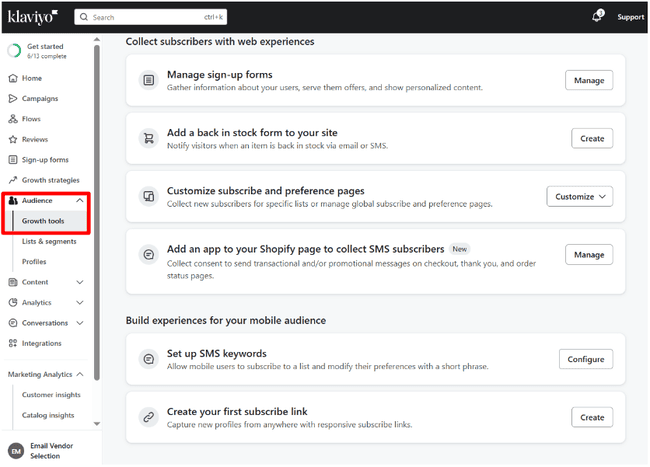
There are more Growth Tools under the Audience tab. These include back-in-stock forms so customers can get alerts when out-of-stock items are available again. You can also set up keywords and one-click links for mobile users to subscribe by SMS.
Managing contacts in Klaviyo
Klaviyo organizes contact management around profiles, lists and segments. Each contact has a profile with all their information. You can build as many lists as you want to group contacts.
Every list can be broken up into segments. The main purpose is for campaign targeting. You create segments out of the data you hold about your customers. Data syncing from your webstore lets you use customer behavior, too. So you can group contacts by product pages they have visited. Or purchases they have made.
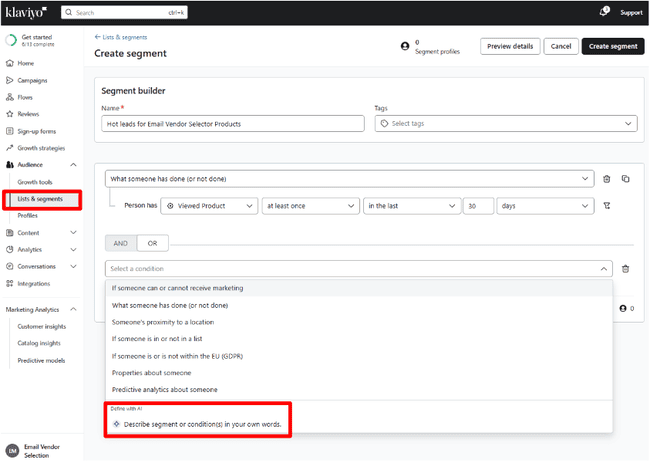
Klaviyo’s segment builder is found under Audience > Lists & Segments. There’s a big choice of preset variables and filters to help you define your segment. Klaviyo’s built-in AI will also build segments for you from plain language prompts.
Overall, Klaviyo’s segmentation is very flexible. And the fact that you can stack unlimited conditions means you can get very precise.
Reporting and Analytics in Klaviyo
Klaviyo’s reporting tools are built with ecommerce marketers in mind. It starts with all the standard email opens, clicks and bounces. Data syncing with your web store shows where the revenue is made and how you can increase conversions.
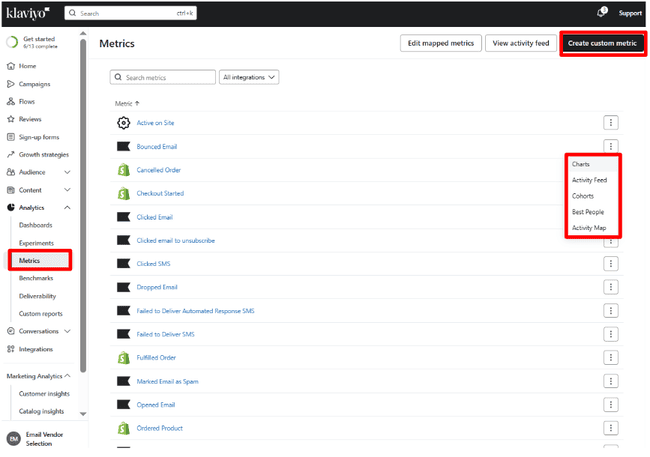
I like the Metrics page in the Analytics section. It’s not often you get a full list of all the things an email marketing platform measures. You can see which metrics are based on marketing activity in Klaviyo. And which are from your ecommerce platform. You can create custom metrics, giving you great control over what you measure. Each metric also has its own dedicated reporting page.
Klaviyo’s main analytics dashboard dives deeper into conversion metrics. Or data from your webstore linked to orders and sales. For each metric, you get a list of charts mapping campaigns and flows to sales performance.
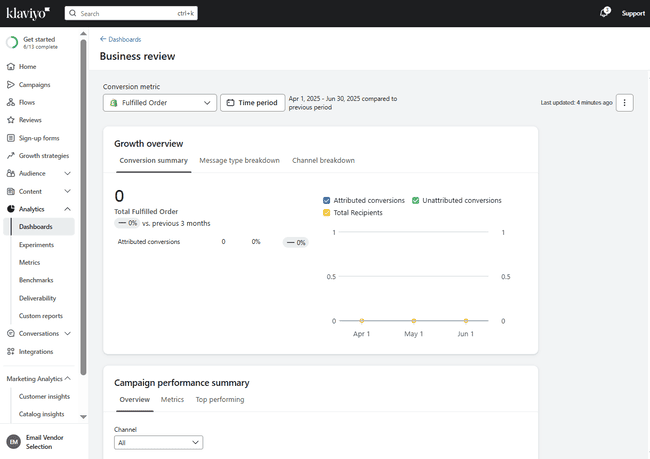
Other analytics options include deliverability reports. These give your campaigns a score based on how many emails get delivered. You can see why emails are bouncing. And take steps to improve performance, like cleaning email addresses from your list with email verification tools.
Now let’s talk about Klaviyo’s attribution model. It has faced quite some criticism for inflating marketers’ performance metrics. By default, Klaviyo uses a last-touch model that credits any purchase to the last email or SMS a customer opened or clicked within a 5-day window.
That means Klaviyo will count any sale as “email-driven” if a customer just opened an email (even via Apple’s auto-open) in the days before purchasing. You can see why that is inflated.
Luckily, that is kind of old news: Klaviyo is way more flexible and accurate if you configure it right. Any brand can customize the attribution to match how you want it. Limit to 3-day attribution on clicks, for instance. Since August 2024, you have new controls (e.g., options to exclude Apple Mail privacy opens and filter out bot clicks). If you change the settings, it will retroactively recalculate all the metrics.
Klaviyo Integrations
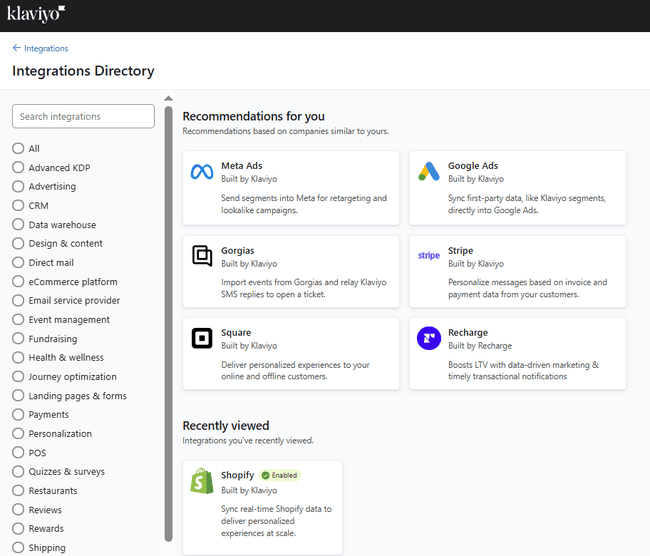
Klaviyo has an outstanding choice of third-party integrations. You can connect your Klaviyo account directly to 350+ apps. This includes 15 ecommerce platforms, like Shopify, WooCommerce, BigCommerce, Magento, and Wix.
Other big-name apps include payment platforms Stripe and Square. Google Ads, Meta Ads, and TikTok Lead Ads for search and social advertising. Eventbrite for event management and ticketing. And Canva for graphic design.
Klaviyo customers who’d like to have more advanced form and popup tools usually use Wisepops and Justuno. They plug right into Klaviyo and are great for eye-catching pop-ups, fun gamified offers, and highly targeted lead capture.
Klaviyo also has a Dev Tools section under Integrations, where you can access API keys and build your own custom integrations.
Get started with Klaviyo for free
Klaviyo Customer Support
Klaviyo offers responsive email and live chat support on all its paid plans. Need help? Just click the Support button at the top right of any page. A sleek pop-out window appears, your gateway to fast answers.
Type your question into Klaviyo’s smart AI assistant, and it searches the knowledge base for relevant solutions. From there, you can also choose to open an email support ticket, start a live chat, or browse the full help center.
Klaviyo advertises 24/7 email support on paid plans. And live chat 24/5, with weekend hours varying by plan. Just take note that the real support in office hours are based on global regions. 9 am to 8 pm ET in the Americas. 9 am to 5 pm local in Europe, Middle East and Africa, and Asia-Pacific.
The help center houses all of Klaviyo’s online self-help resources. These have articles with tips and how-tos. There’s also a training and development resource centre for marketing (The Power Up). And community resources from other users.
Final Conclusion: Is Klaviyo the right email tool for you?
Klaviyo impresses me in a lot of ways. I like the way the platform is designed and how it works. I like all the wizards and other support for first-time users. It makes connecting and syncing data with an ecommerce platform easy. From its templates to its email builder. A/B testing to analytics. Segmentation to automation, it has quality features that are still easy to use.
If you run an online business, it doesn’t just have all the email marketing and SMS tools you need. It sets up those tools to help you grow and make money. If you have the budget, go for it. You’ll be happy with Klaviyo.
Get started with Klaviyo for free
Klaviyo Frequently Asked Questions (FAQ)
Klaviyo Alternatives
Klaviyo vs. Omnisend
The main difference between Klaviyo and Omnisend is pricing. Like Klaviyo, Omnisend is a specialist ecommerce marketing service. It needs an ecommerce integration to work. They offer a very similar set of features. But Omnisend is cheaper at every point of comparison. All Omnisend’s paid plans include Shopify reviews. They’re a paid-for extra in Klaviyo. And Omnisend plans come with more SMS credits.
Check out our full Omnisend review to compare them.
Klaviyo vs. ActiveCampaign
The main difference between Klaviyo and ActiveCampaign is their focus. Klaviyo describes itself as a CRM for B2C businesses. But its main focus is email and SMS marketing for online stores. ActiveCampaign is a marketing automation platform with a CRM. It also connects to all major ecommerce platforms. And offers hundreds of automated workflows, sales pipelines, and behavior tracking on any website. Klaviyo makes it easier to sell products directly via email. And has better SMS tools. But ActiveCampaign is cheaper.
Read our ActiveCampaign review to find out more.
Klaviyo vs. GetResponse
The main difference between Klaviyo and GetResponse is target audience. Klaviyo is designed for small online retailers. GetResponse is broader. It connects to Shopify and WooCommerce and can be used by webstore owners. But it also targets creators, coaches and freelancers. It helps monetize knowledge and content with digital products and webinars.
Get all the details from our full GetResponse review.
Klaviyo vs. Mailchimp
The main difference between Klaviyo and Mailchimp is their approach to email marketing. Mailchimp is a ‘classic’ email marketing platform. Although it has expanded in recent years, it still focuses on the email marketing basics. Building (and automating) email campaigns, growing an audience. Klaviyo does this, but mostly in the context of ecommerce email marketing. It works best by connecting to an ecommerce platform. And focuses on using email and SMS to drive sales.
Compare these tools by checking out our full Mailchimp review.
Klaviyo vs. HubSpot
The main difference between Klaviyo and HubSpot is scale and pricing. HubSpot is an all-in-one CRM with marketing, sales, and support tools. It’s a something-for-everyone platform. It has advanced enterprise-level CRM tools with a pricetag to match. But it also has a brilliant set of completely free CRM tools for small businesses. Klaviyo is more niche. It’s an email and SMS marketing service for online retailers. It works for smaller operators that want sales-focused marketing tools without a full CRM.
Check out our full Hubspot review for more details about its features.