
Kit Review 2026: the creator game-changer or just overhyped?
 Paul Newham
Kit is a different kind of email marketing service. It’s 100% for creators. As a professional writer and reviewer, I know that your business can completely change if you have a strong newsletter and an engaged audience.
Kit helps your creator business send emails, grow your audience, and monetize it.
So if you are a creator, looking for a platform, pay special attention.
As I found, there is a lot of good to say about Kit, but also some gotchas. (I’ll get to that.)
For this review, I went through the whole platform step by step, even making a new free account. To give you my pros and cons, and to see if it is right for you.
Kit Review Overview
Kit (formerly ConvertKit) is an email marketing platform specifically for creators. That means that newsletter growth and monetization are all part of the platform.
Kit was launched in 2013 by Nathan Barry. Since then, it has grown to over 63,000 customers, making it a top choice for creators.
From my review I liked the monetization options. You can run a paid newsletter, sell digital products, and run ads in your newsletters. List growth is also all there: landing pages, forms, and a recommendation network.
Kit’s marketing automation, email editing, and segmentation tools are right on the mark for creators. Not too complex and easy to use. Yes they can be more advanced. But probably great for you unless you need something specific beyond typical creator needs.
Kit also has an impressive free plan. You can send unlimited newsletters to 10,000 subscribers for free. Making Kit cheap to get started with and start emailing. Paid plans start at $39 a month.
Kit’s Core Features
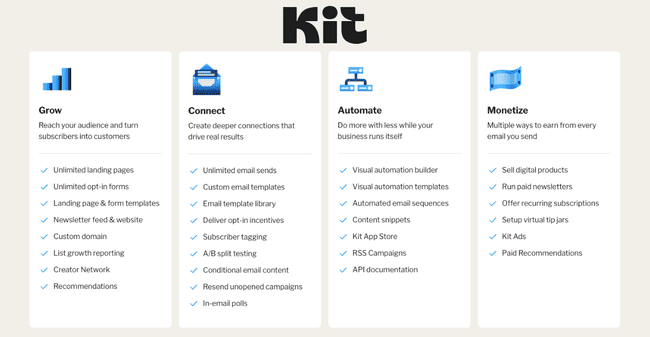
Kit has four main categories of features: audience growth, connect (creating and sending newsletters), automation, and tools for earning money. Here are the highlights:
- List Growth: Kit gives you landing pages and sign-up forms. Kit has 50 great-looking landing page templates. You can also grow your audience with the Creator Network for referring and getting referrals from other creators.
- Email editor and sending: Instead of a drag-and-drop email builder, Kit has a WYSIWYG text-based editor. It’s well-designed and easy to use. It has enough room for design customization to suit most newsletter publishers.
- Templates: Kit has 23 newsletter templates to get you started. And on top, there’s a big marketplace where you can buy email templates from others.
- Automation: Kit has three types of automation. Rules for making simple one-step mini-automations. Drip email sequences and a visual automation builder for more complex workflows. Creators on Kit say that automations are so good that they don’t even need to go into the tool to send emails.
- Monetization: Kit’s is a great help in monetization. The first is selling digital products, courses, and downloads. You can also offer a paid newsletter subscription or a community to your audience. And earn money by recommending other newsletters. On top, they have a sponsor network for ads.
- Segmentation: Kit organizes your contacts with segments and tags. A bit different than other email marketing tools that use lists. The good thing about tags is that they are open-ended and support very flexible segmentation and automation.
If you’re building a creator business and want a newsletter platform built by people who understand newsletters, Kit is definitely worth a try.
Kit Pros and Cons
Kit Pros:
- Selling digital products is easy: Kit makes it easy to sell your digital products. Newsletter subscriptions, courses, ebooks, music, and graphics you can sell them directly. Payment has a Stripe integration.
- Flexible segmentation & automation: Kit has highly flexible tagging, segmentation and automation tools that can almost act like a CRM. They allow you to send targeted campaigns and drive revenue.
- Creator Network to grow your list: Kit’s Creator Network allows you to exchange recommendations with other creators for free. You can also pay for recommendations to grow your audience. Or sell recommendations to earn more money.
- Free Plan: Kit’s free plan is very generous. You can send unlimited emails to 10,000 subscribers. And you can already sell subscriptions and digital products.
Kit Cons:
- Advanced analytics are only in the Pro plan: The email analytics in Kit are very basic compared to most email marketing platforms I’ve used. The more interesting analytics are in the Creator Pro plan, where you can see all the details, revenue and everything.
- Free email template library is small: Kit has 23 free email templates to start, which are nice. And of course, you can make your own. But if you want more pre-made templates, those are all in the Template Library marketplace (typically $19 to $39 per template), where you buy them from other users.
Is Kit for you?
Recommended if:
- You’re a creator with digital products. Kit is designed to help creators sell their digital products with email campaigns. If you use Kit, you don’t need a separate ecommerce store or landing pages. It also makes audience growth, promotions, and selling very straightforward.
- You want to grow your list: Sign-up forms and landing pages are just the tip of Kit’s list growth iceberg. The recommendation network is what really helps you grow your list quickly with referrals from other creators.
- You want to launch your first newsletter. Kit is a great introduction to the world of (monetized) newsletters. Its free plan is a big attraction to newcomers. It gives you unlimited emails for 10,000 subscribers. And you can sell products from the very start.
Not recommended if:
- You want to send simple newsletters on a budget. Kit is a great platform to grow and monetize newsletters. But if you don’t care about monetization, there are many cheaper email marketing tools for the job.
- You are a big sender on a small budget. Kit is less attractive if you already have a very popular newsletter with a big audience (50K or more), but are tight on budget. Because it is just more expensive than the direct competition, like beehiiv. The upside is that there is lucrative monetization with advertising, sponsorship, and promoting other publishers. Kit does have paid recommendations and sponsorships.
- You are an ecommerce shop: If you have an ecommerce store, you’ll quickly find Kit limiting. Automation tools don’t allow you to create ecommerce workflows like others do. The email editor is specific for creators. You can connect to Shopify – but if you are into ecommerce, we recommend checking out Omnisend and Klaviyo.
Kit Review Rating Details
Ease of Use | Kit is well-designed and intuitive to use. It’s easy to find your way around as a new user. More advanced features like segmentation and automation are also beginner-friendly. |
Email Editor | Kit has a WYSIWYG editor, which is more flexible than most. Although it is not a full on drag-and-drop email builder. And has the advantage of being very easy to use. |
Email Templates | The choice of 27 free email templates is smaller than most rivals. There are more available from the third-party template library, but you have to pay for most of these. |
Email Types | Kit has 4 email types: newsletters, automated emails, RSS campaigns, and A/B testing. |
Marketing Automation | Kit’s variety of automation features is a strength. It offers simple timed sequences. Advanced workflows with multiple triggers and conditional logic. And simple one-step ‘rules’ that act like mini-automations. |
Newsletter Monetization | Kit focuses on monetization. You can sell digital products, newsletter subscriptions, do Ads and more. You can also make money by recommending other creators to your subscribers. |
| List Management | Kit nails the use of tags for tracking and managing relationships with contacts. Flexible tagging makes for effective segmentation. Tags also play a key role in Kit’s automation tools. |
| Personalization | Kit offers personalization for every part of an email. You can use tags and conditions to set different content to appear to different people. |
| Landing Pages & Forms | Kit has a good choice of form types. And 50+ landing page templates for hosting forms on. Forms and landing pages use the same editor as emails. Once you learn how to use the form editor, you’ll feel right at home in the landing page editor. |
Reporting & Analytics | The standard analytics are the biggest letdown in Kit. Unless you get the Creator Pro tier, the reporting tools are very basic. |
| Customer Service | Kit has 24/7 live chat and email ticketing on all paid plans. But some users report slow responses. |
| Deliverability | Kit uses SPF, DKIM, and DMARC to verify sending domains. It also automatically removes bounced email addresses. But it doesn’t have any other built-in deliverability or list cleaning tools. You’ll need an email verification tool to keep your list clean. |
| Spam and Design Check ❌ | There aren’t any specific spam testing tools in Kit. |
| AI Writing ❌ | Kit is surprisingly behind the curve on AI writing tools. There’s an AI subject line generator, and that’s it. |
| Integrations & API ✔️ | Kit has just over 50 native integrations with third-party apps. There aren’t many big names. There is a developer platform where you can use the API to connect and build your own apps. |
| User Permissions ✔️ | Kit users can only have two roles. An account admin who has full access to all the settings and billing. Or an editor, who can build emails, landing pages, automations, etc. |
| GDPR & Legal Compliance ✔️ | Kit is GDPR compliant. It has GDPR checkboxes and preference management for subscribers. It has double opt-in by default for all forms. This isn’t required, but it’s considered best practice for legal compliance. |
| Interface Languages | Kit is only available in English. |
| Customer Satisfaction | Kit is popular with users. With a 4.6 average rating on Capterra. And 4.3 on G2. |
Overall Score
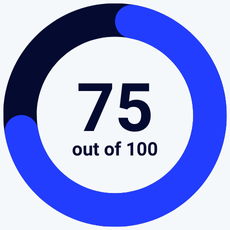
Kit is a solid pick if you’re serious about growing and monetizing a newsletter. The platform is creator‑friendly and offers a generous free plan with 10,000 subscribers, unlimited broadcasts, and basic automation. And you can sell digital products in the free plan, too. Kit’s clean, text‑based editor and tag‑based segmentation keep things simple. If you’re building a creator business and want a newsletter platform built by people who understand newsletters, Kit is definitely worth a try.
Getting Started with Kit
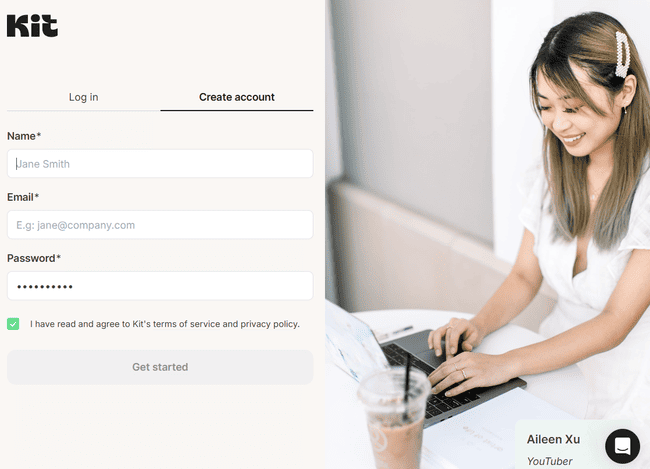
Kit’s sign-up process is straightforward. It walks you through a four-step ‘wizard’ to set up your account.
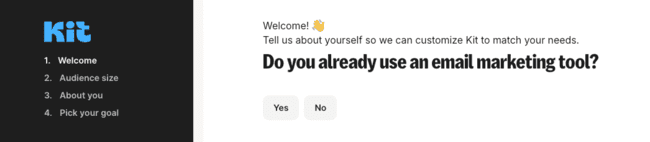
As you sign up to Kit, it asks you if you already use an email marketing tool. Kit supports free migration from another email marketing software. If you have fewer than 5,000 subscribers, the migration is list-only. If you have more than 5,000, Kit imports all your templates, sign-up forms, and automation workflows.
Account setup includes a free subdomain hosted on kit.com. This gives you a place to publish your newsletters. Alternatively, you can use your own custom domain. Or buy your own domain through Kit. Kit helps you with the DNS setup and authentication.
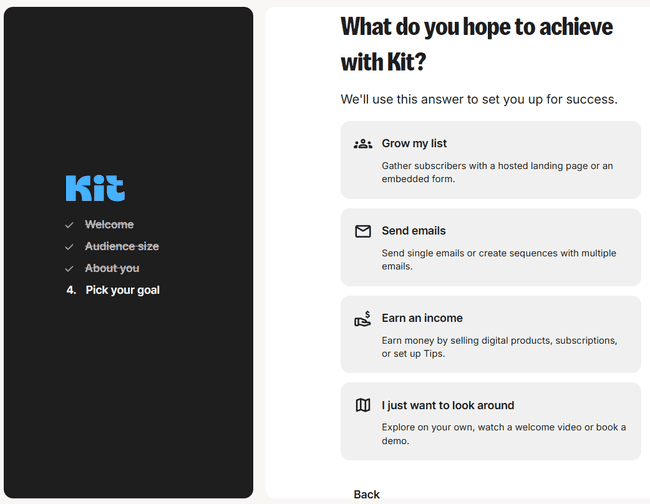
At the end of the account creation process, you can share your goals. And then Kit uses those to customize a helpful user guide. It’s a very nice touch. It will save time for new users to get familiar with Kit.
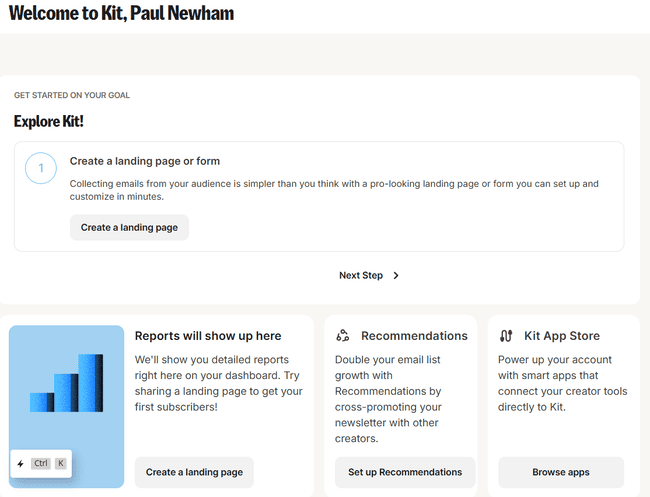
I also like the layout of the ‘welcome’ dashboard. It presents the recommended actions. It’s very clear and easy to understand. This really helps with getting to know the app.
Kit Review: Newsletter Platform
There are four main sections to Kit:
- Grow: Everything to do with lead generation, including sign-up forms and landing pages.
- Send: Building and sending emails and newsletters.
- Automate: The visual workflow builder and a tool for creating conditional rules.
- Earn: To monetize your newsletter.
I’ll start with testing the Send tools. After I review newsletter creation and sending in Kit, I’ll go into monetizing them and how Kit helps manage subscriber lists.
Creating and sending newsletters with Kit
Kit’s email building features are under Send > Broadcasts.
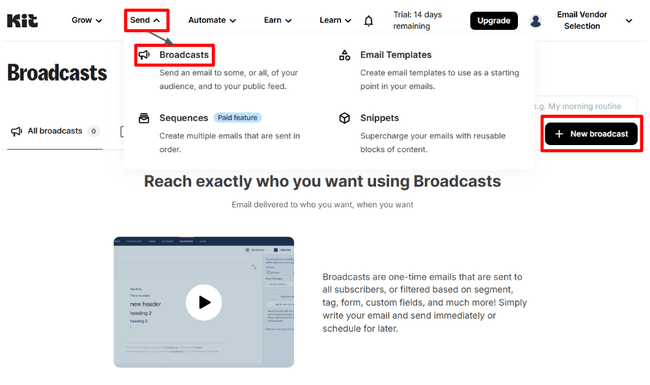
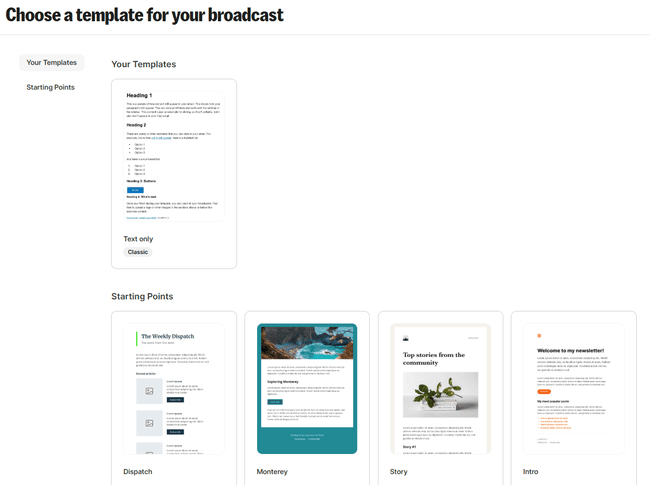
The first step to creating a new broadcast is picking a template. There isn’t a great choice here. Just one basic outline template. And 15 newsletter designs. But there are more templates elsewhere in the platform.
Kit’s editor isn’t a drag-and-drop HTML builder. It’s a WYSIWYG editor, short for What You See Is What You Get. It’s easy to use and ideal for creators focusing on content. Some WYSIWYG editors can be limiting and clunky. But I found Kit’s editor offers a good level of customization. Especially when adding or editing content elements.
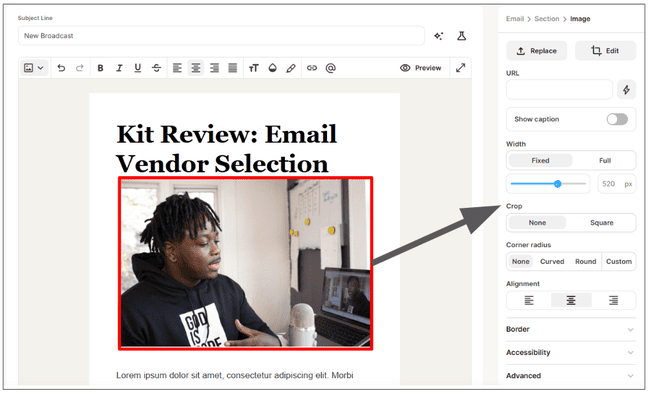
I found the interface intuitive. Clicking any element opens a menu of editing tools on the right. Even without drag-and-drop, Kit makes adding elements simple. Hovering in the main window shows a blue square around nearby content. Click on the blue + and you get a placeholder, then it shows all the elements you can put in there.
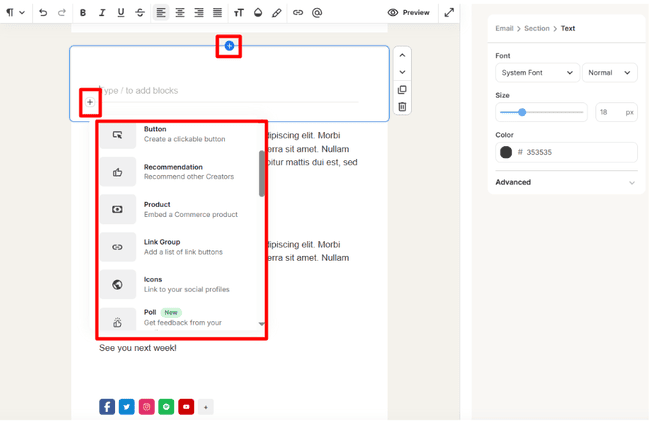
The choice of elements is good. It includes what Kit calls Action elements. There are newsletter recommendations, product listings, and polls. You can also grab content directly from X, TikTok, and Spotify and include it. Music promoters can link gig listings via Bandintown.
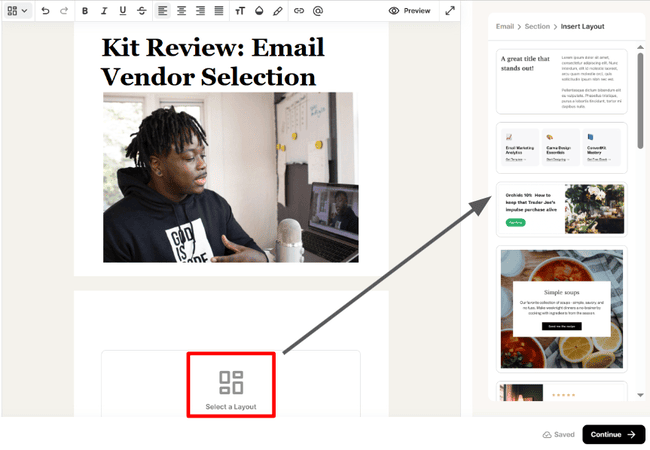
I like the way Kit avoids the layout limitations common to many WYSIWYG editors. You can often only stack content on top of each other in a single column. Kit gives you 19 different layouts for every element placeholder. That’s plenty of choice for mixing up your newsletter design.
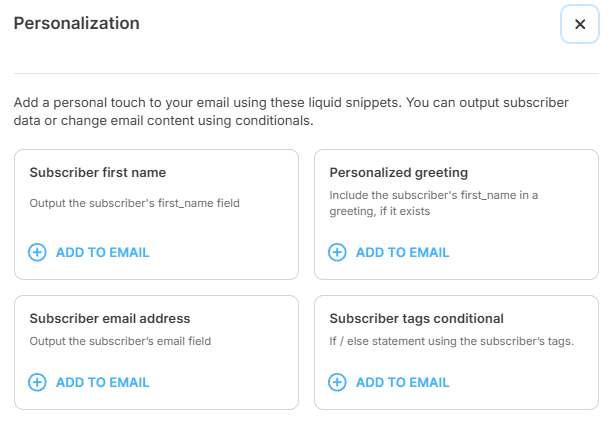
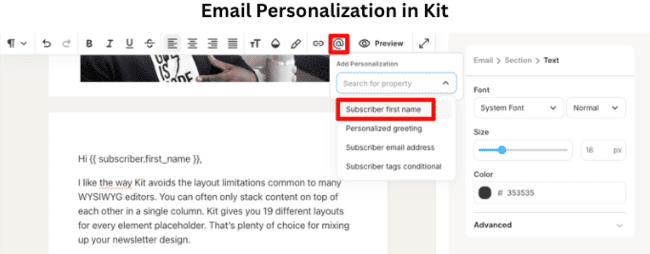
Kit’s personalization tools are excellent. It starts with adding a subscriber name or emails and creating custom greeting. But Kit then goes into dynamic content. You can set conditions for what appears in your newsletter for each subscriber. And it’s very simple to do. You can also do the same with snippets. These are reusable content blocks that can be inserted into every newsletter.
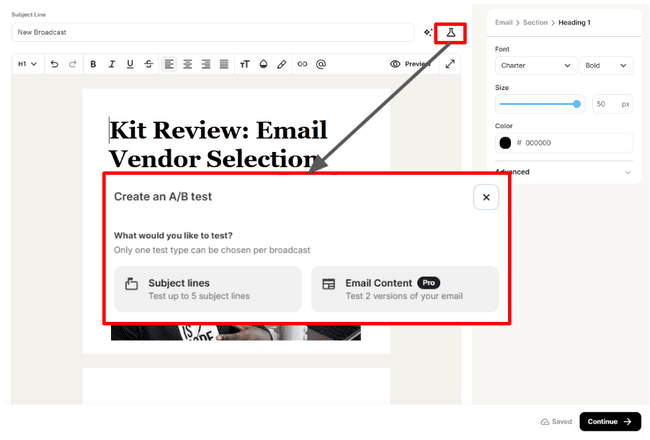
Kit lets you A/B test up to five subject lines on all plans. On the top paid tier, you can also A/B test email content.
Newsletter Templates in Kit
The way Kit manages email templates is a little confusing. You can choose them when you create a new broadcast.
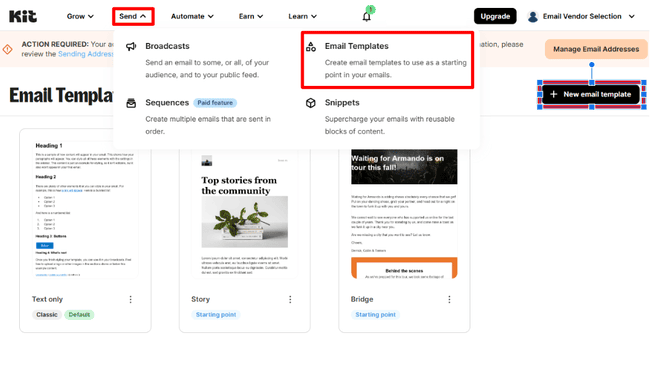
There are a few more under Send > Email Templates > New Email Template. Bringing the total to 23.
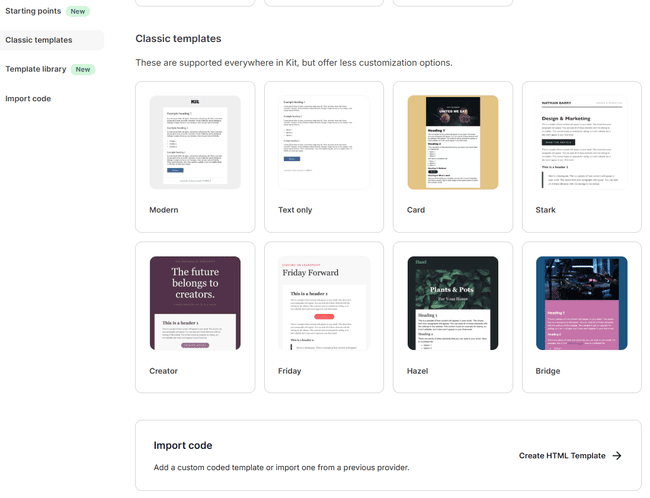
Kit’s Template Library has a much better choice. This is a marketplace of user-created templates. Not only do you get more, but the quality is higher, too. But you have to pay extra for most of them. ($19 to $39, so it’s not crazy money)
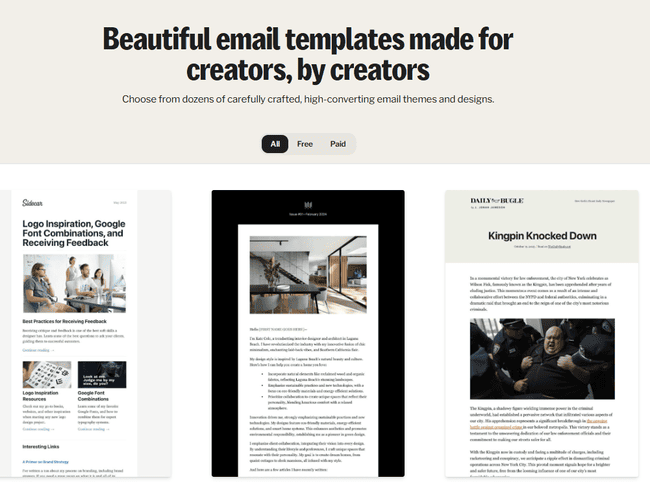
You can also import your own templates by pasting HTML code. This means you could use free email templates from email template builders.
Monetizing your newsletter with Kit
Kit helps you sell digital products through your newsletter and other channels as well. You can sell ebooks, courses, consultations, webinars, music, and photos. You can also sell subscriptions to your newsletter if you want to run a paid newsletter or community.
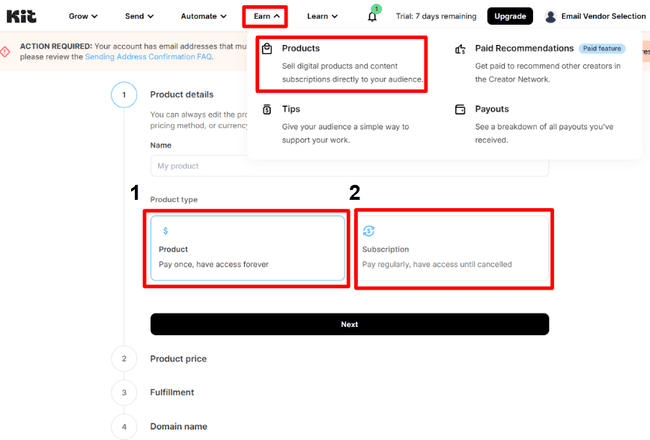
All of these are under Earn > Products. You can sell a product (1). Or you can set up a recurring subscription (2).
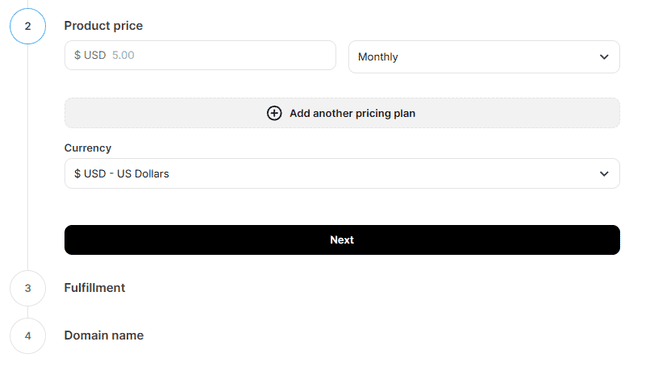
Kit runs payments through Stripe. It has a lot of ways to pay. For products, you can set up payment plans. Or even offer pay-as-you-feel (PAYF). For subscriptions, you can have plans with different pricing tiers. There’s also a Tips feature. Kit can accept payments in six currencies: USD, CAD, AUD, NZD, GBP, and EUR. It charges 3.5% + $0.30 per transaction.
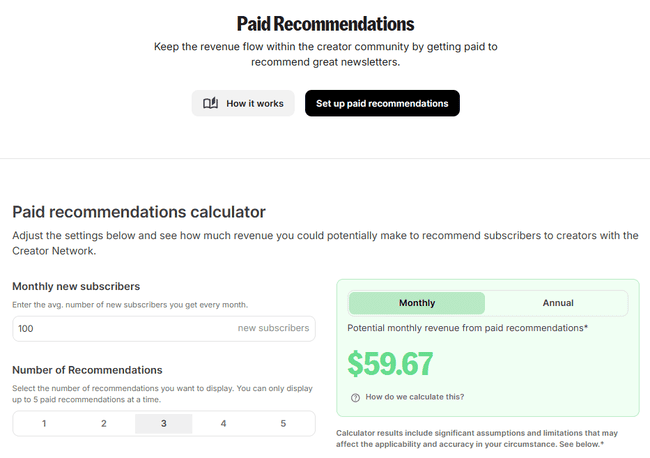
Another way to monetize your newsletter is Paid Recommendations. This means getting paid to promote other newsletters. Kit has SparkLoop included, this is the newsletter referral system.
Kit also has a Sponsor Network. This is available for newsletters with 10,000+ subscribers that publish at least weekly. After you join a Sponsor Network, Kit helps you find and manage relationships with advertisers. You just continue creating like you always have been. And you’ll earn by Kit placing sponsorships in your newsletter. Kit takes a 20% cut of sponsorships that come through there, plus the transaction fee.
Growing your list with Kit
Your earning potential depends on how big your audience is (and the quality, of course 😉). So audience growth is a big deal. Kit’s Growth tools include Signup Forms and Landing Pages. Plus, getting Recommendations from other publishers.
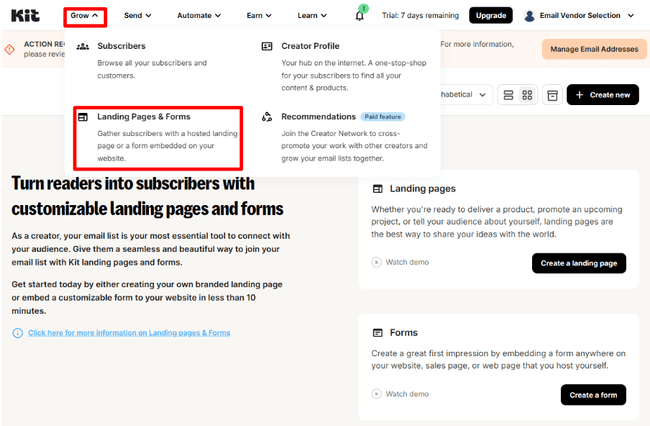
Kit has four types of forms. And 9 templates for inline, modal, and slide-in/pop-up forms. The sticky bar form is a simple name/email field at the top of a page. I like the way Kit’s previews display form types visually. It means you don’t have to guess what terms like “inline” or “modal” mean. I also like that you can add images to form templates.
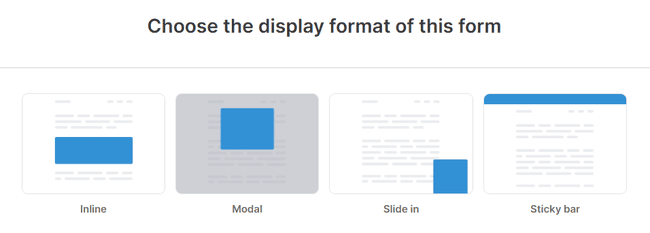
Kit’s form builder is easy to use. You can’t customize templates very much. But making a form is very quick. I like that you can switch templates anytime. Forms can be embedded on a web page via JavaScript or HTML. Or shared via a link on social media.
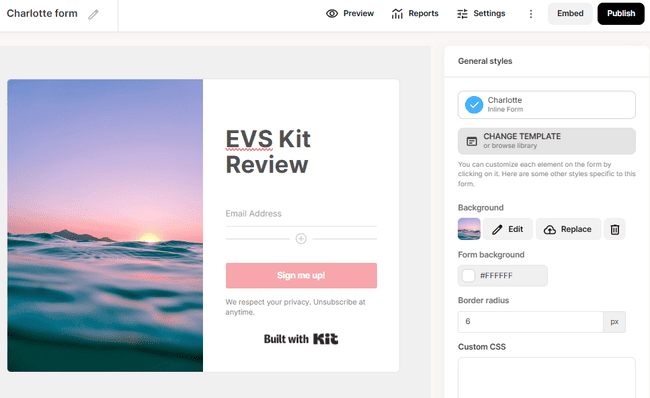
If you don’t have your own website, you can create a landing page. Kit has 50+ landing page templates. These aren’t only for sign-ups. You can build landing pages to sell products and promote events.
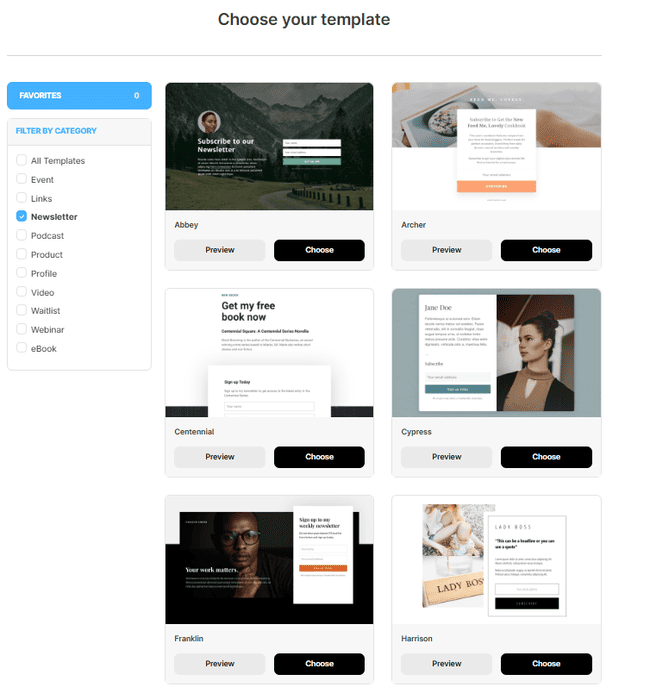
Kit’s landing page templates are well-designed and customizable. The landing page builder uses the same interface as the form builder. I always think this makes things much easier for the user.
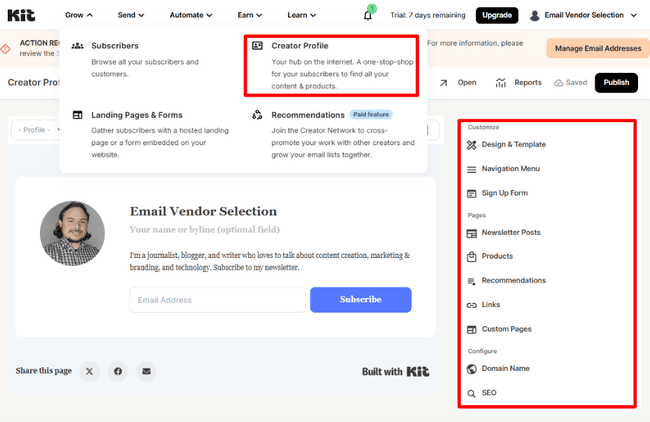
Recommendations for growing your list work differently from paid recommendations. You don’t need to sign up with SparkLoop or pay. Free recommendations work as a mutual promotion system. I promote you, you promote me. To use recommendations, you need to set up a profile in the Creator Network.
Your Creator Profile also serves as your own personal homepage. You can list all your newsletters, products, and recommendations.
Marketing Automation in Kit
Kit includes several automation features. Under Send, there’s a tool for simple email Sequences. Under Automate, there are Visual Automations and Rules.
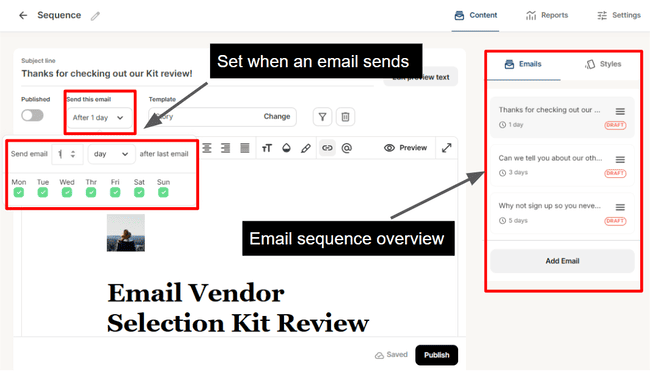
In Sequences, you build a series of emails. And set delays to space out when they get sent. Kit doesn’t have templates for sequences. For such basic automations, I didn’t find the setup very intuitive.
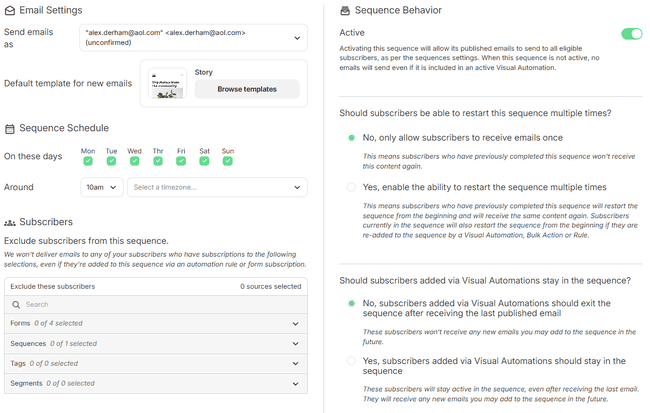
I prefer to use Kit’s visual automations. They’re much more flexible and powerful. Kit has 27 workflow templates already made for to specific creator goals. Examples include “Pitch your book with a free chapter” or “Promote a free 3-day course.”
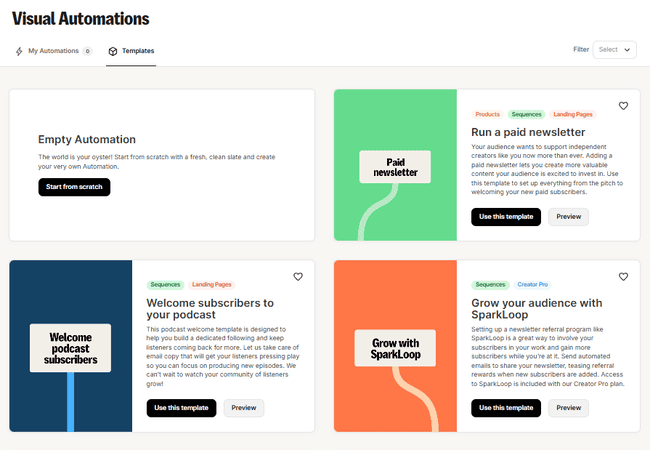
There are templates for commonly used workflows, like a welcome series.
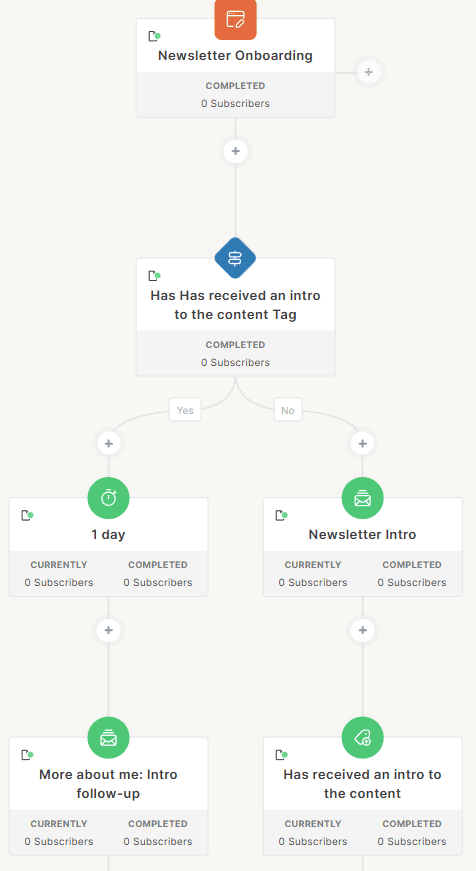
The template above uses tags to check if someone has already received a welcome email. If they have, it uses a yes/no condition to send them a different email.
Kit’s workflow editor is well-designed and simple to use. It strips automation building back to the essentials. That makes it very user-friendly. But you can still build quite advanced workflows.
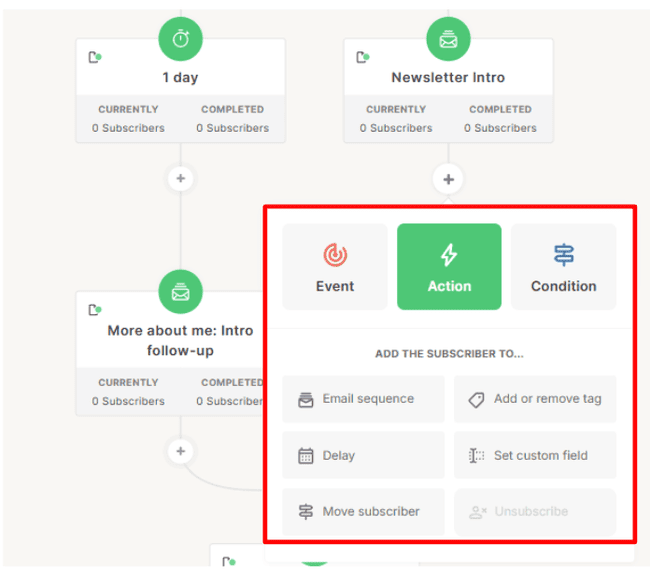
Workflows start with an entry point. To build a workflow, you add three types of steps:
- Events: Pause the automation for a subscriber until a specific event happens. For example, you can move subscribers forward on a date or if they purchase a product.
- Actions: Like sending an email, assigning a tag, updating custom fields, or moving workflows.
- Conditions: Yes/no logic that splits the path based on whether different criteria are met.
You can link unlimited steps and workflows together. Kit tags subscribers to track their movement through workflows. This makes it easy to see where subscribers are, even in large, complex workflows.
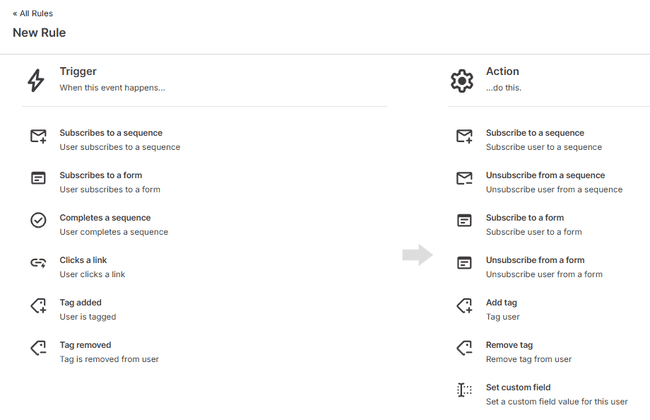
Rules create one-step automations. For example, if someone fills in Form X, you can set a rule to tag them with Y. These are mini-automations that don’t require the full workflow builder.
Managing contacts in Kit
In Kit, all your subscribers are in one list, and you use tags and segments to organize them. You can create segments with any tag or custom field with AND/OR operators. Kit has a default segment for cold subscribers for reengagement campaigns.
Kit’s use of tags for contact management impressed me a lot. In Kit, tags let you capture and store customer data. They allow for effective segmentation. And play a key role in driving engagement and sales.
There are several ways to add tags to subscriber records. You can set up to 10 topics of interest per subscriber. Kit automatically tracks which form a contact signed up with. And every product they purchase. And you can manually create and assign tags.
Tags are important in automations, too. They are used to move contacts between workflows. And track which workflows they’ve been through. This gives you lots of control over how you target messaging.
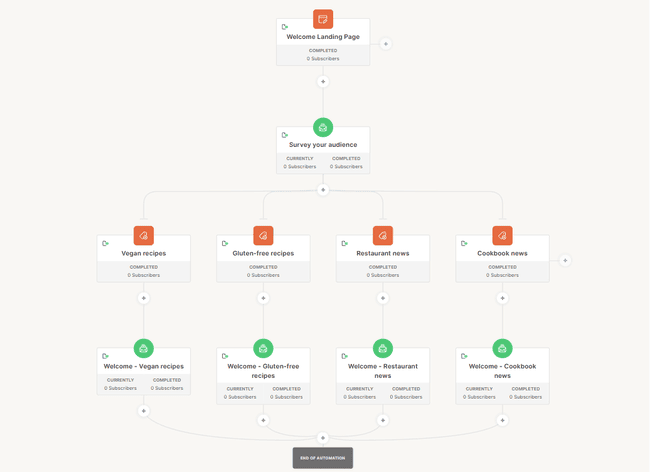
For example, the above workflow uses tags to create segments. Subscribers complete a survey and are tagged based on their answers. They are then targeted with different content. All done automatically.
Analytics in Kit
Kit’s reporting tools are limited. It’s the most disappointing part of the tool in my opinion.
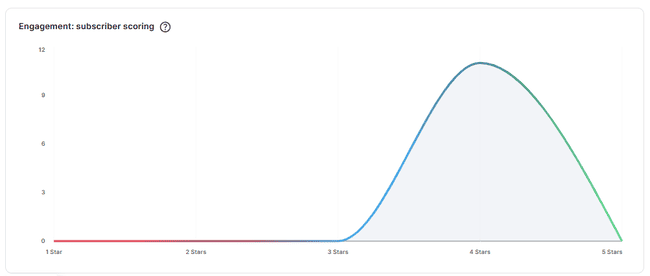
Especially on the cheaper plans, there isn’t a dedicated page for reports. On the dashboard, you get a chart showing 90-day subscriber engagement. It tracks how many people interacted, but not who or how. All you see is how trends change over time.
Under Grow > Subscribers, you see open and click rates, purchases, and unsubscribes.
On the Pro plan, Kit’s Insights feature offers some more advanced reporting. You can set up tracking for landing pages, websites. This gives you a breakdown of opens, clicks, and conversions by individual subscriber. You also get subscriber scoring based on engagement. This is better, but it’s still only the basic level analytics many email marketing platforms offer.
Kit Integrations and API
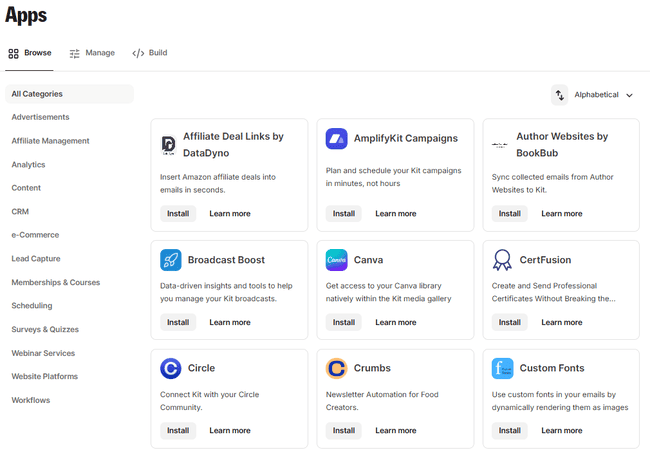
Kit’s App Store features 54 third-party integrations. This is smaller than many rivals and lacks many big-name apps. The list does include Canva, Shopify, WooCommerce, Squarespace, WordPress, and Stripe. Membership and online course platforms, like Thinkific. You can also use Zapier to integrate Kit with thousands more apps.
Some integrations, like Facebook Custom Audiences, are only on the top plan. This syncs your Kit segments with Facebook for ad targeting.
Developers can use Kit’s API to connect custom apps. Kit provides documentation in a dedicated developer space.
Kit Pricing and Plans: How Much Does It Cost?
Kit pricing has two paid plans and a free plan. They’re called Newsletter (free), Creator, and Creator Pro.
Kit’s free plan is excellent. You can send as many emails and build as many landing pages and forms as you want. And grow your list to 10,000 subscribers. You can also monetize your newsletter on the free plan. Its main limitation is that you can only build one visual automation and one sending sequence. But apart from that, I’d rate it as the ideal free tool for starting a newsletter.
The Creator plan starts at $39 per month for 1,000 subscribers. With this, you unlock unlimited automations. Along with free and paid recommendations for list growth. You can also add one additional team member.
The Creator Pro plan starts at $79 per month for 1,000 contacts. With this, you get extra features, including advanced analytics and unlimited users. You can increase the subscriber limit to 500K on both plans. And Kit doesn’t have any add-ons, hidden fees, or extra costs.
| Free plan | Creator | Pro |
| – 10K subscribers – Unlimited broadcasts – Unlimited landing pages – Unlimited forms – 1 visual automation – 1 sequence – 1 user – Segmentation – Sell digital products & subscriptions – Community support | Everything in free, plus: – Unlimited visual automations – Unlimited sequences – 2 users – Free & paid Recommendations – Integrations – Polls – No Kit branding on emails – 24/7 chat & email support – Free migration | Everything in Creator, plus: – Unlimited users – Insights – Email content A/B testing – Newsletter referrals – Priority support |
| Subscribers | Creator | Pro |
| 1K Subscribers | $39 | $79 |
| 3K Subscribers | $59 | $99 |
| 5K Subscribers | $89 | $139 |
| 8K Subscribers | $119 | $169 |
| 10K Subscribers | $139 | $189 |
| 25K Subscribers | $199 | $279 |
| 55K Subscribers | $379 | $519 |
You get 20% off when you sign up for a yearly plan, which comes out to 2 free months per year.
Kit Customer Support
Kit’s customer support includes an online knowledge base, email tickets, and live chat. On the free plan, you only get email tickets and the help centre. On the Creator plan, you get 24/7 live chat, too. You get ‘priority’ chat support on the Pro plan.
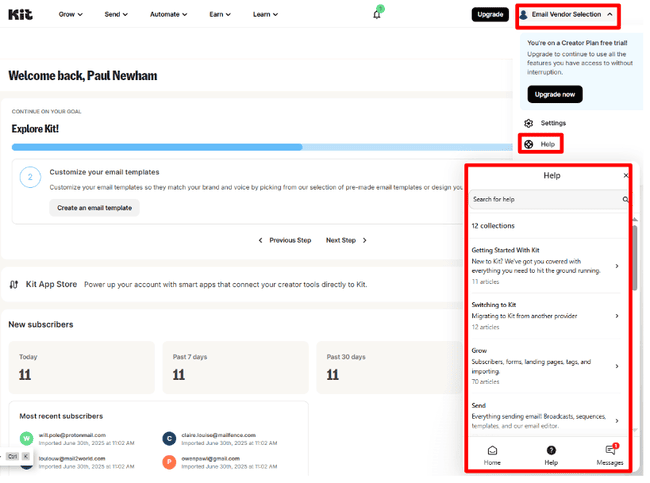
Kit’s support isn’t the easiest to find. I’m used to seeing a big, prominent ‘Help’ button on every page. In Kit, you have to open the account tab and then click Help. This opens a chat-type box. You can access help center guides and live chat from here. When I’m struggling with something, I like to feel support is more immediate.
Final Conclusion: Is Kit the right email tool for you?
So what are the main takeaways from my Kit review? I found the new Kit platform very user-friendly. Onboarding is straightforward. It’s easy to navigate. And you can get started creating newsletters and selling digital products quickly.
It’s a great newsletter platform if you’re a small creator. Its free plan is a huge attraction. Being able to grow to 10,000 subscribers for free is fantastic. Kit gets a bit more pricey once you have a large following and over 50K subscribers.
Kit is also great for finding your feet with your marketing and driving conversions. I’m a big fan of the simple but effective way it uses tagging, targeting, and automation.
Its Creator Network follows the beehiiv newsletter referral system. But it lacks the advertising tools that make big money. All in all, it is certainly worth a try.
Kit Frequently Asked Questions (FAQ)
Kit Alternatives
Kit vs. beehiiv
Both Kit and beehiiv are focused on creators. The main difference between Kit and beehiiv is their approach to monetization. Beehiiv has built-in ad tools and a sponsor marketplace. This makes it a top Kit alternative for larger, established publications. Kit focuses on helping creators sell digital products. It’s more accessible for smaller or solo creators. It has a very generous free plan to help new creators get started. But, beehiiv is much cheaper for larger senders (over 50K subscribers).
Check out our full beehiiv review to compare it with Kit.
Kit vs. Mailchimp
The main difference between Kit and Mailchimp is that they are for different types of users. Mailchimp is a marketing tool designed for SMBs and newsletter senders.
If you’re an online creator looking to make money, Kit is for you. It lets you sell subscriptions and digital products directly. Its automation and tagging tools are very intuitive and user-friendly. Overall, it’s set up for turning email subscribers into paying customers.
Most SMB senders know that Mailchimp may not be the best choice for their marketing efforts. We recommend checking out Mailchimp alternatives.
Kit vs. Clickfunnels
Clickfunnels is a funnel builder. It’s built to convert leads into customers through targeted lead capture and upsells. Its USP is its choice of ready-made funnel templates. Kit has similar tools such as forms, landing pages, automations, and sales features. But it takes a simpler, email-centric approach. It’s more affordable and easier to learn.
Find out more with our guide to the best ClickFunnels alternatives.
Kit vs. MailerLite
The main difference between Kit and MailerLite is functionality. MailerLite is a general-purpose email service provider. It has more features, better email design tools and lower pricing. It suits users wanting to send email marketing campaigns. But it also has ecommerce features and supports paid newsletter subscriptions. Kit stands out for its monetization focus. It’s easier to sell products and subscriptions directly. And its Creator Network provides an alternative audience growth tool. This is something MailerLite doesn’t offer.
Find out more in our full MailerLite review.