
Free Email Verifier Tool for Accurate Email Address Validation

Worried about high bounce rates from your email marketing campaigns?
With our free email verifier, you don’t have to be. Type or paste an email address to check if it’s valid before you hit send. Go on, give it a spin. It’s free!
Status
UndeliverableReason
REJECTED EMAILDomain
- Name
- Accept all
- Disposable
- Free
- mohi.to
- No
- No
- No
Account
- Role
- Disabled
- Full mailbox
- mohi.to
- No
- No
Provider
- Domain
- google.com
How to Use This Free Email Verifier
It’s important to keep your mailing lists free of fake and invalid addresses. Every email that bounces is an email wasted. And even worse than that, high bounce rates start to harm your sender reputation. That means more of your emails start landing in spam.
29.2% of email marketers have seen deliverability get worse in the past 6 months, according to recent email deliverability stats. 36% of marketers say managing bounce rates is their biggest list hygiene challenge.
With our free email verifier tool, all you have to do is type in an email address and hit return. Our verification engine does the rest. You can find out exactly what it does in the how does email verification work? section. But in simple terms, it tells you if an email is active and working. And then it runs various checks to see if it is genuine and can be trusted.
Our free email checker is ideal for quick one-off email address checks. If you want to bulk verify multiple emails or whole lists, we recommend Bouncer. And you can get 20% off your subscription here!
What is Email Verification?
Email verification is about knowing who you’re sending to. And beyond that, whether your emails will be delivered or not. If an account is old and unused, a verification check will tell you. Similarly, it will tell you if an address has any typos.
Quality email verifiers also check whether addresses are genuine. Fake email addresses are a common tool for hackers and cybercriminals. They use them to launch phishing and spoofing attacks to steal data. An email verification service checks addresses are authentic. And that they belong to who they say they are.
What Happens If I Don’t Use Email Address Verification?
Every email marketer wants to grow their contact lists. But how do you know who is signing up? Are they genuine subscribers or spam bots?
People stop using email accounts, the inboxes get full. They might even get hacked and taken over by scammers to launch phishing attacks from. All of these can lead to bounces and damage your sender reputation. Not checking your lists regularly leaves you vulnerable.
Here’s a list of reasons why email verification makes sense for every email marketer.
Improve list hygiene
Email verification is critical for keeping lists ‘clean’. This means keeping them free of fake, inactive, and invalid email addresses. Good list hygiene underpins all the other benefits on this list.
Reduce bounces and increase deliverability
Email verification weeds out email addresses you can’t send to. By sending to verified emails only, you lower the risk of bounces. And turning this around, you increase your deliverability rate.
Boost campaign performance
Emails first need to be delivered to get opens, clicks, and conversions. Every email bounce is a lost opportunity. So good list hygiene lays the foundations for good campaign ROI.
Protect your sender reputation
High bounce rates harm deliverability. Internet service providers (ISPs) flag accounts with high bounce rates as potential spam sources. Spam filters block more emails from accounts with a poor reputation. This means fewer emails landing in inboxes.
Guard against spam traps and blocklists
Sometimes internet service providers (ISPs) go further than knocking down your sender reputation. Repeated spam offenders get added to blocklists. Emails from blocklisted addresses and domains get automatically rejected by email servers. That’s bad news for any email sender. But if you get caught sending to a blocklisted email address, you also get penalised.
Similarly, ISPs try to catch people out with spam traps. The idea is, if you’re sending to them, you’re not practising good list hygiene. You’re therefore a spam risk. Sending to a spam trap email does serious damage to your sender reputation.
A good quality email verifier will check email addresses against known blocklists. And pick out any that are spam traps.
Get started with 100 free verifications
How Does Email Verification Work?
There isn’t one single way to verify email addresses. There are different ways to do it. The best email verification tools do some combination of the following.
Deliverability ‘ping’ test
This is the most basic email verification check. It’s done to establish whether an email address exists. It weeds out inactive accounts or those with a full or non-functioning inbox. It can also pick out fake addresses that aren’t linked to a working account. Or incorrect addresses.
The test works simply by sending a signal to the mail server. If it receives a ‘ping’ back, it shows the email address is a working account. While useful, this test doesn’t give you any more information about why an address doesn’t work. Just that it can’t receive emails.
Syntax check
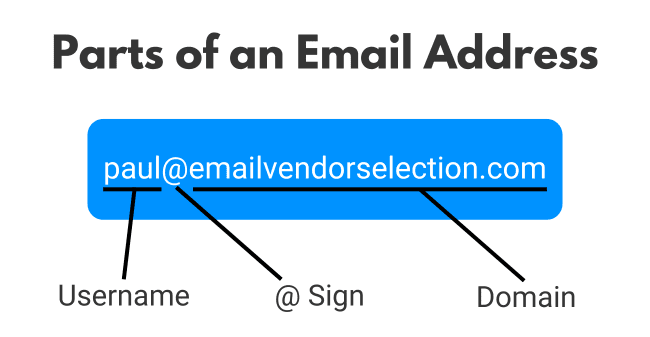
Valid email addresses have to follow a set formula or syntax. The rules are as follows:
- Every email address has 4 parts. A username, an @ sign, a domain name and a top-level domain. In that order.
- Usernames can have a maximum of 64 alphanumeric characters. Full stops are allowed, but no other special characters.
- Domain names fall into 2 broad categories. They are either the name of a public email service, like Gmail, Outlook or Yahoo. Or the name of a registered web domain. This is common for business email addresses.
- The top-level domain is the part that comes after the ‘dot’. The best-known examples are .com, .net, .org, etc. But there are dozens available. This is also known as a domain extension.
Syntax checks identify if any of these rules are broken. It can be a sign that an email address has been automatically generated by a spam bot. Or it could be a genuine mistake. Either way, addresses with incorrect syntax can’t receive emails and need weeding out.
Domain authentication
Just because an email domain follows the correct syntax doesn’t mean it’s genuine. Domain name authentication is an important step in weeding out invalid addresses.
When users set up a domain for sending email, they have to use Domain Name System (DNS) records. DNS records are like the internet’s directory. They store background information for every domain. Domain owners have to authenticate their DNS records. Up-to-date authentication tells you a domain is genuine and active. Fake and invalid addresses don’t have correct records.
Blocklist look-up
The worst offending spam senders eventually end up on blocklists. Blocklists are databases of known email-related threats. They are kept up to date by commercial operators. And made available to ISPs for their spam defences. Any email sent from a domain or IP address that appears in a blocklist risks being blocked outright.
Email service providers also take a dim view of anyone sending to a blocklisted address. If there’s a blocked address in a bulk mailing list, for example, spam protectors can spot this. It’s a sign of bad list hygiene. Plus the fact that sending to these addresses will cause more bounces. So it harms your sender reputation in 2 ways.
An email checker does what inbox defence software does before you hit send. They compare email addresses on your list against blocklists. And flag any that it finds.
Address type report
Some types of email addresses are ‘riskier’ than others to send to. Meaning, there’s a higher chance of them resulting in bounces. A good email checker will flag these address types up.
A good example is disposable email addresses. A disposable email address is a temporary account. People use them to sign up for services when they want to avoid spam to their main account. This is bad news for email marketers. Disposable email addresses soon become inactive. And then start to cause bounces.
Another example is catch-all email addresses. Catch-alls receive emails to a specific domain even when the username is wrong or doesn’t exist. Take a business email, for example. Your contact John Smith left a business several months ago and his email account was shut down. You keep sending emails because you don’t know he left. And instead of bouncing, the catch-all system redirects them to another inbox.
The catch is, that it can count as an unsolicited email. Instead of John’s inbox, your email lands in Jane’s. But with John’s name in the personalized subject line. The spam protectors spot that and put a mark against you.
Useful Steps to Improve Email Deliverability
Email deliverability is crucial to the ‘why’ of email verification. It’s to stop bounces, protect your sender reputation, and improve your deliverability rates.
But of course, good deliverability is not all down to how you verify email addresses. Good list hygiene is one part of a much bigger package. Here are the other important steps to take.
Have double opt-ins for all new subscribers
The best way to earn and maintain good deliverability rates is to only send to people who want your emails. Engaged subscribers open emails. Unengaged subscribers ignore them. Ignored, unopened emails end up in the spam folder.
High engagement starts with sign-up forms. Every lead capture form these days has to have an opt-in check box for data privacy reasons. But people tick them without thinking about what they are signing up for. Or they do it on the spur of the moment and then change their minds.
Double opt-in involves following up on every form submission with a confirmation email. New contacts have to open, read and respond to that email before they are added to your list. This extra step goes a long way to avoiding spam complaints.
Make it easy for people to unsubscribe
People change their minds. If someone decides they no longer want to receive emails from you, so be it. Make it easy for them to unsubscribe. Keeping on sending to people who don’t want your emails is a far worse option. They will start ignoring them, so your open rates will go down.
Focus on quality
The best way to keep subscribers engaged is to send relevant, interesting emails. There are 2 sides to this. The first is all about quality of content. Don’t fall into the trap of sending emails for the sake of it. Engaging, relevant marketing emails need a clear purpose. That should be backed up by quality of execution. From email design to choice of images to what you write, the aim is to make your emails stand out in the inbox.
Personalize and segment
After quality, you also have to think about making your content relevant. The principle here is that not everyone on your list will be engaged by the same things. You have to know how to target different people with different messages.
This is where segmentation and personalization come in. Segmentation starts with gathering information about your contacts. And using that to decide who does and doesn’t receive a particular campaign. Or different versions of the same campaign. Personalization can be as simple as including people’s names. But it can build on segmentation to include very carefully targeted content.
Work on your subject lines
Subject lines are the first thing people see in their inbox. They have a big impact on whether people decide to open an email or skip it. So it’s worth spending time on your subject lines from a quality perspective.
Schedule smartly
When you send emails makes a difference to deliverability and open rates. People are more active in their inboxes at different times. Or if they open their inbox to see a long list of emails waiting, they’re more likely to delete without reading.
You can work out the best times to send by trial and error, comparing open rates. Or some email marketing services offer send time optimization tools. Another thing to consider is how often you send. If you want to send at high frequency, build up to it slowly. This is called ‘warming up’ your IP address. Check the health of your IP with the best IP reputation checkers.
Frequently Asked Questions
Can I verify my whole email list?
Do I need to pay for every email I verify?
If you want to verify emails in bulk, you can use a service like Bouncer to validate 100 emails for free.
How often should I clean my email list?
But list hygiene is also about checking if old contacts are still valid. It’s a good idea to run a full list check every 6 months to do this.