
7 Best Email API Services for Fintech in 2026 (Reviewed)
 Yaroslav Hurchenko
Fintech moves fast, and so should your emails. Customers expect secure, lightning-fast email updates about their money. An email API designed for fintech makes that happen with dependable deliverability, strong security, and a setup that’s built for high-volume reliability.
Don’t know where to start? You’ve come to the right place!
We’ll cover why fintech companies need a specialized email API, how to choose the best email API provider for fintech and detailed reviews of the best fintech email APIs (Application Programming Interfaces).
Disclaimer: I work at Mailtrap, and I personally researched each service from this list and sent emails simulating real-world use cases, so you can expect a non-biased review.
7 Best Fintech Email APIs: Overview
Here’s a brief overview of the 7 best email API providers:
- Mailtrap offers the best email API for fintech companies with high sending volumes and a focus on high deliverability rates and in-depth analytics.
- SMTP.com is a solid choice for fintech companies that need an email API without any over-the-top features.
- SendGrid offers an email API for fintech companies that need granular control over their infrastructure.
- MailerSend is best for fintech companies looking to send SMS messages on top of transactional emails.
- Mailgun is a solid fintech email API provider for enterprise users with dedicated developer teams.
- Amazon SES is most suitable for fintech companies that are already in the AWS ecosystem.
- Resend is a solid email API for fintech companies with strong developer teams who can use everything the platform has to offer.
Also, here’s a sneak peek for you and a quick breakdown of each email API provider:
| Provider | Free plan | Pricing | SDKs | Compliance |
| Mailtrap | 1,000 emails per month | From $15/month | Node.js, PHP, Ruby, Python, Elixir, Java | GDPR, ISO 27001 (no SOC 2 yet), no HIPAA |
| SMTP.com | N/A | From $25/month | N/A | GDPR, CASL, CCPA |
| SendGrid | 100 emails per day | From $19.95/month | C#, Go, Java, Node.js, PHP, Python, Ruby | GDPR, SOC 2, ISO 27001, no HIPAA |
| MailerSend | 500 emails per day | From $7/month | PHP. Node.js, Golang, Python, Ruby, Java, Laravel | GDPR, ISO 27001 (no SOC 2, no HIPAA) |
| Mailgun | 100 emails per day | From $15/month | Python, Go, Node.js, PHP, Java, Ruby | GDPR, SOC 2, ISO 27001, HIPAA (with BAA) |
| Amazon SES | 3,000 emails per month (during the first year) | $0.10 per 1,000 emails | Java, .NET, PHP, Python, Ruby, Go | GDPR, SOC 2, ISO 27001, HIPAA (via AWS BAA) |
| Resend | 3,000 per month | From $20/month | Node.js, PHP, Laravel, Python, Ruby, Go, Java, Rust, .NET | GDPR, SOC 2, ISO 27001 (no HIPAA) |
*Prices and features are relevant at the time of writing this article.
Check out our review of the best email API services and free SMTP servers to find more platforms.
Why do fintech companies need a specialized email API service?
An email API is a type of web API that allows you to send messages directly from your app/project by integrating it with an email service provider (ESP), usually over Simple Mail Transfer Protocol (SMTP) or HTTPS.
Since fintech businesses deal with financial and personal data, they need a specialized service for sending time-sensitive transactional emails.
When I say transactional emails, I mean important emails like OTPs (one-time passwords), fraud alerts, new device logins, suspicious activity notifications, etc. These are all emails that must arrive in the recipients’ inboxes on time. Any delivery issues can lose user trust and impact your platform’s security.
With that in mind, your ideal fintech API needs to be:
- Reliable, so your important emails still get delivered during volume spikes.
- Scalable to help you reach inboxes as your customer base expands.
- Secure so the sensitive data you send via email stays safe during transmission.
- Compliant with regulatory requirements like SOC 2 and GDPR or standards like PCI DSS, so your business doesn’t face fines.
How to choose an email API provider for fintech?
I’ll explain the criteria I used to evaluate transactional email services for fintech. You can also use it to do your own research and have an easier time choosing an API.
Quality of email infrastructure provider: deliverability, reliability, scalability
The first thing I consider when reviewing a provider is its email infrastructure, which consists of the holy trinity: deliverability, reliability, and scalability.
Deliverability
Email deliverability is the API provider’s ability to help you reach main inboxes. To help you achieve a high deliverability rate, providers use dedicated IPs, MTAs, separate streams, etc.
You want to make sure your payment confirmations, deposit alerts, invoices, 2FAs, and other emails get delivered without going to the spam folder or missing the recipient’s inbox completely.
Reliability
I can’t know for sure if a provider’s API is 100% reliable, without sending a large number of emails over a long period of time. However, I can get a better picture of it by browsing status pages like this one and user feedback on social media about the provider’s customer support team.
A reliable fintech email API provider needs to offer:
- high delivery speeds,
- high email uptime,
- dedicated streams for transactional messages, and
- flexible retry logic.
Reliability is especially important for companies that implement open banking frameworks, where sharing customer financial data between institutions requires a reliable infrastructure.
Scalability
When you increase your email sending load during market shifts, you need a scalable email infrastructure behind you so you don’t experience any hiccups.
That is, if you don’t want to face any bottlenecks, your email API provider should offer a cloud-based infrastructure with multiple MTAs and dedicated IPs or streams, and support a high sending throughput. Additionally, I checked whether:
- Their team is available around the clock or not.
- They provide email deliverability consultations.
Security
Considering that 41% of the banking institutions lack DMARC protection, fintech companies must use email infrastructure that supports proper authentication and monitoring.
That’s why I checked each email API provider’s security pages like this one to see how they handle encryption, authentication, access, and logging. Here’s a summary:
| Provider | Encryption & transmission security | Authentication & identity control | Account access & user controls | Security event logging & notifications |
| Mailtrap | Strong TLS enforcement, MTA-STS support | SPF, DKIM, DMARC alignment | MFA, RBAC, detailed audit logs | Detailed logs, customizable alerts |
| SMTP.com | Enforced TLS, opportunistic TLS fallback | SPF, DKIM, DMARC | Info not publicly disclosed | Email event webhooks |
| SendGrid | Enforced TLS, MTA-STS | SPF, DKIM, DMARC | MFA, RBAC, SSO | Activity feed, email event webhooks |
| MailerSend | Enforced TLS, MTA-STS support | SPF, DKIM, DMARC (automatic setup), OAuth login | MFA, team roles & permissions (RBAC) | Email activity logs, webhook events for delivery, open, click, etc. |
| Mailgun | Mandatory TLS, MTA-STS | SPF, DKIM, DMARC | MFA, granular user permissions | Detailed event logs, webhooks for notifications |
| Amazon SES | Opportunistic/forced TLS, MTA-STS (manual setup) | SPF, DKIM, custom MAIL FROM, DMARC | IAM, MFA, CloudTrail integration | Extensive logs via CloudWatch/CloudTrail |
| Resend | Enforced TLS (via AWS infrastructure), HTTPS API | SPF, DKIM, DMARC (automated setup), domain verification | MFA (via Supabase), team-based access control | Logs via Vercel/AWS, webhook support for delivery status |
All providers on this list support at least TLS 1.2 or TLS 1.3, DMARC alignment, and MFA, and have some form of event logs. A big bonus is that they all perform regular penetration tests and security reviews, although SMTP.com didn’t have any public info.
Compliance
Non-compliance with GDPR can get you fined for up to 20 million euros. With this in mind, I carefully went over compliance pages like this one, so you know what to expect from each email API provider’s compliance.
I also checked whether the providers have transparent data retention policies and how detailed their logs are, in case you might need them for auditing.
For your convenience, I put them all in a table:
| Provider | GDPR | SOC 2 | ISO 27001 | HIPAA | Logging |
| Mailtrap | Adherent / DPA available | 🕓 In progress | ✅ | ❌ | Detailed logs, customizable alerts |
| SMTP.com | Adherent / DPA available | Not specified | Not specified | BAA available | Not specified |
| SendGrid | Adherent / DPA available | ✅ | ✅ | BAA available | Extensive audit logs |
| MailerSend | Adherent / DPA available | ✅ | ✅ | BAA available | Activity feed, event webhooks |
| Mailgun | Adherent / DPA available | ✅ | ✅ | BAA available | Detailed logs, webhooks for notifications |
| Amazon SES | Adherent / DPA available | ✅ via AWS | ✅ | BAA available (via AWS) | Extensive logs via CloudWatch / CloudTrail |
| Resend | Adherent / DPA available | ✅ | ✅ | ❌ | Logs via integrations (e.g., AWS) – limited info |
Pricing comparison
I checked whether some of the most important features, like dedicated IPs or customer support, are locked away for high-tier plans or as add-ons. Or, even worse, if high deliverability is dedicated to expensive plans.
I’ve also made sure to compare the pricing limits between the email API service providers on this list, so here’s a summary for your convenience:
| API provider | 10,000 emails | 50,000 emails | 100,000 emails | 250,000 emails |
| Mailtrap | $15 | $20 | $30 | $200 |
| SMTP.com | ~$25 | ~$50 | $80 | $~200+ |
| SendGrid | $19.95 | $35 | $60 | $200 |
| MailerSend | $13 | $35 | $68 | $162.50 |
| Mailgun | $15 | $35 | $75 | $215 |
| Amazon SES | $1.00 | $5.00 | $10.00 | $25.00 |
| Resend | $20 | ~$35 | ~$60 | ~$150 |
Code libraries
Code libraries are designed to help you integrate an email API with your app/project in as little time as possible while having to do minimal coding.
So, for this article, I researched which providers offer code libraries or snippets for integration. And since we’re talking about fintech, I’ll be sure to look out for Java and C#, the major programming languages in this space.
Quality of documentation
Trying to integrate an email API without comprehensive documentation is like shooting in the dark. That’s why I made sure to check:
- How well is each provider’s API documentation designed
- How many use cases does each API cover (e.g., transactional emails, attachments, templates, webhooks, etc.)
- Each API’s GitHub repository to see if it’s regularly updated and maintained
Hosted countries
A common issue for financial services and banks in email marketing is the location of servers. Why? Well, if you need to deliver your emails super fast with low latency, you need your email servers and data to be near your recipients. So, if your recipients are in Europe, you need to send them from, you guessed it, Europe.
That’s why I checked where each of the providers’ infrastructure is hosted:
| Email API provider | Hosted country |
| Mailtrap | Based in the EU, but the servers are in the US |
| SMTP.com | US-based, info on servers not available |
| SendGrid | EU region selectable, US by default |
| MailerSend | EU-based with EU data residency and GDPR compliance |
| Mailgun | EU region sending & storage |
| Amazon SES | Region-specific data storage (EU/US/Asia) |
| Resend | Hosted on AWS (regions configurable depending on AWS setup) |
Customer support
Blockers usually occur when you least expect them, which is why every email API provider must have a dedicated and reliable customer support team.
This is especially true since issues with sending important transactional emails in fintech. For example, facing a blocker when sending OTPs or financial transactions means your dev team is going to lose a big chunk of time, and your customers will lose trust in your service/product.
User reviews
When researching providers for reviews, I always dig through user reviews, and I recommend you do the same. This lets you see if any of the fintech transactional email services have any recurring issues reported by the users, whether they are responsive to feedback, and how transparent they are.
For this article, I’ve focused on finding reviews and case studies from companies in financial services, such as neobanks, challenger banks, buy now pay later services, investment platforms, trading applications, and P2P payment apps. In short, I looked for feedback from financial institutions.
1. Mailtrap
G2: 4.8 🌟 Capterra: 4.8 🌟
Supported SDKs: Node.js, PHP, Ruby, Python, Elixir, and Java.

Mailtrap is an email delivery platform that offers a flexible SMTP and API service for businesses with high sending volumes. It’s also worth noting that on top of its SMTP/API, Mailtrap also offers email marketing features.
It’s suitable for fintech companies since it has high deliverability rates, regardless of the plan you choose. To help you achieve high rates, Mailtrap provides a truly separate stream, dedicated IP addresses, domain or IP warmup, throttling, and other useful features.
Here’s how it performed on the free plan without a warmed-up domain:
| Platform | Email placement results | Spam filter rating | Inbox email delivery with top providers |
| Mailtrap | Inbox: 78.8% Tabs: 4.8% Spam: 14.4% Missing: 2.0% | Google Spam Filter: Not spam; Not phishy Barracuda: Score 0 Spam Assassin: Score: -3.8 | Gmail: 67.50% Outlook: 77.78% Hotmail: 100% Yahoo: 55.56% |
Mailtrap has dashboards where you can track the most important metrics like delivered, bounces, opens, etc. Additionally, the platform keeps your logs for 30 days, which can be useful for compliance audits.
You can also fine-tune your emails before you send them with the Mailtrap Sandbox, a testing tool that comes with HTML preview, spam checker, and tech info for each email.
To keep you and your recipients’ financial data safe, Mailtrap rotates your DKIM keys monthly, enforces TLS encryption, and keeps detailed activity logs. It’s also compliant with GDPR, has ISO/IEC 27001:2022 certification, and SOC 2 is in progress.
Mailtrap Pros
- High deliverability rates
- In-depth analytics
- Sandbox environment for testing
- Email marketing features
- Deliverability expert consultation
- GDPR compliant
- ISO/IEC 27001:2022 certified
- Extensive API documentation
- Equal customer support availability for all plans
Mailtrap Cons
- Automation workflow builder is still in beta
Pricing starts at $15 per month for 10,000 emails via the email API. The Sandbox starts at $14 per month for 500 email tests. There is also a free plan that lets you send 1,000 emails a month.
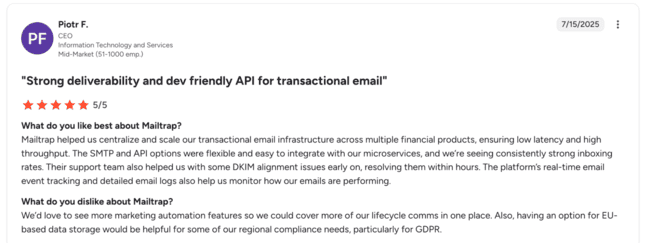
A user testimonial that stood out to me said both Mailtrap’s SMTP and API were flexible and easy to integrate, and that they’re seeing high inboxing rates. Moreover, Mailtrap’s support team helped them with DKIM alignment.
Source: G2
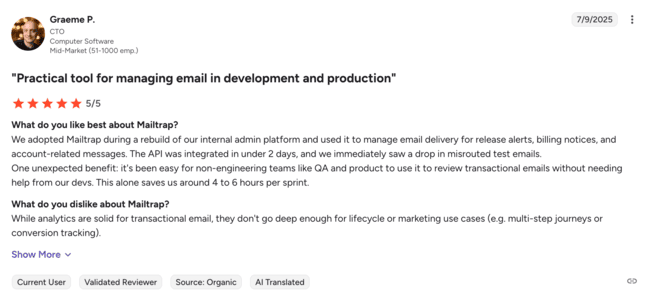
Another one said how they use Mailtrap to deliver release alerts, billing notices, and other account-related messages. Although they like the fact that Mailtrap saves them time, they would like the analytics to be more in-depth for marketing emails.
Source: G2
Try Mailtrap for free or read our full review
2. SMTP.com
G2: 3.3 🌟 Capterra: 3.5 🌟
Supported SDKs: N/A
SMTP.com is one of the longest-standing providers in the industry. As its name suggests, it provides an SMTP relay but also an email API for sending transactional emails.
It’s suitable for fintech companies looking for a service that focuses on deliverability and monitoring.
SMTP.com promises a delivery rate of 98% and server uptime of 99%, which you can check on the provider’s status page. To reach these rates, the platform provides users with dedicated IP addresses and hybrid pools, bulk email list validation, and basic analytics via API.
SMTP.com states that its IPs, infrastructure, data encryption, and authentication status are monitored around the clock.
Another benefit of SMTP.com for fintech companies is that the platform keeps your logs for up to 90 days, which is probably the longest period of email logs amongst its competitors.
Additionally, SMTP.com places a strong focus on data protection and privacy, being compliant with GDPR, CASL, and CCPA, making it a solid choice for both EU and US fintech businesses.
SMTP.com offers a Reputation Defender, an add-on that proactively suppresses your bad email addresses. This protects your domain and IP reputation and increases your inbox placement.
SMTP.com Pros
- High throughput
- In-depth monitoring
- Up to 90 days of email logs
- Email list validation
- Delivery consultation
- Plenty of ways to reach customer support
SMTP.com Cons
- Doesn’t provide code snippets or SDKs for easier integration
- Analytics and reporting are a bit basic compared to the competition
Pricing starts from $25 per month for 50,000 emails, and the platform doesn’t offer a free plan. It also has plans for high-volume senders that start at a minimum of 250 million emails per month.
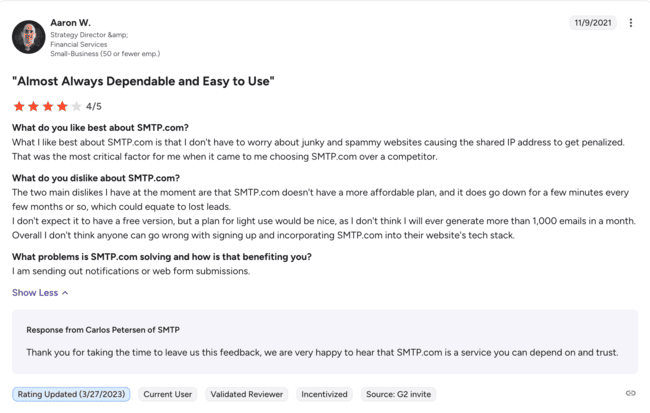
Although the SMTP.com reviews I found are sort of a mixed bag, I’ve noticed that its email API gets praise from people in financial services. For instance, Aaron here likes the shared IP address SMTP.com offers, but hopes for a more affordable plan:
Source: G2
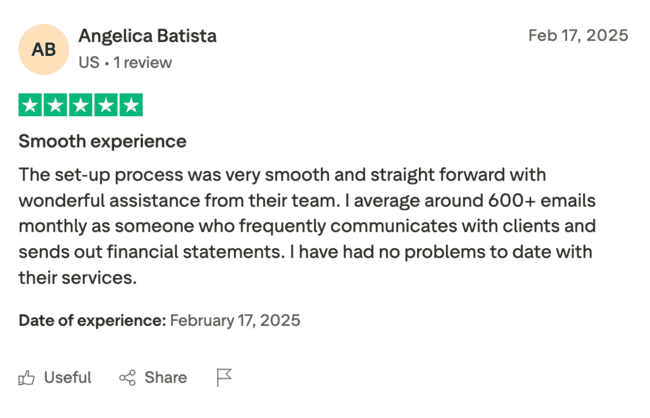
Another reviewer I found likes the straightforward setup and the help she received from the SMTP.com support team:
Source: Trustpilot
Get started with SMTP.com today
3. SendGrid
G2: 4.0 🌟 Capterra: 4.2 🌟
Supported SDKs: C#, Go, Java, Node.js, PHP, Python, Ruby
SendGrid is an email delivery platform that offers an SMTP and email API for developers, and tools for marketers.
It’s a solid choice for fintech companies as it offers plenty of deliverability features and Deliverability Insights for observing email performance.
Your dev team will appreciate SendGrid for the control it gives users over its email infrastructure. You can manually adjust IP usage and ending rates, and send emails from servers closest to recipients.
SendGrid states that it sends 100 billion emails every month, which means that the platform is quite scalable.
Some SendGrid security features that stand out are detailed IP access management and activity feed, and TLS / MTA-STS enforcement. It also has certifications for SOC 2, ISO 27001, and HIPAA. If you need logging for compliance audits, you’ll need to use Twilio’s security tools.
SendGrid Pros
- Deliverability insights
- Global data centers
- Deliverability consultation
- Email validation
- Consultation services
- Extensive API documentation
SendGrid Cons
- Customer support and dedicated IPs are limited to higher-tier plans
SendGrid pricing starts from $19.95 for 50,000 emails per month and has a free plan with 100 emails/day for the first 60 days.
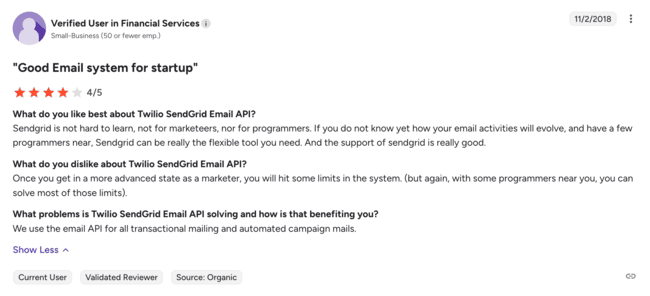
As for fintech user reviews, I’ve seen a few people mention that it’s tricky to use as a marketer if you don’t have devs nearby. Overall, they seem to be satisfied with sending transactional emails and automated campaigns:
Source: G2
I’ve also read a few interesting case studies on the SendGrid customers page. For example, you can see how Crypto.com used SendGrid’s API and ID verification to allow their customers to log in simply by clicking a magic link they receive in an email.
Try SendGrid for free or browse SendGrid alternatives
4. MailerSend
G2: 4.2 🌟 Capterra: 4.4 🌟
Supported SDKs: PHP. Node.js, Golang, Python, Ruby, Java, Laravel
MailerSend is a relatively new email API and SMTP provider, developed by the same team behind the ever-so-popular MailerLite.
It’s a solid choice for any fintech company looking to send transactional emails and SMS while having the ability to create professional email designs easily.
You can use the drag-and-drop or HTML editors to create designs, and most importantly, preview how they appear before sending them. MailerSend also has email split testing, which lets you see which headers, subject lines, or templates work best.
You can also insert personalized content, user-specific info, or market data. This is super useful for fintech companies. For example, you can send emails with personal transaction IDs, account balances, OTPs, and account lockout alerts via simple-to-use fields.
Another selling point here for fintech businesses is that you can verify your email list using the MailerSend bulk email verification tool or use the email address validation API to verify email addresses in real time. The best part is that you get code snippets for the validation logic, so you don’t have to do it manually.
Your developer team will also appreciate MailerSend webhooks, which support real-time event tracking and let you monitor system status.
MailerSend Pros
- SMS support
- Email verification
- Customizable templates
- Drag-and-drop + HTML editors
- Inbound routing
- Webhooks for event tracking and status monitoring
- Live chat support for all plans
MailerSend Cons
- Dedicated IPs are limited to the most expensive, enterprise plan.
The pricing starts from $7 per month for 5000 emails and 100 SMS + email verification credits. The free plan is also quite generous, offering you 500 emails per month and features like analytics, which are usually locked for higher-tier plans.
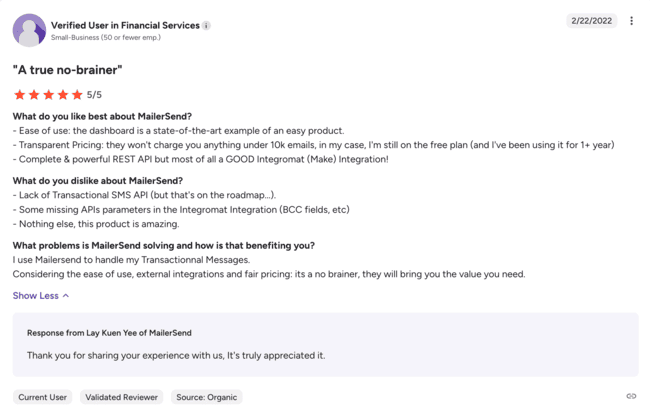
Since MailerSend is relatively new (launched in 2020), I didn’t expect to see many reviews about it online, but I was wrong. Its fintech users like how easy to use the platform is, how transparent the pricing is, and the powerful API integration that comes with MailerSend:
Source: G2
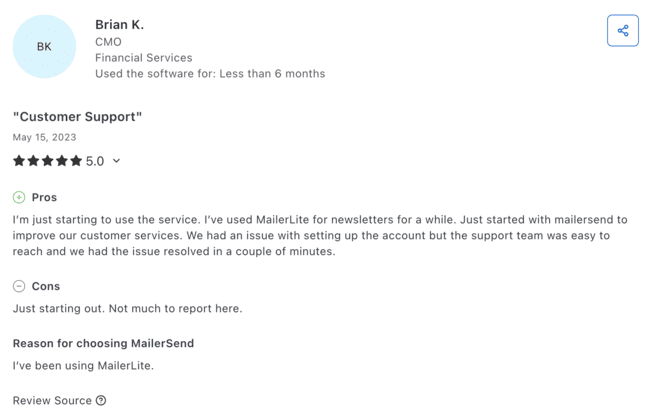
Some fintech users also say that MailerSend’s customer support team was reliable and helped them set up the account within minutes:
Source: Capterra
5. Mailgun
G2: 4.2 🌟 Capterra: 4.3 🌟
Supported SDKs: C#, Go, Java, Node.js, PHP, Python, Ruby
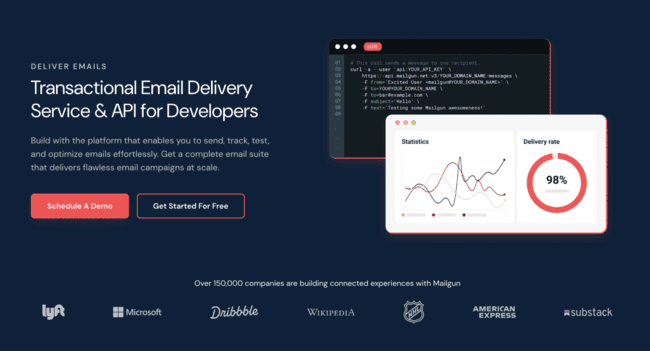
Mailgun is a developer-friendly SMTP and email API service provider that offers deliverability features and marketing tools.
Mailgun’s pricing model is on the more expensive side and more suitable for enterprise users and fintech businesses with high sending volumes.
Its selling point for fintech business is the Rapid Fire Delivery SLA, a service level agreement that promises stable delivery of up to 15 million emails per hour with a latency of under 2 seconds. Although this is useful if you plan to send burst emails, note that it’s reserved for enterprise plans.
I must also mention the Mailgun webhook API, which supports a variety of events (e.g., accepted, delivered, spam complaints, etc.). It can be configured at the domain level, which can be handy if you have multiple domains.
Mailgun lets you send emails from multiple regions worldwide from a single account since it’s hosted within both the EU and the US. This can be super helpful for complying with certain regulations, plus your recipients will get emails faster if they receive them from close by servers.
If you’re into AI, I have to mention that Mailgun uses AI to predict inbox placement, and optimize sending times.
Mailgun requires TLS and MTA-STS. This gives you granular control over user permission and keeps detailed event logs.
Mailgun Pros
- Drag-and-drop editor
- Templates API
- Email validation
- Various AI tools
- In-depth analytics
Mailgun Cons
- A lot of the advanced functionality is paywalled, like SLA or dedicated IPs
Pricing starts from $15 per month for 10,000 emails and you can send up to 3,000 emails on the free plan (100 per day).
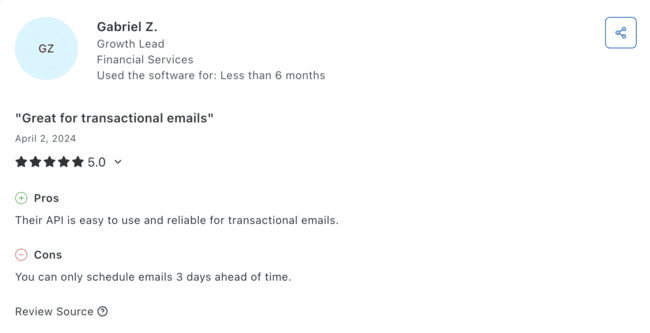
On user review sites, I came across many reviews that praised Mailgun’s API for being great for transactional emails. Like this short and sweet review, for example:
Source: Capterra
On Mailgun’s case studies page, I found a detailed report on how ZipBooks, an accounting software, successfully switched from Mandrill (now Mailchimp).
ZipBooks used Laravel, a popular PHP framework, to integrate with Mailgun and start sending transactional emails over a single weekend. They also set up bcc email sending functionality, which is perfect for any invoicing app, trading or payment platform. Read the detailed report here.
Try Mailgun for free or read our full review
6. Amazon SES
G2: 4.3 🌟Capterra: 4.7 🌟
Supported SDKs: Java, .NET, PHP, Python, Ruby, Go
Amazon SES (Simple Email Service) is an email delivery service that relies on Amazon’s cloud-based infrastructure and provides both an email API and SMTP.
It’s a safe choice for any fintech company that’s already knee deep in the AWS ecosystem or has a team of experienced developers.
To use Amazon SES to its fullest extent, you need to integrate it with other AWS services like Lambda for automating email workflows or CloudWatch for monitoring deliverability metrics and tracking bounces.
You have many ways to control your email infrastructure with Amazon SES. You can configure dedicated IP pools (these are super affordable), set up custom MAIL FROM domains, and implement authentication protocols.
Fintech companies can also scale quite well with Amazon SES, since the platform has a high sending throughput that starts around 50,000 emails per day.
Amazon SES has servers in the EU, the US, and Asia, follows all industry-standard practices, and offers CloudTrail and Data Process Addendum (DPA). Both can be useful for fintech businesses that want to stay compliant and secure.
Amazon SES Pros
- Rich API documentation
- AWS integrations
- Reputable IP addresses
- Servers in the EU, the US, and Asia
- Advanced webhooks
- Generous free plan and budget-friendly pricing
Amazon SES Cons
- Has a really steep learning curve if you don’t have experience with email sending or AWS
- The user interface and the dashboard are pretty minimal, barebones even.
Amazon SES has a super simple, pay-as-you-go pricing model. You pay $0.10 per 1,000 emails, which is essentially $1 for 10,000 or $10 for 100,000 emails. Also, you pay $0.12 per gigabyte (GB) of data you send via attachment, which might be useful to know if you plan on sending documents like financial statements, invoices, and identity verifications.
Additionally, you get 3,000 emails for free each month during your first year using Amazon SES.
Amazon SES seems to be getting a lot of love online, since I’ve noticed that people usually leave positive remarks about the platform. Most of them like how it sends transactional emails, pricing, API, and integration with the AWS ecosystem.
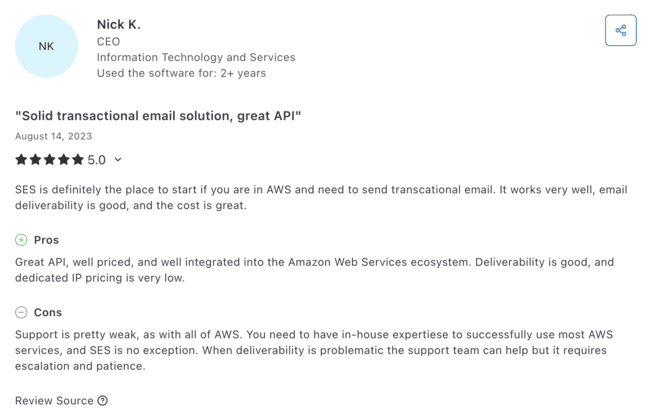
Source: Capterra
I also read some case studies on the Amazon SES customers page, most of which were relatively well-known SaaS companies.
There’s also a report by VirtualData.io, a software for processing unstructured data in legal, healthcare, and finance. They successfully used Amazon Bedrock to extract data from lots of FDA-regulated documents at once. Then processed it and delivered it to the customers via the Amazon SES API.
Check out our review of the best Amazon SES alternatives to compare
7. Resend
G2: 4.3 🌟Capterra: N/A
Supported SDKs: Node.js, PHP, Laravel, Python, Ruby, Go, Java, Rust, .NET

Launched in 2023, Resend is a new email sending platform that offers developer-friendly SMTP and email API for sending transactional and marketing emails.
It’s most suitable for fintech with strong developer teams who can make use of the extensive Resend integration and put to work integrations with AWS services like Lambda. For example, you can manage domain verification and DNS records by integrating Route 53.
Your developer team will also appreciate React email, an open-source framework you can use to design transactional emails using React and JSX. They’ll also be able to preview the emails in HTML or plain text on different devices.
Resend also offers integrations with Vercel via its streamlined Node.js SDK, auto-generating API keys and setting environment variables in your stead. This makes it ideal for sending real-time alerts, payment confirmations, and other important transactional emails with minimal setup and maximum reliability.
Another thing I liked is how transparent Resend is about its business operations. For instance, you can find everything about the company, from their work policies to which stack they use, and how they use RFCs in their handbook.
On Resend’s security page, I found out that the platform is compliant with SOC 2 Type II and GDPR.
Resend Pros
- Super clean UI
- Vercel integration
- Affordable dedicated IPs
- Thorough documentation
- Easy integration with code snippets
- Reliable customer support
Resend Cons
- Requires experience with APIs and templating systems to get the most out of it.
Pricing starts from $20 per month for 50,000 transactional emails and $40 per month for 5,000 contacts and unlimited marketing emails. There’s also a free plan that lets you send 3,000 emails per month or have 1,000 contacts.
Since Resend is still new, I couldn’t find many reviews about it online, although the ones I did find all seem to praise its API for documentation, analytics, and overall sending functionality.
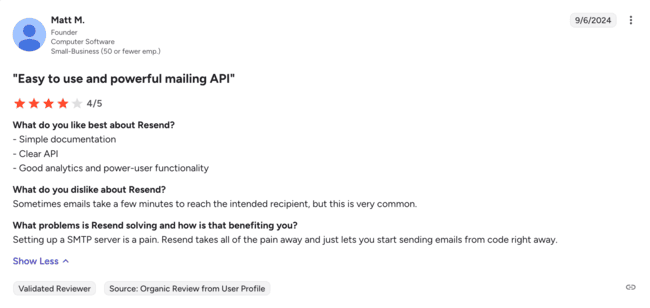
Source: G2
Resend’s customer page surprised me with how many successful companies use it to send emails. I also found three case studies on fintech companies (Fey, Shepherd, and Theya) who successfully set up sending functionality and now praise Resend for compliance, API transition speed, deliverability, and reliability.
Self-hosted
Although it’s not necessarily a dedicated email API service, I have to mention self-hosted solutions.
This method is best for fintech companies that want to have physical access to their physical servers and have a competent IT team to set it all up and maintain it.
To host your own server and start sending emails from it, you need to configure MTAs, set up DNS records, secure your server with TLS, manage sender reputation, handle on-premise hardware, and more.
As you can imagine, the cost of this setup can quickly ramp up, but if you have enough sending volume each month, it’s generally worth it in the long run.
The costs can add up, but you will also be able to handle data on your own and fine-tune your infrastructure according to the latest compliance and security requirements. This is especially useful for fintech businesses, which deal with sensitive financial information.
Self-hosted solutions offer granular control since you choose which protocols you enforce, how you configure spam filters, firewalls, etc. You can also meet marketing regulations easily since you control where data is stored, who can access it, and how long it’s kept.
If you’re interested in learning more about the differences, check out our article about email service providers vs on-premise solutions.
Self-hosted Pros
- Improved security
- Customizable
- Compliance control
- No ties to 3rd party providers
- Improved data ownership
Self-hosted Cons
- Not easy to set up
- Requires a team of IT experts to properly configure and maintain
The costs range from a few hundred dollars to several thousand dollars. The final amount of money you have to put aside for a self-hosted solution depends on whether you buy your own hardware or use a self-hosted platform (e.g., Mailcow, iRedMail, etc.), on the external deliverability tools you’ll use, and the number of devs you’ll hire.
Self-hosted servers don’t have ratings on G2 or Capterra, so I hopped on social media to find out what people have to say. I’ve come across different opinions, like in this Reddit thread, where one sysadmin recommends it:
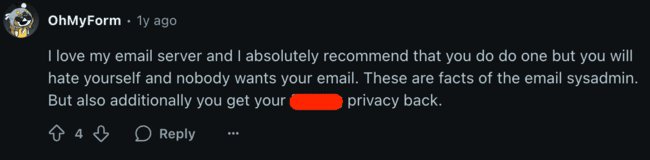
On the other hand, in the same thread, another user talks about his regrets of trying to host an email server:

Wrapping up
When looking for a specialized fintech email API, you aren’t just looking for allowed monthly email sends. You need high deliverability, reliability, and extensive documentation, just to name a few.
So, I recommend you to use the criteria I provided you in this article, check out the email providers on the list, and see what’s best for your team.
Remember: what might work for someone else, might not work for you, so be mindful of your business’ needs and your team’s requirements.
Here’s a summary of the top fintech email APIs:
- Best for high deliverability: Mailtrap
- Best minimal solution: SMTP.com
- Best for developers and marketers: SendGrid
- Best for transactional emails and SMS: MailerSend
- Best for developers: Mailgun
- Best for AWS users: Amazon SES
- Best for JS stack teams: Resend