
Beehiiv Review 2026: The best tool for creators?
 Paul Newham
Beehiiv is an excellent newsletter platform for anyone who wants to create, grow, and monetize their newsletters.
If you want to start with beehiiv or are considering it, this review is for you. It’s my take on the platform after a month of testing and comparing it to all my experiences with email marketing software. (I have tested over 40.) You may have heard a lot about beehiiv on social and Reddit already.
This review is the story of my own experience as a brand-new beehiiv user. I’ll give you my honest opinion as I walk through beehiiv’s main tools and features step-by-step. The bits I like and those I don’t like.
How is beehiiv different from other email marketing platforms?
With any good email marketing platform today, you can create and send a good-looking email. Add automation and personalisation, and you are ready to send monthly and weekly email newsletters. Beehiiv does all of this.
The biggest difference is that beehiiv helps you run a full newsletter program from one platform:
- Monetize and earn from your newsletter
- Grow your email list.
- Publish blogs
And now you know why it is so often compared to Substack and Kit, as they are the closest competitors.
- Beehiiv lets you publish your newsletters and you get a free blog. You can run a paid newsletter or community as well. Substack is more like a blog with an autoresponder. Substack takes a percentage (10%) off your paid newsletter subscription fees, beehiiv doesn’t.
- Beehiiv gives you more ways to monetize. Like via their ad network and recommendations. Where beehiiv sets itself apart from Kit is its list growth tools.
Because, after all, more newsletter subscribers mean more money. It has the usual sign-up forms. You can also create ‘Magic Links’ for one-click sign-ups and a full network of other newsletters that can recommend you. Then it offers a mix of organic and paid referral features.
Here’s a quick summary table of beehiiv, Kit, and Substack:
| beehiiv | Kit | Substack | |
|---|---|---|---|
| Audience Growth Tools | Great functionality Referrals, Boosts, Recommendations, Landing Pages, Forms | Great functionality Creator Network, Landing Pages, Paid Recommendations | Good functionality Recommendations, Network Discovery (no referrals) |
| Monetization | A lot of good options Paid subs, ad network, Boosts, 0% fee. | Some good options. Paid subs, product sales, tip jar, sponsorships | Few built in options. Paid subs only, 10% fee, no ad network |
| Automation | Visual automation builder with 8 workflow templates | Visual automation builder with tags, and triggers | None – all posts are sent to your audience if you turn that on, after that there is no automation. |
| Analytics | Detailed statistics Campaign & subscriber-level data+ source tracking | Standard statistics. Campaign & subscriber-level data | Basic analytics open/click rates, no segmentation |
| Price | Free for 2,500 contacts, paid plans, 0% rev share | Free up to 1,000 (or 10k); paid tiers, small % commerce fees | Free to use the blog, but costs 10% of paid sub revenue |
You see that Beehiiv is a pretty good alternative when compared with Kit and Substack.
Get a free beehiiv account and 20% off your subscription for 3 months if you decide to continue.
Beehiiv Review Summary
Short of time? Here’s the tl:dr version of what I learned about beehiiv.
- Beehiiv is a great tool for anyone who wants to create, grow, and make money from their newsletter.
- Earning through built-in subscription management, ad network, and recommendation system.
- Lots of ways to attract more subscribers, including their signup recommendation network.
- The email editor is the weaker spot. You’ll just have to try it out for yourself. It’s more like a blogging platform and works very well if you send text-based newsletters or simple designs with a few images sprinkled in.
- There’s a generous free plan with 2,500 subscribers to get started. Beehiiv’s paid plan is only $43 a month. And allows you to earn back all of that and even make money from your new subscribers.
- Beehiiv started in 2021, and the team comes from a publishing background. It’s a modern platform shipping new features and improving them quickly.
- It’s a solid pick if you want to grow and monetize a newsletter. Built by people who understand how to grow newsletters. It’s creator-friendly, packed with smart list growth and monetization features.
Get started with beehiiv for free
Beehiiv’s Core Features
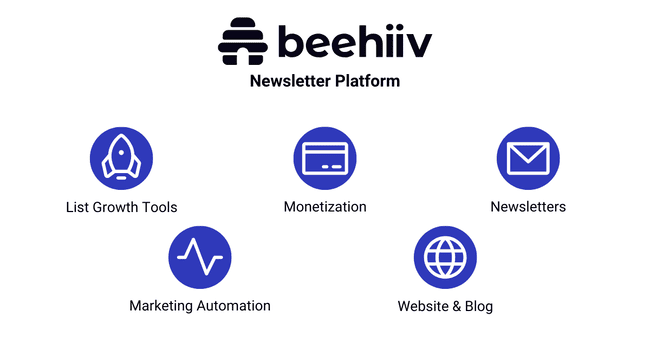
Beehiiv organizes its features into 4 categories. Tools for growing your audience, tools for content creation and publishing, data, and analytics. And ways to earn money. Here are the best tools:
- List Growth: Building an audience for your newsletter is beehiiv’s superpower. It has signup forms, pop-ups, and landing pages. Plus tools for organic and paid recommendations, referrals, and Boosts. Pete Huang, the Creator of The Neuron, grew his newsletter to over 10K subscriptions in a month. He says “There are some great things with beehiiv. We’ve picked up on recommendations and referrals and such.”
- Monetization: Beehiiv gives you the power to make money from newsletters with multiple ways to monetize your publication. From paid subscriptions to ads and sponsorship. And you can get paid for recommending other newsletters to your audience.
- Blog + Newsletter: Beehiiv newsletters are not just created to send out by email. They are also published as blog posts. You can build your own website to host your blog on.
- Editor: Beehiiv doesn’t have the conventional drag-and-drop editor most email marketing services have. It’s more of a blog editor experience where you start typing the content types you want. The design options are pretty limited, but it’s easy to use.
- Automation: Beehiiv’s automation workflow builder is user-friendly. It has a good choice of triggers and actions. And you can build advanced sequences with if/then conditional logic. Automation is mostly set up for onboarding and nurturing subscribers.
Beehiiv Pros and Cons
Beehiiv Pros
- Multiple ways to monetize: Beehiiv is strong in money making functions. There are paid newsletter subscriptions – without taking a cut of the fees. You can also run ads through the built-in Ad network and sponsorship functions. And earn commission each time you refer new subscribers to other publishers.
- Easy email list growth: Beehiiv goes way beyond most email marketing software on email list growth. The sign-up forms are the first part of it. And then the most powerful growth tools are newsletter recommendations from other publishers.
- Publish your newsletter on a blog: With beehiiv, you can create content and publish that in your newsletter and free blog at the same time. So your newsletter also lives on a blo, that’s easy to link to, gets SEO traffic, and you can even build a website to host your blog on.
- Great free plan: It is easy to start with beehiiv’s free plan with 2,500 subscribers, which includes recommendations and multiple publications.
Beehiiv Cons
- Limited email customization: In beehiiv, you create newsletters, which then get emailed to subscribers. There are a handful of email templates, and you can make them look as your brand, but beyond that, there are less design tools to customize how your emails look.
- Confusing navigation: We found that finding your way around beehiiv can be awkward at first. It doesn’t signpost all its features very well.
Get started with beehiiv for free
Is beehiiv for you?
Recommended if:
- You’re looking to grow your email list. Beehiiv’s excellent email list growth tools. Like the signup pages are excellent. And finding others to recommend your newsletter is easy. You can pay to grow and get paid with each new subscriber.
- You want to earn from your newsletter. The monetization is included. They could help you earn more, faster. Or even just a bit to offset the costs.
- You want to publish a blog with your newsletter. It’s particularly useful if you like the idea of using your newsletter as a blog and repurposing your newsletter content to promote it. Beehiiv does both in one place.
Not recommended if:
- If you want the absolute cheapest, and budget is your main concern. Beehiiv is a service that is especially good for creators. Loaded with a lot of cool functions it is oddly still cheaper than Mailchimp. But if you just want to send out a newsletter, there are cheaper email marketing services available, like MailerLite and Brevo.
- You’re an ecommerce business. Ecommerce businesses will find that it isn’t for them. There are many better ecommerce email marketing tools out there, like Omnisend. Beehiiv’s email editor is better for text instead of products and images. And you can only connect an ecommerce store with Zapier or Make if you’d like to sell some merch.
Beehiiv Review Rating Details
Ease of Use | Beehiiv’s tools are generally well-designed, and it has a user-friendly interface. If you are used to other email tools, the navigation is tricky at first. But you quickly pick it up. |
Newsletter Monetization | This is where beehiiv comes into its own. Great choice of ways to make money from your newsletter. And to grow your audience. |
Email Editor | Simple and user-friendly text editor. The options for customizing your design are limited. Comes with a handful of pre-made email templates. |
Email Templates | Very limited choice of just 7 templates. |
| Email Types | Beehiiv is a specialist modern newsletter platform. So mainly it’s all about sending newsletters. But you can send different types of emails as part of automations. |
Marketing Automation | The automation builder is user-friendly. And there is plenty of room to create advanced workflows. It could do with more workflow templates. |
List Management | Great flexibility to create custom data fields and add any tags you want. You can gather contact data using surveys and polls. This leads to excellent segmentation. |
Personalization | It’s easy to add any data you have about subscribers into newsletters using merge tags. You can also use them to set different content to appear to different segments. |
| Landing Pages & Forms | The landing page builder is basic and gives limited room to customize designs. Subscribe forms capture email addresses only. You can follow up with more in-depth surveys. I’d like to see survey templates and better design tools. The most powerful list growth tools are newsletter recommendations from other publishers. |
| Reporting & Analytics | In-depth analytics are supported by clear, user-friendly visuals. 3D analytics include detailed stats about subscribers, posts, and clicks. I like how beehiiv uses graphs to help you understand and act on your data. |
| Customer Service | The only way to get support from the beehiiv team is by email ticket. And that is only available on paid plans. But the knowledge base is packed with useful information. And it’s easy to find answers to any questions you have. |
| Deliverability | Beehiiv supports the SPF, DKIM, and DMARC authentication. You can also set up IP warm-up. And dig deep into key metrics about bounces and their causes. There isn’t any integrated email validation, so you’ll have to get an email verification tool to clean your list. |
| Spam and Design Check ✔️ | Beehiiv flags if your newsletters are likely to fall foul of spam filters. This includes things like your email file size being too big. |
| AI Writing ✔️ | The beehiiv AI writing assistant includes a translator, a spelling and grammar checker. And tools to shorten, extend, simplify and change tone of voice. |
| Integrations & API ✔️ | Beehiiv has 3 integrations with Zapier, Make, and Honeycommb. You can connect to thousands of apps with Zapier or Make. And you can use the API for building your own connections. |
| User Permissions ✔️ | There are 3 user permission levels. All team members can use the main tools. The others control billing, API and account settings access. |
| GDPR & Legal Compliance ✔️ | Beehiiv gives you the option to publish a sign-up ToS and privacy policy on your website. And cookie consent opt-ins. But these aren’t mandatory even for pages with subscription forms. |
| Interface Languages | Beehiiv is only available in English. |
| Customer Satisfaction | Beehiiv is highly rated by users. It gets 4.3/5 in Capterra reviews, and 4.5/5 on G2. |
Overall Score

Beehiiv is a solid pick if you’re serious about growing and monetizing a newsletter. It’s creator-friendly, packed with smart list growth and monetization features. Built by people who understand how to grow newsletters. It’s not perfect. Templates and navigation need work, but if you’re building a content-driven business, Beehiiv’s definitely worth a try.
Getting Started with beehiiv
Creating a beehiiv account takes about 6 minutes. First, you verify your email and phone number. This helps prevent spam and protects everyone’s sender reputation.
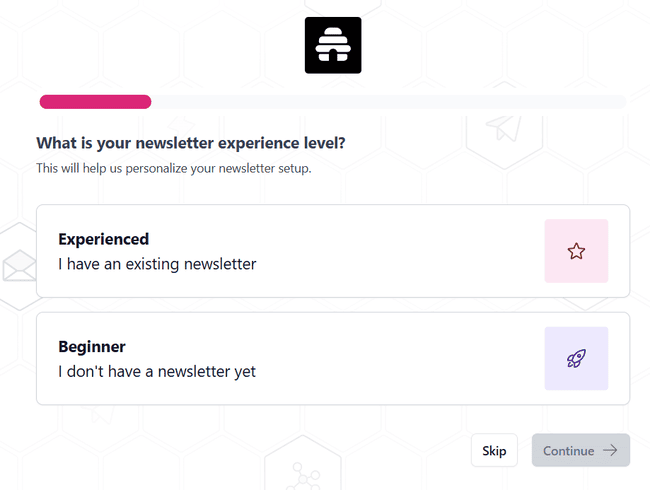
Beehiiv then takes you through account set-up. If you already have your own newsletter, you can import it from your old platform. Beehiiv handles the migration for you. The process depends on which platform you came from. You can import existing subscribers. And previous newsletter content. If you are moving from Kit, you can import invoices, too.
If you haven’t got a newsletter yet, beehiiv jumps straight into setting one up. Just be ready with details about your planned publication. Like, how often you plan to publish. And the content tags you want to add.
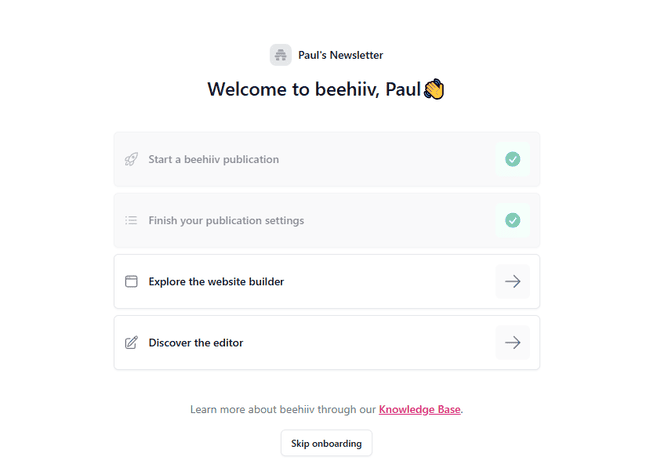
Overall, the setup process is very straightforward. Once finished, you see onboarding steps on your dashboard to explore the website builder and newsletter editor.
Get started with beehiiv for free
Beehiiv Review: Newsletter Platform
Beehiiv prioritizes features a little differently to most email marketing services. I’m used to the focus being all about creating great-looking emails. But in beehiiv, that takes a back seat to growing your audience.
Let me explain how it does that. And why it might suit you.
Grow your list with beehiiv
Beehiiv has what I’d call ‘traditional’ lead generation tools like landing pages and forms. But where beehiiv shines is the extra features on top of those.
I’ll start with landing pages and forms. To make a landing page, you go to the website builder:
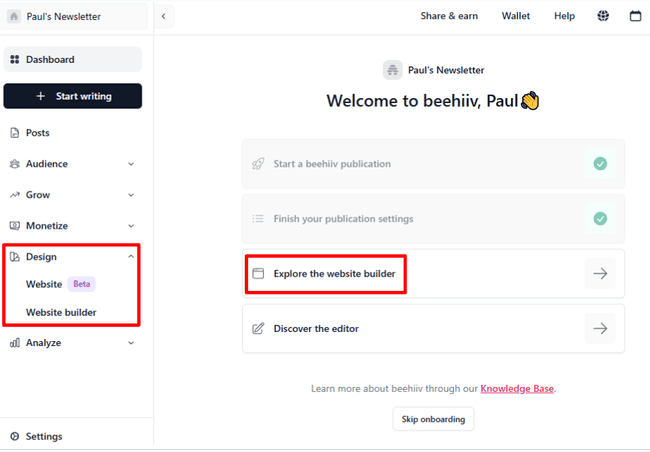
Beehiiv groups everything together. You build a website to publish your newsletter on. You can use this as an archive or as an actual website. There’s a clear emphasis on lead generation. Every Homepage comes with a Subscribe embed form already made. The other two pre-formatted page options are for a Signup Page and an Upgrade Page. And then, of course, your newsletters will be displayed there.
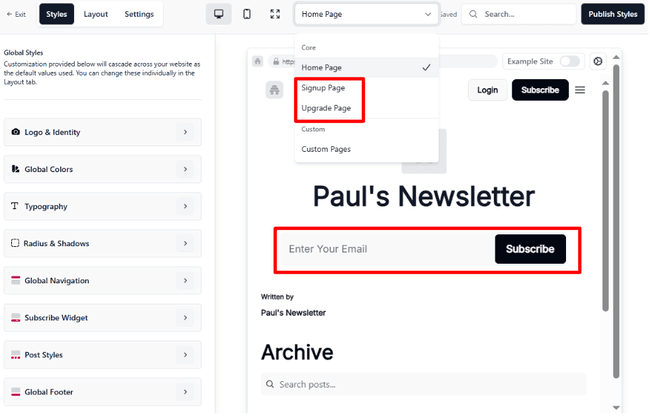
Beehiiv’s website builder is not a drag-and-drop editor. The benefit of this is you can build a site for your publication very quickly and easily. But there are only two templates. The plain, basic outline you see above. And one pre-designed Example Site, shown below. For even more speed and convenience, more templates would be a big plus.
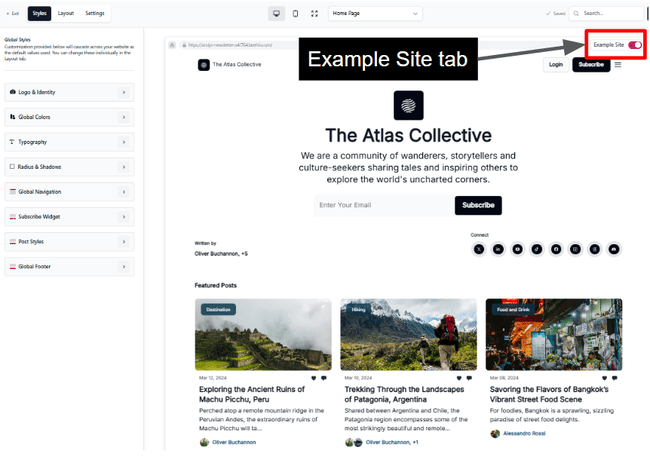
Beehiiv has recently launched their new website builder for every plan. But that goes too far for this review right now.
The Beehiiv’s landing pages have one type of form. You get a single field for email addresses and a button. You can make this a pop-up form. But there’s no option to ask for more info. There is logic to this. We don’t want it complicated. The more fields a signup form has, the less likely people are to complete it. So it makes sense to keep the first capture step easy. And then ask subscribers for more details directly after.
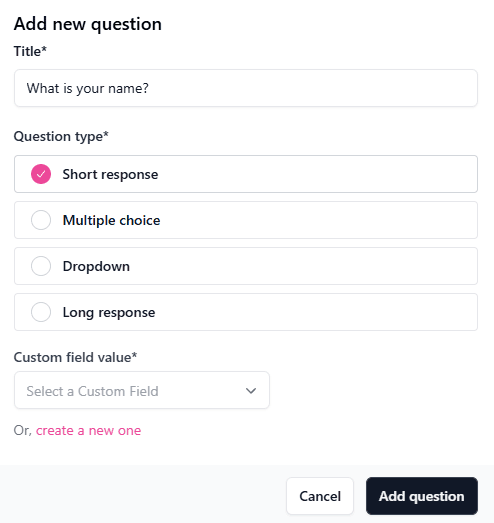
In beehiiv, this is easily done in Audience >Surveys, where you can build forms with any custom fields you like to capture any data about your subscribers. It’s a simple wizard-type builder.
Referrals, Recommendations, Magic Links & Boosts
Beehiiv chooses simplicity with its landing pages and forms. But it more than makes up for it with its other growth tools. All of these are in the Grow menu.
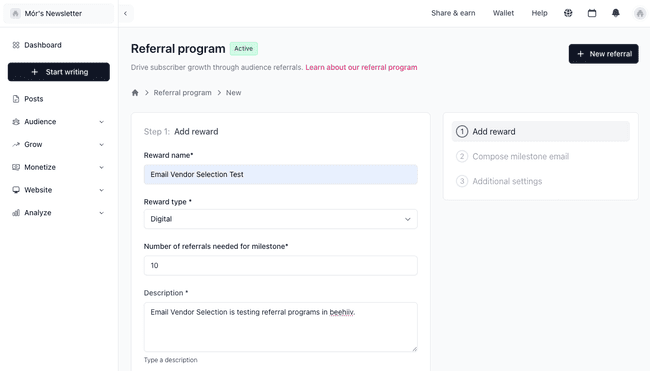
Recommendations work in a similar way but for other publishers. There are no incentives this time. The reward is a mutual benefit for publishers who plug each other’s newsletters.
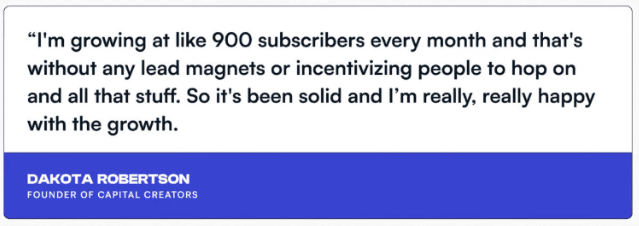
Does this work? The publisher of one of beehiiv’s most successful newsletters thinks so. Wrongs to Write gets around 900 new subscribers every month. In this interview, publisher Dakota Robertson says all his new subscribers are organic. And that he is a big fan of beehiiv’s Recommendations.
Boosts work like a paid-for version of recommendations. You pay to get recommended in other newsletters. You only pay for genuine, engaged subscribers after they signed up. So it’s a very interesting option for quickly building an engaged audience. As we’ll see later in monetisation, boosts are also a nice way to make some money yourself by recommending others.
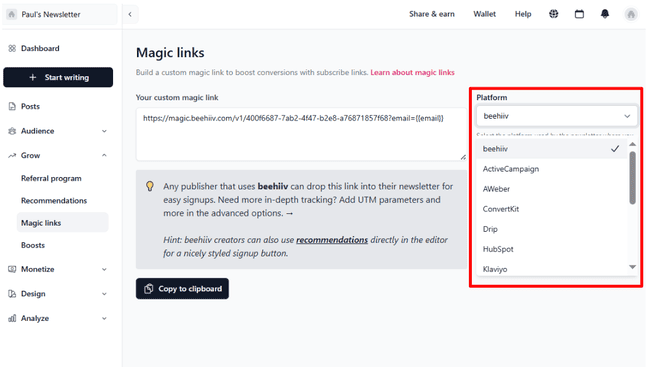
Finally, Magic Links makes recommendations even easier with one-click sign-ups. Any other publisher promoting your newsletter via email doesn’t need to send leads to a signup form. Clicking on a Magic Link completes the subscription automatically. The links are specific to other email services, like ActiveCampaign, HubSpot, Kit, Klaviyo, Mailchimp, and more. Beehiiv users can also use Magic Links in their own promotional emails.
Get started with beehiiv for free
Creating and sending newsletters with beehiiv
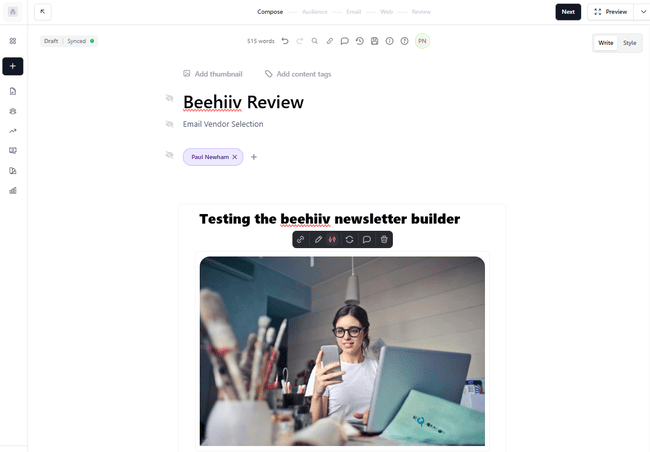
Creating a newsletter in beehiiv is different to most email marketing platforms I’ve used. For one, it doesn’t have a drag-and-drop HTML editor. Just the kind of text editor typical of a blogging platform.
That makes creating your publication very simple. If you already run a blog or newsletter, you’ll already be familiar with these types of tools. It’s just like typing in Word or Google Docs, super simple.
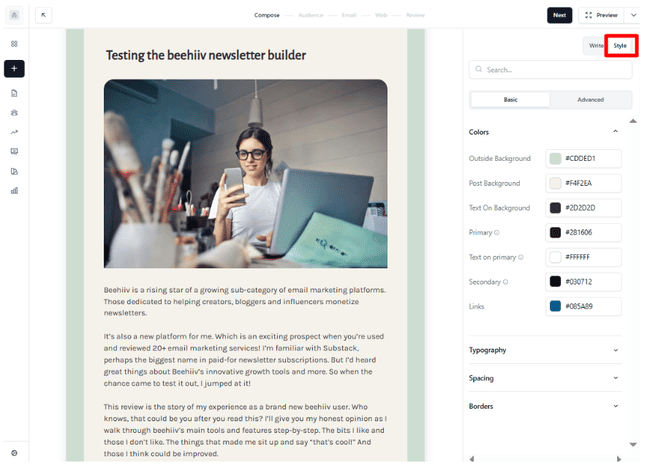
All the options to make the email fit your brand are under the Style tab in the top right. You can change colours and fonts. And adjust spacing and borders. Under Advanced styling options, you can style ‘widgets’ for CTA buttons, lists, and tables. You also get extra image formatting options here. That sounds like a lot, but actually customization is pretty limited if we compare it to other email marketing services.
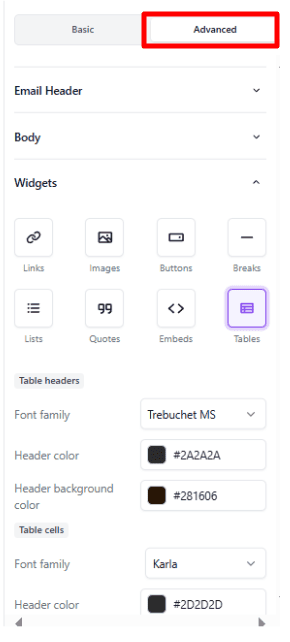
Again, the focus is simplicity. As a blogger or writer, your want to focus on the quality of your content. More than on elaborate visual email designs. Beehiiv keeps that side of things very stripped back.
Where beehiiv gets more interesting is personalization. You can add information relevant to each recipient to your newsletter. And you can also switch what content they see with dynamic content.
You can do both of these things with merge tags. Merge tags link data held about your subscribers to your newsletter. In beehiiv, typing in a double {{ bracket shows all merge tags:
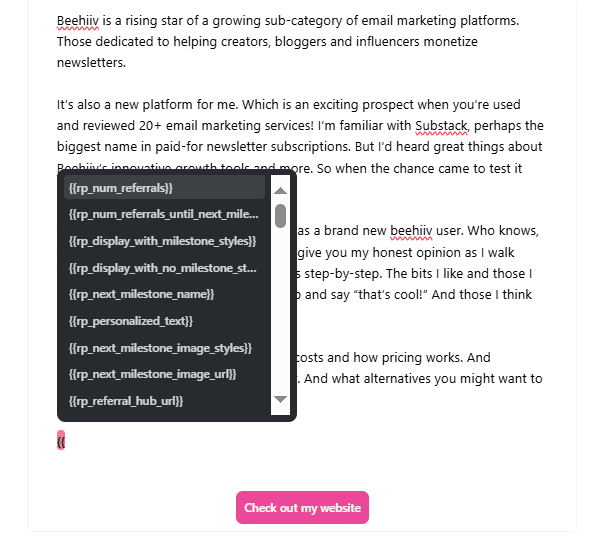
The list of pre-formatted tags is impressive. You can also create your own to personalize with any information you like.
Where beehiiv stands out is that you can also track subscriber behaviour. And use that to personalize emails. For example, the image above shows merge tags linked to referral milestones. You can use these to show how many referrals a subscriber has made. And how many until their next reward milestone. You can also use this data to show different images and text.
This gets us into dynamic content. You can use subscriber data to create audience segments. So everyone who has X number of referrals. Everyone in a particular country. Everyone who has subscribed in the last X months, etc. You can then use these as rules for displaying different content.
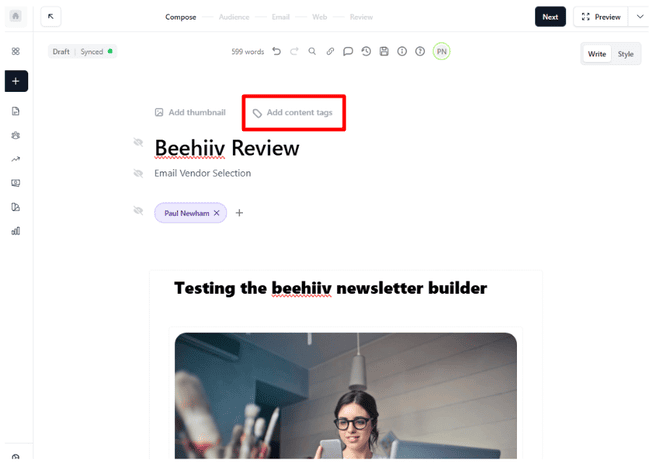
Don’t confuse merge tags with the Add content tags option on the Write page. These tags are for organising your publications on your website:
Once you’ve finished creating your email, it’s on to sending. In Audience, you decide who will receive your newsletter by email. In Email, you add your subject line. And activate social links to make your newsletter easy to share.
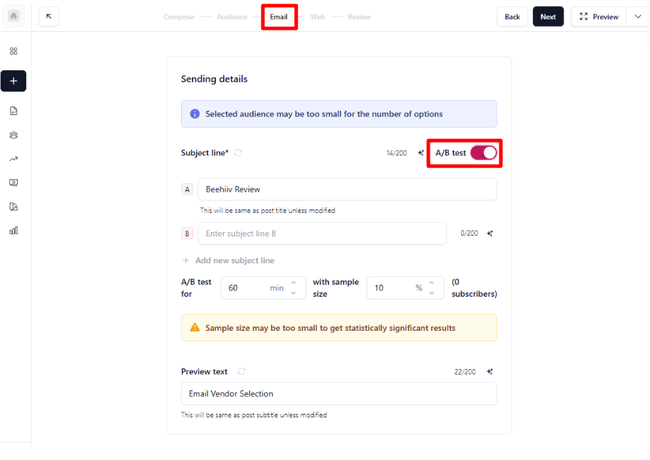
You can A/B test up to four subject lines. This beats just comparing two subject lines for how they affect open rates. And I like that you can set a time limit for the test to run. It’s just a shame that subject lines are the only thing you can test (for now).
Finally, the Web tab includes a long list of settings for the post. This includes beehiiv SEO and visibility options. The latter lets you control who can see your post. E.g. paid subscribers only. Or everyone who has a link.
Newsletter Templates in beehiiv
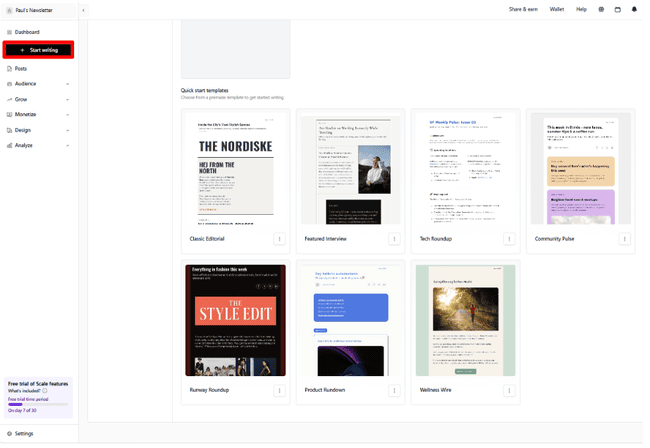
The Start writing button in the top left main menu shows you beehiiv’s newsletter templates. There are 7 templates to choose from.
As with landing pages/websites, I think beehiiv misses a trick here. Yes, you don’t need fancy, complex visual designs to make a great newsletter. As a writer, you want to keep that side of things simple. But templates do make design simple. They do half the work for you.
Get started with beehiiv for free
Monetize your newsletter with beehiiv
Let’s get into what you’re probably most interested in about beehiiv. How it helps you make money from a newsletter.
Beehiiv gives you four ways to make money from your newsletters:
- Paid subscriptions
- Boosts
- Ads
- Direct sponsorships
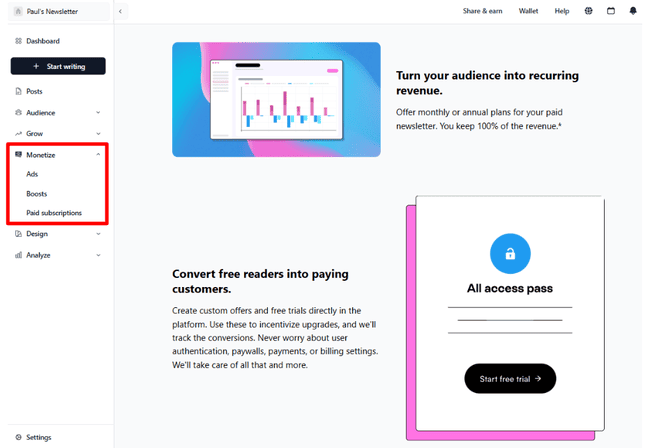
Paid subscriptions are the most obvious way to make money from a newsletter. Plenty of other platforms offer this. Including some more general email marketing services. But beehiiv’s subscription feature stands out.
For one, you keep 100% of your subscription revenue. Beehiiv doesn’t take a cut. You can charge monthly or annual subscriptions. And beehiiv handles all aspects of payment and billing for you.
Beehiiv also has features for encouraging subscribers to pay. You can set up free trials and time-limited offers. The personalization tools are also a great help here. You can set up newsletters with extra content for premium subscriptions. But your free followers still get something.
Subscriptions can be a solid source of recurring income for your newsletter. But if you really want to make big money, beehiiv has more to offer.
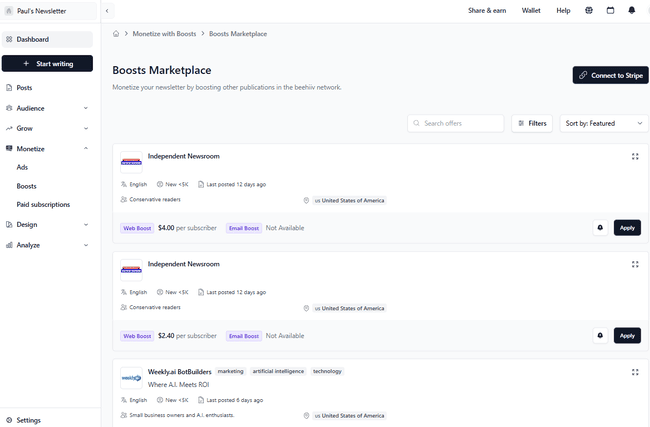
I’ve already mentioned Boosts. And how they can grow your audience through paid-for referrals from other publishers. That works both ways. You can also earn by being paid to promote other newsletters.
Beehiiv manages this via its Boosts Marketplace. This shows all publishers looking to pay for referrals. You can sort them by location, language, and category. You have to connect a Stripe account to accept payment.
Boosts are a popular and lucrative feature for beehiiv users. Matt Navarra, publisher of the Geekout newsletter, calls it “free money”. He has earned $25,000 from paid referrals alone.

Beehiiv also has a large Ad Network. There’s a learning curve to advertising. Beehiiv takes care of as much as it can. Including matching advertisers with the right newsletters. But you have to do some work refining your Preferences to help beehiiv find the best matches. You also need a newsletter with a decent audience to attract advertisers in the first place. So it’s not a monetization option for new publications.
Beehiiv groups direct sponsorships with Ads. The beehiiv partner program is not available until the highest paid tier. In effect, sponsorships work as a more direct way to sell advertising space. You get more freedom to sell larger packages and build longer-term partnerships.
Ads and sponsorships are the most lucrative way to make money in beehiiv. Many of beehiiv’s top-earning publications make their money from ads. For example, AI newsletter Cyber Corsairs made $65,000 in just seven months, mostly from advertising. The Vincent family of investment and finance newsletters, meanwhile, make 100% of their revenue from advertising and partnerships.
Monetize your newsletter with beehiiv
Marketing Automation in beehiiv
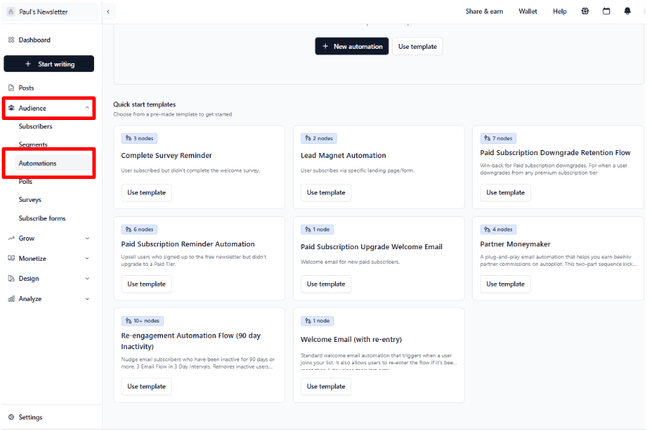
Beehiiv’s marketing automation surprised me in a good way. There are 8 pre-built workflow templates. They are all focused on subscriber growth and monetization. I like the fact that beehiiv describes what each workflow does clearly in the preview. Including how many steps or ‘nodes’ each sequence has. This also shows you can build some pretty advanced workflows.
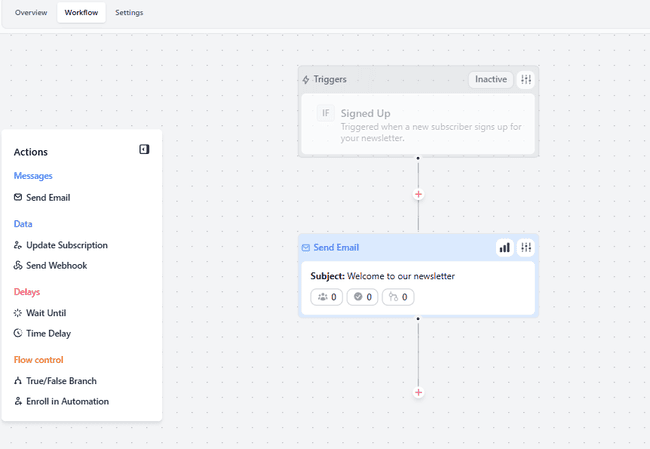
The templates range from a very basic one-step welcome workflow. To an advanced 10-step re-engagement workflow for inactive subscribers. In between, you get a sequence welcoming new paid subscribers who have upgraded from free. One to remind new subscribers to complete an onboarding survey. A payment reminder template. And one for managing partner commissions.
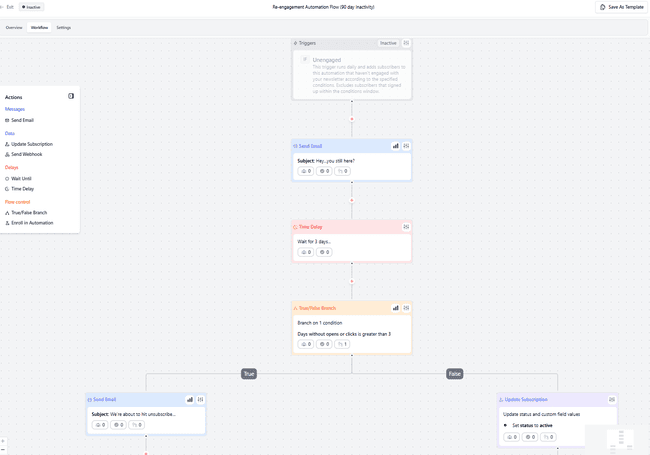
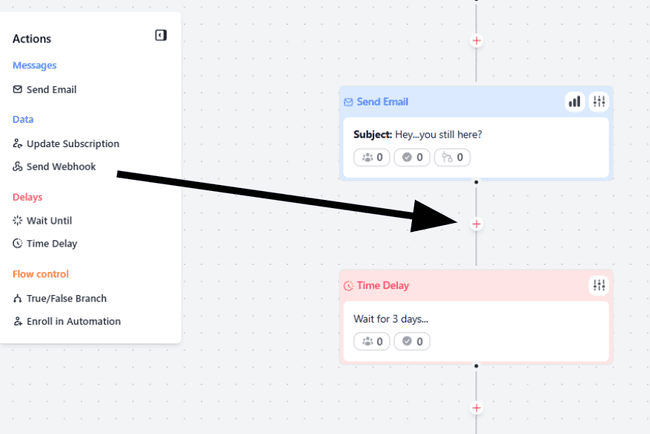
All automations are fully customizable. The editor doesn’t take long to get the hang of. Key actions are listed in a box to the left. You drag and drop these into position to add a new step. You can add as many steps as you like.
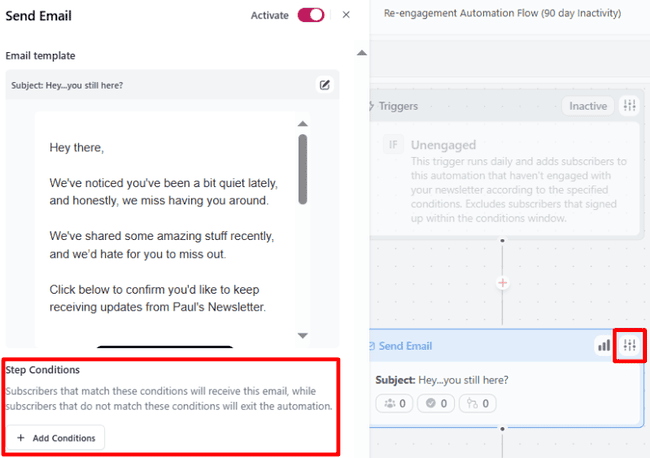
Each action can be edited by clicking the slider icon in the top right of each box. One thing I really like is that you can set conditions for each action. This lets you get specific about how, when and why each action takes place.
Beehiiv’s automations also work well linked to third-party platforms. A lot of its biggest publishers use them to automate connections to social media. For example, Dakota Robertson uses beehiiv’s welcome sequences to onboard followers from Twitter. He says this is a crucial step in converting leads into customers.
Managing contacts in beehiiv
List management goes hand in hand with beehiiv’s focus on list growth. Its big strength is the ability to create custom data fields and tags for each contact.
Data fields are information you gather and store about each contact. You can gather new data by running surveys and polls. You just link questions in a survey to a custom data field.
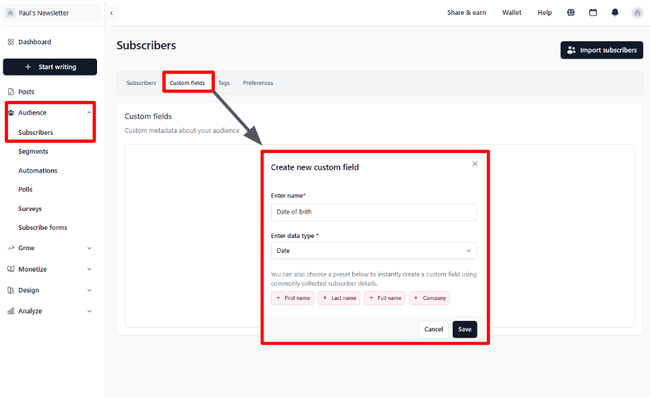
Tags are more for internal use. They tell you extra information about a contact. But this isn’t data that is held as part of their profile. So, for example, you might want to tag contacts by which form they signed up with. Or who they were referred by. I like the way beehiiv lets you color-code tags, too. This helps you see groups of contacts quickly.
Using segments in beehiiv
Custom fields and tags let you segment your subscribers any way you like.
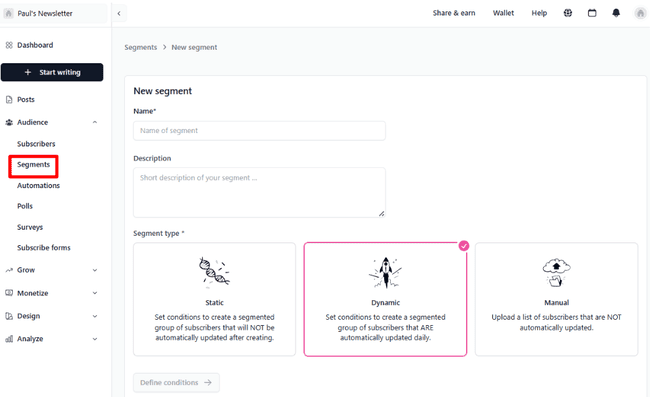
Beehiiv is excellent for this. A cool feature is that you can make your segments dynamic. Meaning that whatever criteria you set, beehiiv updates who fits them. This is ideal for building segments for any customer data that changes over time. Like referral points.
There are four main ways you can segment your beehiiv list:
- By contact attributes, including custom fields and tags.
- By engagement, e.g. number of opens and clicks within a fixed time period.
- By email or automation data. This means sorting contacts by which emails received. Or which workflow they’ve been through.
- By behaviour data. This includes survey and poll responses. And referral count.
What makes beehiiv’s segmentation so powerful is that you can combine as many of these as you like with AND/OR operators.
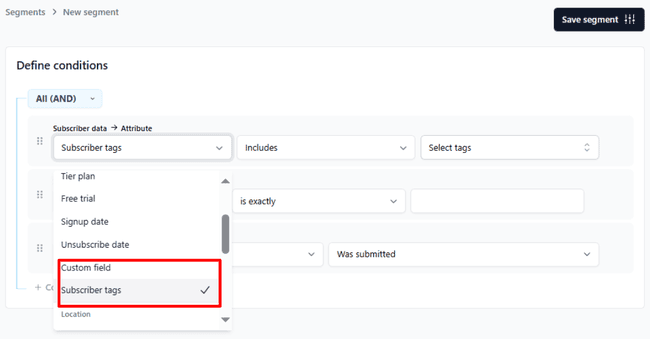
The ability to create segments with behaviour data is a sign of high-quality segmentation. It means you can identify your most loyal subscribers by open and click rate. And target them with special offers or premium content, for example.
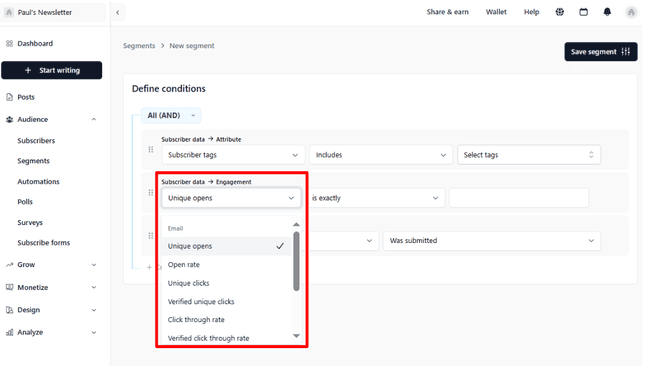
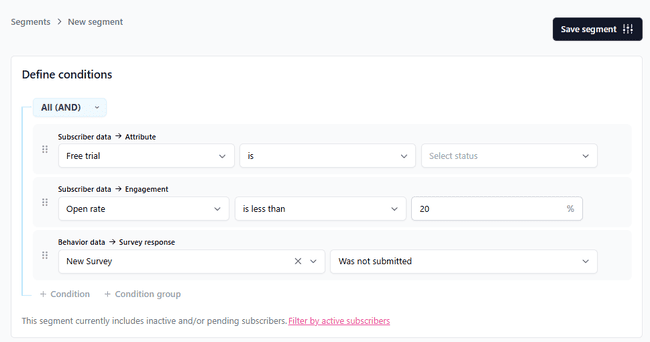
You can also identify users with low engagement. And reengage or remove them from your list. This means you don’t waste time with disinterested subscribers. For example, the below segment sorts out people who take part in a free trial. But don’t read many of your newsletters. And don’t complete an onboarding survey.
Analytics in beehiiv
Beehiiv goes big on data. This doesn’t surprise me. It stakes its reputation on growing your online business and making you money. Strong performance is key to both. And data unlocks strong performance.
The main account dashboard is an analytics dashboard:
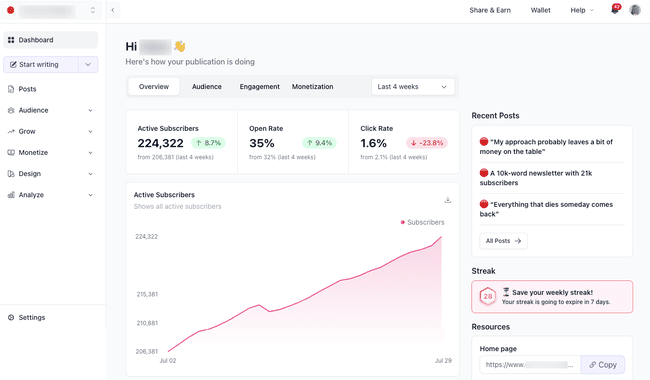
This gives you all the headline performance information you need for your publication. In the Overview tab, you can see top-level data like overall open and click rates. It also shows the number of active subscribers you have.
The other dashboard tabs let you dig deeper into:
- Subscriber data (Audience)
- A more detailed breakdown of open and click rates (Engagement)
- And headline earning figures (Monetization).
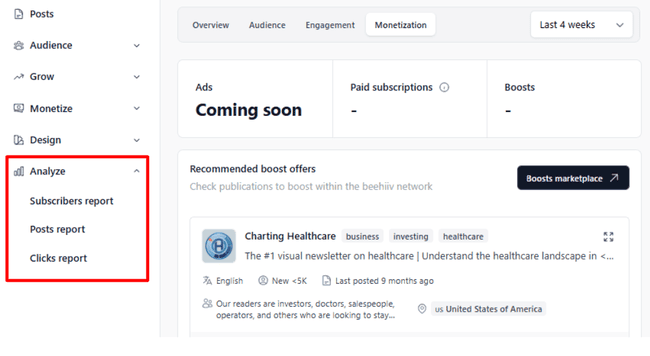
But this is still just the tip of the iceberg. Beehiiv’s full reporting options are under the Analyze tab. Here’s where what it calls ‘3D analytics’ kicks in. What this means is that beehiiv breaks reporting down into three ‘dimensions’:
- Subscriber analytics
- Post analytics
- And Click analytics
You can’t help but be impressed by the level of detail beehiiv’s analytics goes into. A full description is beyond the scope of this article. But to pick up some highlights, here’s an example of what the Subscribers Report Overview looks like:
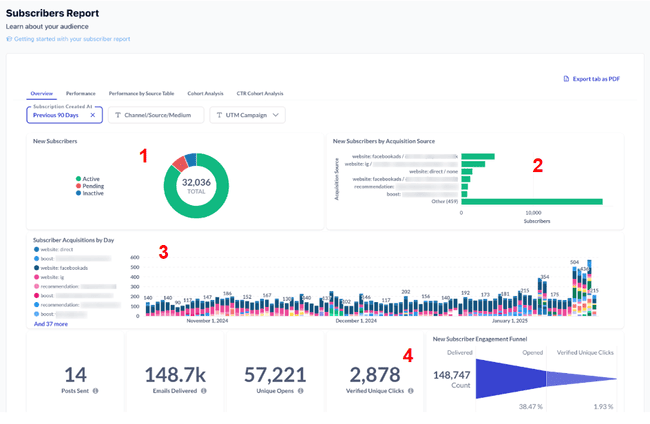
There’s a lot to unpack just here. The four charts show:
- Number of active, inactive, and pending subscribers.
- New subscribers by acquisition source.
- New subscriber acquisitions by day. The different colours on this bar chart show different activities. So things like posts sent, emails delivered, opens, and clicks. The idea is to see how activity influences your subscriber growth.
- New subscriber engagement funnel. This visualizes how many emails sent to new subscribers convert to opens and then clicks.
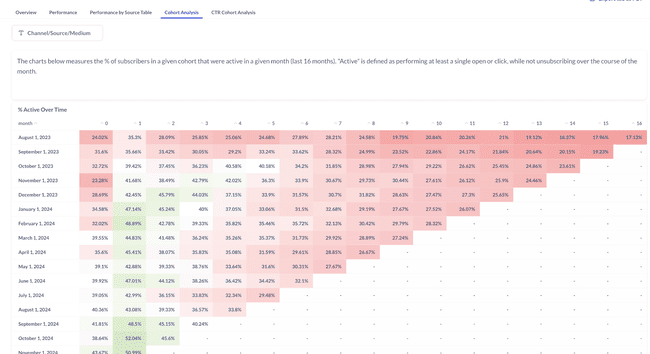
This is real pro-level marketing analytics. There’s a bit of a learning curve getting to grips with how to use them effectively. But I like the fact that beehiiv uses visualizations to help you. The rest of the subscriber report tabs drill down into even greater depth. For example, Cohort Analysis tracks new subscriber activity over 16 months. This helps you see if a certain new ‘cohort’ is active for a while, but then starts to lose interest. And then look at why that might be.
It’s a similar story with Post and Click reports. Every post you make gets its own detailed reports page. This shows the basics like opens, clicks, and any unsubscribes after receiving it. But it also breaks down which links got clicked. And shows who interacted with a post. Whether that’s clicking a link, sharing, or adding a comment. You can toggle post analytics between email only, web views only, or both.
The Clicks report shows link-by-link click analysis. Rather than just links in a single post, the Clicks report tab includes all links in all posts. You can set a timeframe you want to analyze. And search for specific links by keywords in the URL. Link analysis is an excellent way to understand how to get more conversions.
One great thing about beehiiv’s click metrics is that it measures what it calls verified clicks. This means it filters out clicks by bots that distort your data. And you get a true picture of how many humans are clicking your links.
Beehiiv Integrations and API
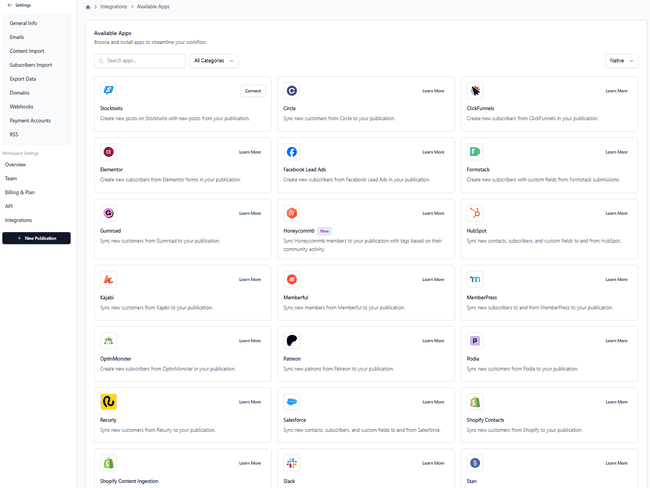
Beehiiv has 3 native integrations with Zapier, Make, and HoneyCommb. With Zapier and Make, you can connect almost any tool you use without coding. Alternatively, beehiiv has an API to integrate beehiiv with any other software.
Get started with beehiiv for free
Beehiiv Pricing Plans: How Much Does It Cost?
Beehiiv has three pricing tiers. A Free plan. A standard paid plan called Scale. And a premium plan called Max.
| Free | – 2,500 contacts – Unlimited email sends |
| $49 | – 1,000 contacts – Scale plan with unlimited email sends, automations, monetization features, and 3D analytics. |
| $69 | – 2,500 contacts – Scale plan with unlimited email sends, automations, monetization features, and 3D analytics. |
| $89 | – 5,000 contacts – Scale plan with unlimited email sends, automations, monetization features, and 3D analytics. |
| $109 | – 10,000 contacts – Scale plan with unlimited email sends, automations, monetization features, and 3D analytics. |
| $169 | – 25,000 contacts – Scale plan with unlimited email sends, automations, monetization features, and 3D analytics. |
The free plan is a good starting point for launching a newsletter. You can run three different publications. And within each, send as many newsletters/emails as you like. You can create websites to host them on. And build your audience with forms and recommendations. You also get full access to analytics and segmentation tools. Another plus is that you get a free custom domain for a website.
The catch is that the free plan won’t let you use the monetization features. So it may even be cheaper than free (!) to start with the Scale plan. If you are expecting to do some ads or recommendations.
You can easily earn more on beehiiv than the cost of a monthly subscription, but if you are extremely budget-focused and don’t care about the monetization, growth, and blog publication there are even cheaper email platforms. The Scale plan starts at $43 a month and includes paid subscriptions, advertising, and Boosts. It also unlocks automation and AI writing.
The Max plan is designed for larger teams. You get unlimited seats and can run 10 different publications. Other bonuses include tools to create podcasts and priority support. And it removes beehiiv branding from your newsletter.
There are also 30-day free trials for the Scale and Max plans. But you don’t get to try out all the features. Monetization tools aren’t included, for example.
Exclusive discount
Beehiiv offers a generous discount for our readers to help you get started on your favorite plan. Sign up to Beehiiv for free and get 20% off for 3 months.
Beehiiv Customer Support
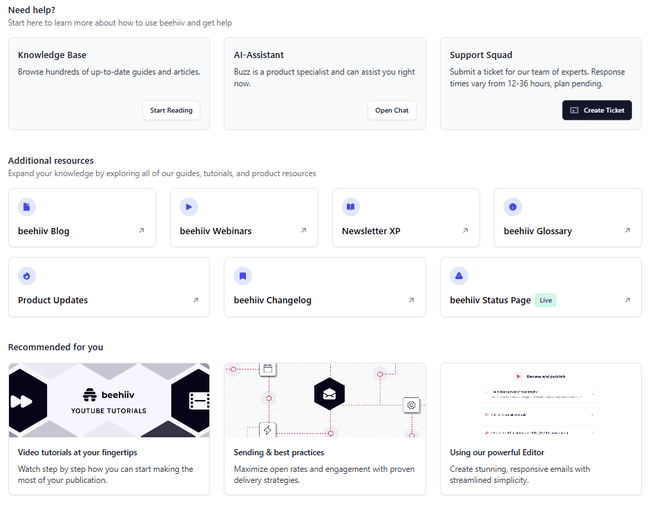
Beehiiv’s support is mostly online self-help rather than customer service. The only way to contact the beehiiv team for help is via email ticket. There is no phone support and no live chat beyond a chatbot.
On the plus side, I am impressed by beehiiv’s knowledge base. It has multiple articles on all the topics we tried to look up. Clearly labelled and easy to find. And the step-by-step guides to using different tools are particularly useful. There are also video tutorials, webinars, and glossary pages.
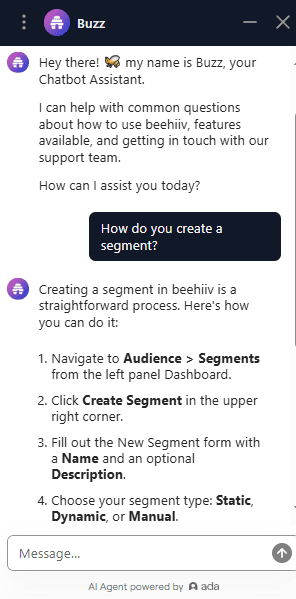
Beehiiv does have an AI chatbot to help you answer queries. I didn’t find it much quicker than searching the knowledge base. Especially if you want more in-depth help.
Final Conclusion: Is beehiiv the right newsletter platform for you?
So what are the main takeaways from my beehiiv review? I love a lot of what beehiiv does. It makes for a great creator-friendly newsletter platform. It’s innovating in email marketing and how you turn a newsletter or a blog into a business. Its audience growth and monetization features are top tier. I’m also impressed with its automation, segmentation, and analytics tools.
I think beehiiv will get even better. Some of its navigation is clunky. It could improve its design tools, especially by providing more templates.
So is beehiiv the right newsletter platform for you? It’s worth checking out if you have ambitions to start and grow a successful monetized newsletter. The growth and monetization tools are more effective the bigger you are. Get started with beehiiv for free.
Beehiiv Frequently Asked Questions (FAQ)
Can you make money with beehiiv?
How much is a beehiiv subscription?
How much do people make on beehiiv?
Can you use beehiiv for free?
Does beehiiv Boosts work?
Beehiiv Alternatives
Beehiiv vs. Mailchimp
Mailchimp is a marketing platform with email marketing, marketing automation, and website-building tools. You can also run SMS and social media campaigns.
Beehiiv is purpose-built for anyone who wants to craft, grow, and monetize newsletters. You can earn money from subscriptions, paid referrals, ads, and sponsorship. Tools for all of these are available in Beehiiv. Mailchimp doesn’t have any native monetization options. You have to connect to third-party apps.
If your focus is on growing your list or earning money directly from a publication, beehiiv is the clear winner.
Learn more in our Mailchimp review or find the best Mailchimp alternatives here.
Beehiiv vs. Kit
The main difference between Beehiiv and Kit is the type of newsletters they are best suited for. Both beehiiv and Kit are similar in their approach to monetization. Both offer paid subscriptions, recommendations, and sponsorship. But where beehiiv runs its own built-in ad network, Kit has commerce tools. So you can sell digital products from within your newsletter. Kit is also set up for email-only newsletters. It has better design tools and more templates.
Kit suits commerce-focused newsletters where the aim is to sell directly to the audience. Beehiiv is more for creators who want their publication to be the product. Beehiiv’s ad network also suits larger newsletters and offers more earning potential.
Check out our Kit review to compare it with beehiiv.
Beehiiv vs. Substack
The main difference between Beehiiv and Substack is how they monetize newsletters. Both treat newsletters as blog-like publications. Which then get sent out by email to subscribers. Both allow you to charge for subscriptions. This is Substack’s main way to earn money. And it takes a 10% cut of subscriptions. Beehiiv lets you keep 100% of subscription earnings. And has other monetization options like ads and paid referrals.
Substack is simpler to use. It’s an ok choice for casual writers. Who may like the idea of earning money somewhere down the line. Beehiiv has more features. It suits creators who want to grow their audience and earn a bit more.