
GetResponse Review 2026 – Is this the best tool for you?
 Rukham Khan
Finding the perfect email marketing tool can be tough. There are many parts to consider: How easy it is to use, features, and of course price. GetResponse is one of the best email marketing tools around and is very popular. But is it right for you?
You might have seen GetResponse user reviews. That’s a good way to start your research but it doesn’t tell the whole story. Our review of GetResponse is based on extensive testing and research. We use our industry experience and knowledge of dozens of other email marketing and marketing automation software.
In my GetResponse review, I’ll take you through all the details of the software and save lots of time.
GetResponse email marketing software summary
- GetResponse is a powerful email marketing tool with smart automation features.
- Setting up campaigns is super easy. GetResponse helps you at each step of the way.
- Lots of templates available for emails, landing pages, funnels, and forms. Although some can do with an update.
- I loved the easy integration with analytics and other software.
- Pricing is competitive and it’s easy to scale as your business grows.
GetResponse’s Core Features
GetResponse is a full-featured email marketing and automation tool with all the nuts and bolts you’d expect. Here are GetResponse’s most important features:
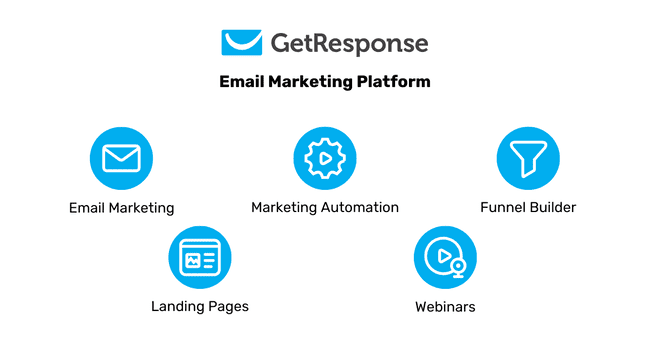
- Drag and drop email editor: Creating marketing emails and newsletters is easy. Drag content blocks on the canvas and edit them directly. Add special elements like images, video, and products to your emails.
- Email templates: GetResponse comes with 120+ email templates. You can save templates for future use, design in HTML, or build your own design from scratch.
- Funnel builder: Create complete sign-up and sales funnels. Funnels let you sell more and grow your email list.
- Marketing automation: GetResponse is full of marketing automation features. Create autoresponders, drip campaigns, and complex workflows. GetResponse automations have lead scoring to single out your hottest leads.
- A/B testing: The backbone of every successful campaign is testing. In GetResponse, you use an A/B testing wizard for emails and landing pages, and automatically use the best version as the winner.
- Landing pages: Build landing pages with a drag-and-drop editor. GetResponse’s landing page editor can add forms and videos. The pages are hosted by GetResponse, so you don’t need separate hosting.
- Customer support: GetResponse has a responsive support team. There is a knowledge base, a help center, and 24/7 email and chat support.
- Integrations: Sync GetResponse with 65+ tools, including CRM or eCommerce platforms. You can make custom integrations with the GetResponse API or Zapier.
GetResponse Pros and Cons

Pros
- It’s beginner-friendly but also offers advanced tools. GetResponse is intuitive enough to build your first campaign in about 10 minutes. And it offers advanced automation, lead scoring, dynamic content, funnels, and webinars.
- It’s an all-in-one marketing platform. You get email marketing, landing pages, signup forms, sales funnels, webinars, website building, and even AI writing, all tightly integrated.
- Advanced automation without the confusion. Even if you want to build complex automations, GetResponse does it easily without becoming a headache. I could stack conditions and actions. In my test, setting up a detailed welcome series with follow-ups took less than 30 minutes.
- Built-in funnels and landing pages. One standout feature of GetResponse is funnels. It lets you build complete sales funnels with landing pages to capture leads or increase sales. Together with GetResponse’s webinar features it’s a nice package for running online events.
- Solid ecommerce features. The Shopify and WooCommerce integrations let you import products, track sales, and recover abandoned carts with targeted emails.
- Has content monetization features. GetResponse’s new creator tools help you build and sell courses, send paid newsletters, and promote them. And you can easily keep students engaged with automations.
- Reliable and quick customer support. 24/7 live chat and email support, plus a deep help center. During our research, many users highlighted how responsive and helpful the support team is.
Cons
- Some templates feel outdated. While the email and landing page editors are good, parts of the template library could use a visual refresh.
- You can build only 1 custom automation in the Starter plan. The Marketer plan includes unlimited automation. But that starts at $29/month for 500 contacts. Brevo’s Business plan has unlimited automations, 500 contacts, and 5000 emails for $18/month.
- Doesn’t have a built-in CRM. GetResponse manages contacts well, with tagging, scoring, and segmentation, but doesn’t include sales pipelines or deal tracking like a CRM platform.
Is GetResponse for you?
Recommended if:
- You’re a small or mid-sized business, freelancer, or e-commerce store owner. GetResponse makes it easy to send newsletters, set up signup forms, build landing pages, and automate campaigns.
- You’re after an all-in-one marketing platform. GetResponse has webinars, sales funnels, and even a website builder. So you can handle more of your marketing in one place.
- You want automation that’s advanced but isn’t overcomplicated. Its workflows, autoresponders, and tagging make it simple to automate campaigns based on subscriber behavior.
- You run a small online shop. GetResponse has Shopify and WooCommerce integrations that import product and contact data. You can send and automate campaigns with AI product recommendations. Recover abandoned carts and segment customers based on purchase history.
- You want to turn your content into income. If you’re a content creator who wants to earn from your work, GetResponse is worth a look. You get tools to build a website, create landing pages, and even launch online courses.
Not recommended if:
- You need a full CRM with pipelines and deal tracking. While GetResponse has good contact management, segmentation, and lead scoring, it’s not a full CRM with email marketing.
- You’re looking for a simple and affordable newsletter sender. GetResponse’s strength is in its extra features, which may be more than you need if you just want to send newsletters. Check out the best email newsletter software and cheap email tools for more affordable services.
Sign up to GetResponse for free
GetResponse Review Rating Details
Ease of Use | GetResponse is easy to get started with. We could set up an email in 10 minutes, and it felt intuitive. |
Email Editor | The GetResponse email editor is modern, sleek, and functional. You can add: images, text, buttons, videos, spacers, social links, and custom HTML. Save and reuse custom blocks for recurring content. |
Email Templates | 120+ email templates in 7 categories, some look a bit outdated. You can save templates and upload your custom HTML email templates. I’d love to see some templates with design in the free plan. |
Email Types | GetResponse has 6 different email types: newsletters, autoresponders, A/B testing, RSS newsletters, surveys, and advanced automations. |
| Marketing Automation | It takes a bit of time to familiarize yourself with all the possibilities. But once you do, you have the power to build complete customer journeys. 41+ workflow to help you get started building automations. The visual workflow editor has conditions, filters, actions, and lead scoring. |
| List Management | GetResponse makes it easy to manage your lists and create segments. You can create dynamic segments that update automatically. And filter based on custom fields, email engagement, purchase history, location, and lead scores. Add or remove tags and update contact fields in automations. You can add 8 conditions and 8 condition groups in a segment with AND/OR operators. |
| Personalisation | Add names, interests, past actions, or any data with custom fields. The dynamic content blocks let you show different sections based on tags, custom fields, or lists. You can combine 8 conditions to fine-tune what blocks subscribers see. |
| Landing Pages & Forms | The landing page builder gets the job done. Widgets for images, video, buttons, forms, and text. Includes A/B testing. The only place where they fall behind is template designs. Some of the 190+ landing page templates look outdated. |
| Reporting & Analytics | Thorough reporting for all main tools like emails, forms, landing pages, automations, funnels, and webinars. Stats are clean and easy to understand. |
| Customer Service | 24/7 chat and email. Email support in 7 languages (English, Polish, German, French, Spanish, Italian, and Portuguese). Deep knowledge base and FAQ. |
| Deliverability | GetResponse reports an overall deliverability of 99%. Behind the scenes, it enforces good sending practices, like using your own domain with DKIM authentication and DMARC reinforced. And uses shared IPs with established reputations. There’s also a built-in email validation tool, and dedicated IPs are available in MAX plans. |
| Spam and Design Check ✔️ | GetResponse has a built-in spam checker that flags authentication and HTML formatting issues that might trigger spam filters. There’s also inbox preview to see how your email looks in popular webmail, desktop, and mobile clients. Includes Gmail, Yahoo, Outlook 365, Outlook desktop versions, Apple Mail, and more. |
| AI Writing ✔️ | GetResponse includes an AI writing assistant in its email editor. It helps you brainstorm subject lines or draft email copy when you’re out of ideas. Just give it a prompt, and it generates engaging text. You can adjust the tone and length. It’s included on all paid plans. |
| Integrations & API ✔️ | 65+ native integrations, including ecommerce platforms, website builders, and CRM platforms. If you can’t find an integration, you can use Zapier to integrate GetResponse with 5000+ apps or the API for custom integrations. |
| User Permissions ✔️ | 3 default user permissions are available for administrator, marketer, and designer. Assign custom user permissions for each part of GetResponse. Just answer a series of questions to give no, partial, or full access to campaigns, subscribers, forms, landing pages, websites, automation, billing, settings, and templates. |
| GDRP & Legal Compliance ✔️ | GetResponse works hard so you don’t have to worry about legal headaches. They’ve gone through an independent audit and are officially GDPR-compliant. It adds required privacy features automatically. For example, every email footer gets an unsubscribe link, and you can add consent checkboxes to your signup forms. |
| Interface Languages | GetResponse is available in 13 languages: English (US, UK, EU), German, Dutch, Italian, French, Spanish, Polish, Portuguese, Indonesian, Vietnamese, and Russian. |
| Customer Satisfaction | GetResponse gets lots of positive reviews from customers. It has 4.2 on Capterra and 4.3 stars on G2 during our research. |
Overall Score

Get started with GetResponse for free here
Getting started with GetResponse
Signing up for GetResponse takes about 5 minutes. You start by filling out your name, email, and password. Then you’re asked to confirm your email. GetResponse asks you to fill out some company data after you confirm your email: company name, address, and phone number. Then you can start exploring. The getting-started wizard is split into marketing and content creation.
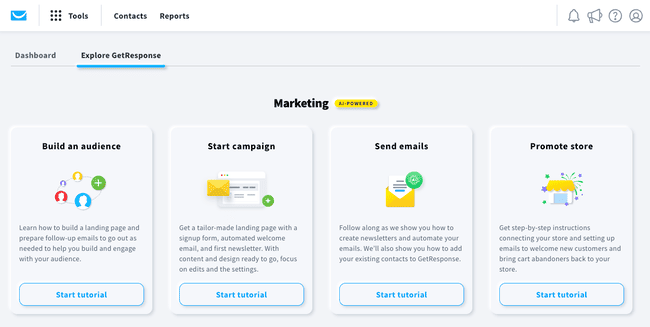
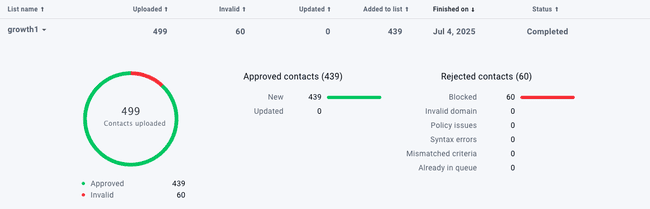
First I wanted to test adding a sender and importing a list. Importing a list took me 2 minutes. After uploading my CSV, mapping data to custom fields was quick and simple.
GetResponse shows a notification during the import that they’ll check my list. This is to make sure the list won’t harm our account, GetResponse, and other customers. Good to know they take deliverability and security seriously. GetResponse also cleaned 60 contacts automatically during the import.
You can set up sender emails manually or automatically. The automatic version is an integration with Entri. It adds the TXT records for popular domain providers. It worked for our domain, and we could set it up in about 8 minutes.
Get started with GetResponse for free here
GetResponse Review: Platform Walkthrough
Now to the part you’ve been waiting for. We’re going to review the core GetResponse features and see if they’re the right fit for you.
Getresponse Email Marketing
Designing your first email is smooth with GetResponse. They’ve thought about the user experience. I was able to set up my first email within 10 minutes and it felt really intuitive.
Design your first email with GetResponse
Once you create a free account, you can directly start designing your actual email. Click on ‘Design message’, and you’re greeted by over 120+ email templates. Nice!
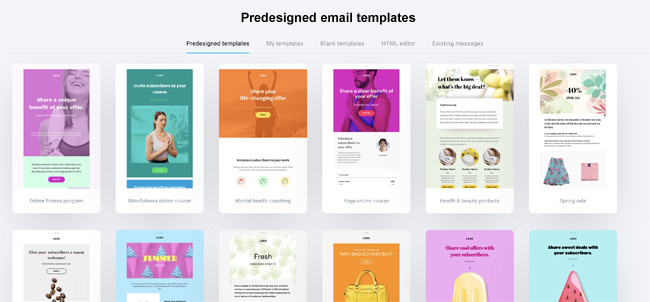
GetResponse has 7 categories of email templates. For example, you can ‘educate, promote, welcome’ your customers. Say you like an email template, press “save” and it shows up in ‘My templates’ tab to reuse later.
After you pick a template, you start customizing your email in the email builder.
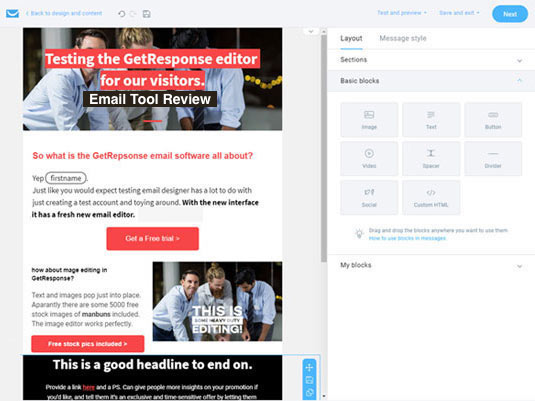
The GetResponse email editor is packed with features, yet never overwhelming. All the editing options are shown when you need them. So it’s all very intuitive.
Old-school HTML code lovers can start based on an HTML design or code it from scratch, but that isn’t needed at all. It is good to know that there is also an option for custom HTML blocks inside the drag-and-drop template builder.
Drag & drop email editor options
In the layout section, you decide the structure and look of your email. Set up how many columns you want, basic colors, etc. The main editing is done with drag-and-drop content blocks.
You can add:
- Images, text, and buttons
- Video (youtube-ish!)
- Whitespace and margins
- Social sharing links and
- Custom HTML
My favorite part of the email editor is that you can save blocks and sections. I always use the same elements for headers, footers, and some text and image combos. So in my next email, I save a lot of time by re-using them.
Adding videos and images is straightforward. You can either drag and drop your image or browse from GetResponse’s free stock images (!) collection.
For videos, you just enter the link, and it’ll show up embedded in the email.
The fun doesn’t stop here. Under the eCommerce tab, you can add products into your email from your online store. Provided you link with your ecommerce platform like Shopify the products are right there. And even add a ‘recommended products’ section’ for that extra touch.
Setting up your email for success
On a single page, you create the whole email. Add subject lines, sender email address, and choose the right email list to send it to.
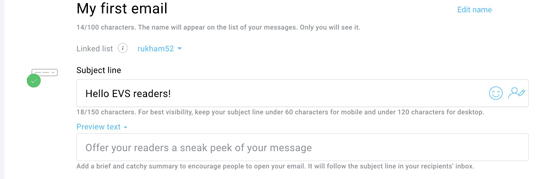
The cool thing about GetResponse email tracking is it lets you track eCommerce interactions:
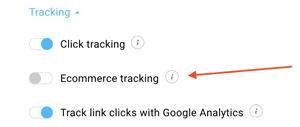
You can track what your readers do after they click on your email links. Click tracking works with a GetResponse tracking snippet, but also works with a Google Analytics integration.
With eCommerce tracking you know which email marketing campaigns drive revenue and sales. And can justify your marketing costs.
GetResponse Email Automation
GetResponse Autoresponders are the building blocks of automation. You create the email just like normal newsletter designs, but then trigger them to be sent as an autoresponder.
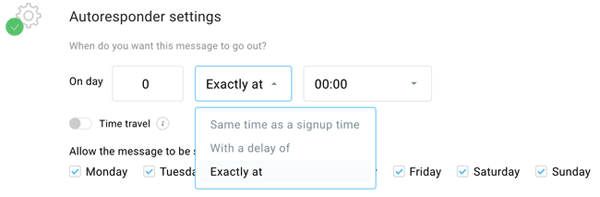
The scheduling gives you control over email delivery. You can choose to send the email at the moment of signup, after a few hours, or at the exact time and date of your liking. You can untick the days of the week when you don’t want the autoresponder to go out. For example on weekends.
The feature I like most here is the ‘time travel’ toggle. You turn this option on to deliver the email at the recipient’s local time.
Let’s dive into marketing automation features a bit further.
Marketing Automation Tools
GetResponse shines in marketing automation. It is one of the best SMB email marketing platforms, because of the automation workflows.

I fell in love with GetResponse marketing automation when I opened the automation menu and saw this:
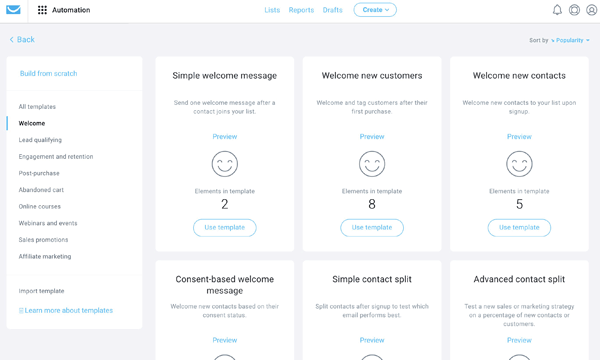
This menu looks like a marketer’s dream. These submenus have automation templates to get you started. Because we are reviewing, I am making a ‘welcome’ automation for you.
Creating a customer welcome automation
On to creating an automation to welcome my new customers. I start with a pre-made automation template. And after a few clicks, I already have this:
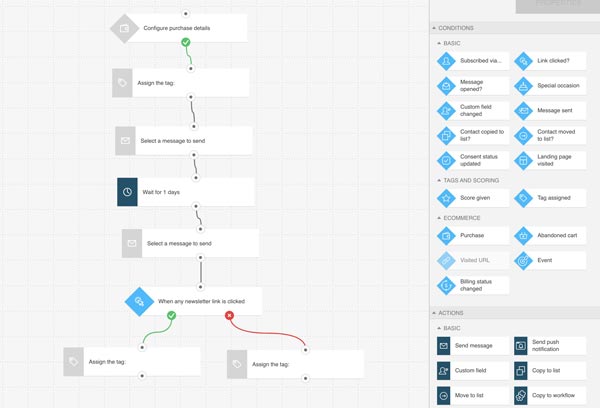
I know, it looks impressive. When you zoom in on the automation flow, you realize GetResponse has done half the work for you. It’s easy to change everything like you want it.
The automation editor has conditions and actions. For instance, if a customer buys something from you or not (condition), you send different emails (action). My first action is to send a welcome email. You can add as many emails and conditions as you want.
For this email campaign, I’ve created a flow where my new customers get two emails in two days. Then, for my convenience, I separate customers who clicked on my email. Once the campaign starts, GetResponse keeps track of all of this automatically. 😍
My score for GetResponse automations is 4.3/5. It takes a bit of time to familiarize yourself with all the possibilities. But once you do, you have the power to build complete customer journeys. Create your own automations, build customer profiles and personalize emails.
With GetResponse you can create automation workflows for:
- Lead qualification
- Engagement and retention
- Post-purchase notifications
- Abandoned cart triggers
- Webinars and online courses
- Sales promotion, and
- Affiliate marketing
These are just some examples. With the pre-built automation templates and a bit of tweaking, you can build your own automations with precision.
Sign up for GetResponse for free here
Funnel Builder
Onto the conversion funnel feature. A funnel is another way to describe all the steps in a marketing campaign. So that includes forms, emails, SMS, landing pages etc.
GetResponse’s conversion funnel builder starts by asking if you want to:
- Build your email list (or leads)
- Sell products
- Promote a webinar
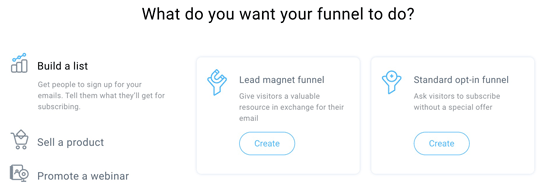
Begin with a new lead magnet or use one from the 17 templates GetResponse offers. Once you’ve picked your lead magnet, you can build your funnel.
The whole funnel-building process is guided. You get suggestions of what to do at each step and don’t forget anything. GetResponse, for instance, tells you not to forget a thank you page and directly offers a thank you page template. Smart!
How to create a conversion funnel
As your first step, you’ll create a signup landing page. Pick the template, tweak your copy and design, and publish the page.
Then you’ll create the thank-you page, followed by a promotion email. This is the email to start promoting your newly made funnel.
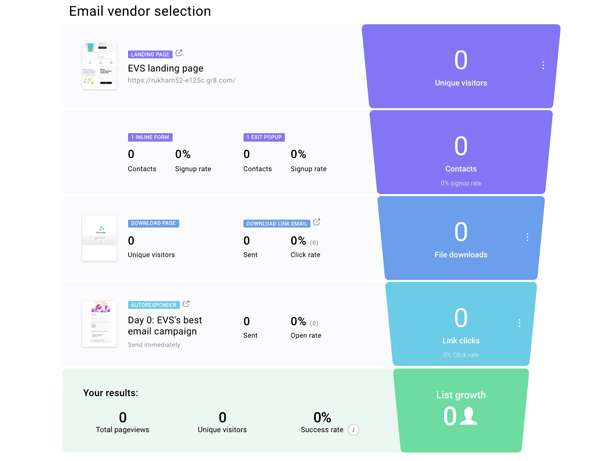
Promote your funnel through Facebook ads. Link your Facebook account to GetResponse and it works.
Finally, you get all your vital stats to monitor your campaign’s progress. Monitor signup rates, the number of contacts, page views, and success rate from the conversion dashboard. (they’re making it too easy!)
I adore that I can design a whole funnel in one dashboard, all with the ability to track vital stats. It makes the GetResponse funnel builder feel effortless.
Website Builder
GetResponse website builder is their newest addition to the platform.
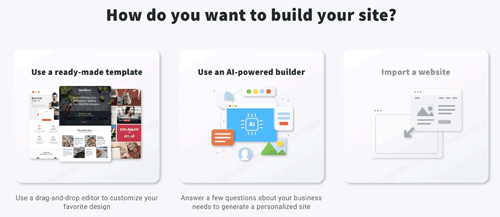
You build a website from templates or with their ‘AI powered builder’. With the AI-powered builder, you answer a few questions and GetResponse will automatically generate a personalized website.
Other website building options include:
- Widgets (forms, chat boxes, price tables, etc.)
- Website colors and themes
- Adding logos and images
After fiddling with the builder for just 5 minutes, I was able to create a decent homepage with minimal effort.
The builder lets you edit everything on the page. You can change fonts, text sizes, add/remove images, reposition elements, adjust padding, and more.
There’s a separate menu for adding and editing pages on the website. You can tweak the navigation bars, headers, and footers. The drag-and-drop editor shows further customization when you select a section.
The menus look exactly like the email and landing page editor.
Webinars
Webinars are so hot right now. GetResponse is one of the few email marketing platforms that have webinars.
Setting up a webinar is easy. After selecting your title, you add time, date and duration of the webinar. Then you choose which contact list you’ll add your registrants to. You can add autoresponders for registrants to get right after they sign up.
After everything is set to go, GetResponse will create a webinar link to drive people to sign up for your webinars.
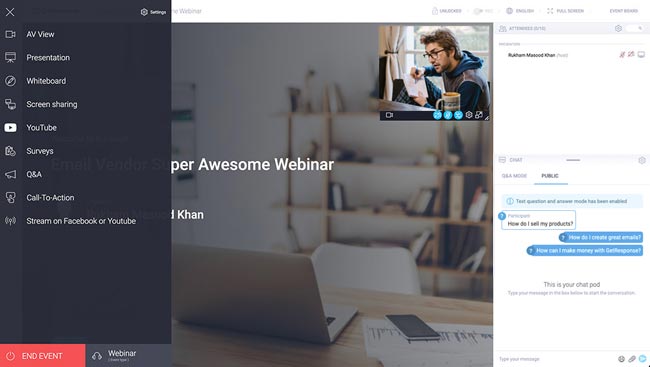
Now you can send invites to your contact list, manage other webinars, and keep track of webinar performance.
I found the webinar tool to have good quality. It’s got interactive features that let you keep the audience engaged. These include chat, polls, Q&A, and whiteboard.
If you want to show a feature or product, you can share your screen. If I’m looking to sell a product, I can add a call to action directly in the webinar.
People who are already using email marketing and webinars on different platforms will love the fact that GetResponse brings them both together.
You have access to the chat pod and the global settings for your event. The event is hosted inside the GetResponse app. They also have a mobile app you can use to give your webinar on the go.
Landing Page Builder
The Getresponse landing page builder is included for free in all plans. The landing page builder currently offers 198 templates. Although to be honest, I’d stick to the newest 100 templates, some of the older ones… look really old.
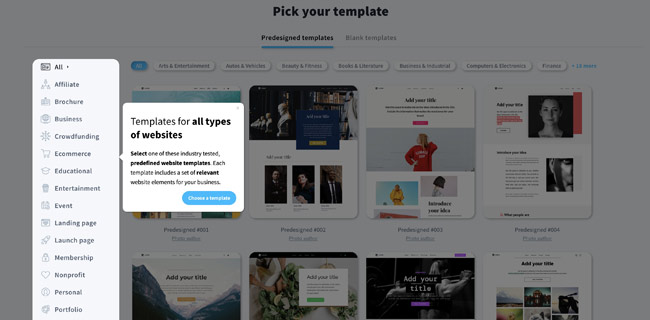
After choosing a landing page template you can start editing. The editing experience is different from the email creator.
The single-column menu on the right has all the drag-and-drop elements like text, images, video, buttons, etc.
In the beginning, I thought I wanted the icons to be labeled. But after playing around a bit you’ll quickly know what is what and grab the right elements.
What I like about the landing page builder is you can create A/B variants of your landing page from the beginning. The top left corner of the page lets you create as many variants as you want, along with forms and thank-you pages.
Landing page setup
After you’re satisfied with your page design. You can add SEO, URL and email list settings.
What comes next is probably my favorite part. As with your emails, you set up analytics and web event tracking for your landing pages. You can choose your analytics platform to track landing pages. GetResponse integrates with all of them: Google Analytics, Facebook Pixel, Kissmetrics, etc.
The landing page builder gets the job done. Of course, some specialized landing page software has more fancy features. If GetResponse can give their builder a bit of a refresh and add more templates, they’ll be on par with other tools.
I’d still stick with this GetResponse because you can link your landing pages to other campaigns like webinars, funnels, and automations.
Other GetResponse features that deserve a mention are:
SMS marketing, Web push notifications, Paid ads, and Livechat
So GetResponse is powerful beyond email marketing. It lets you set up complete funnels to convert visitors into customers. The story doesn’t end here though. To review an email marketing platform you have to look at customer support and pricing plans.
GetResponse customer support
You can get in touch with GetResponse support through live chat and email. Their live chat support is available 24/7.
GetResponse has a big help center that covers all product-related questions you might have.
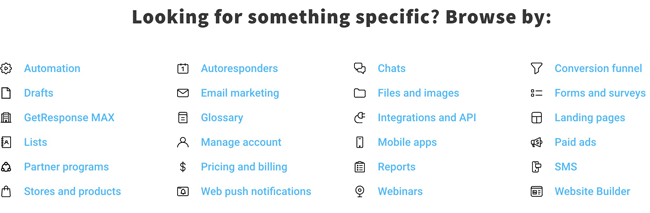
There’s a guide for newbies to get started. There are articles on how to use and configure individual features. And you find case studies to improve your email marketing and marketing automation.
The GetResponse platform is available in 13 languages. Customer support is available in 7 languages. The reps are helpful and usually answer quickly. The only minor downside is that phone support is only available with the Max plan.
GetResponse Pricing & Plans
GetResponse comes with 3 plans for smaller businesses Starter, Marketer, and Creator. MAX and MAX2 are their enterprise offers with custom pricing, more advanced marketing features, priority support, and a dedicated account manager.
GetResponse pricing is based on the size of your email list and starts at $9 for the Starter plan. Here’s the breakdown of their prices:
| Free | – 500 contacts – 2,500 email sends – One landing page |
| $10 | – 500 contacts – Starter plan with unlimited email sends. |
| $19 | – 1,000 contacts – Starter plan with unlimited email sends. |
| $29 | – 2,500 contacts – Starter plan with unlimited email sends. |
| $54 | – 5,000 contacts – Starter plan with unlimited email sends. |
| $79 | – 10,000 contacts – Starter plan with unlimited email sends. |
Getresponse Discount
If you opt for a yearly subscription, you already get 10% off. You can also get a 10% discount for completing the get started checklist. But we got you an additional 10% discount on your GetResponse plan. Just sign up through this special link here and get our GetResponse discount.
Integrations
GetResponse offers 65+ integrations. They’ve neatly organized them on their integrations page.
You can connect your GetResponse account with:
- popular eCommerce platforms
- CRMs
- payment gateways
- social media apps
- landing page and popup builders
Ecommerce tools GetResponse connects with include Shopify, WooCommerce, BigCommerce, Prestashop, Magento, ThriveCart, Privy, Bonjoro, and Etsy.
Additionally, with the GetResponse API your build your own integration or use Zapier to connect.
GetResponse Alternatives for Email Marketing
There are of course many GetResponse competitors. So how does Getrespones compare to other marketing tools? These are the main alternatives:
Brevo
Brevo is a good choice for small to medium businesses but not the best at the enterprise level. It’s budget-friendly. Although most users will find the tools to be enough. Its advanced features are limited compared to GetResponse. Brevo doesn’t have a course creator, webinars, or a funnel builder to name a few.
Both companies offer a free plan. Brevo is free for 300 emails a day, while GetResponse is free for up to 500 contacts.
ActiveCampaign
ActiveCampaign is a marketing automation service with added sales CRM. ActiveCampaign has more powerful automation features and similar pricing. ActiveCampaign gives you an email, form, and landing page builder, sales CRM, lead scoring, messaging, SMS, and chat.
MailerLite
MailerLite is an affordable email marketing tool. Compared to GetResponse, Mailerlite is cheaper and offers better-looking templates. There are fewer features, for instance, no webinars.
GetResponse bottom line: Is it the right fit for you?
Congratulations! You made it to the end of our review. You understand how important it is to have the right email marketing tool. One that is powerful and fits your business needs.
GetResponse fits the bill for a powerful and capable online marketing software.
GetResponse gets 84/100 for its user interface, automation features, and value for money. The landing page builder could do with an overhaul but I’m sure GetResponse is already on it.